# Graphql
How to use Graphql In Finmars and query examples
# Getting Started
## What is GraphQL
GraphQL is an API query language.
It lets the client ask **exactly** for the data it needs.
No more. No less.
Main ideas:
- One endpoint.
- Client chooses fields.
- Strong types.
- Clear schema.
GraphQL replaces many REST endpoints with one structured API.
---
## What We Use in Finmars
In Finmars, GraphQL is built with:
- **Django**
- **Strawberry GraphQL** [https://github.com/strawberry-graphql/strawberry](https://github.com/strawberry-graphql/strawberry)
Strawberry is a Python GraphQL library.
It works well with Django models.
It uses Python type hints to define the schema.
Key points:
- Schema is written in Python.
- Types are strict.
- Queries are validated before execution.
- Errors are clear.
---
##
---
# Access to Graphql from Browser Playground
Open the GraphQL playground in your browser:
```
https:///:realm_code:/space_code:/graphql/
```
E.g. [https://eu-central.finmars.com/realm0v4ry/space063sw/graphql/](https://eu-central.finmars.com/realm0v4ry/space063sw/graphql/) (Link is not lead to anything, just an example)
You will see:
- Query editor
- Schema explorer
- Result panel
You must be authenticated.
[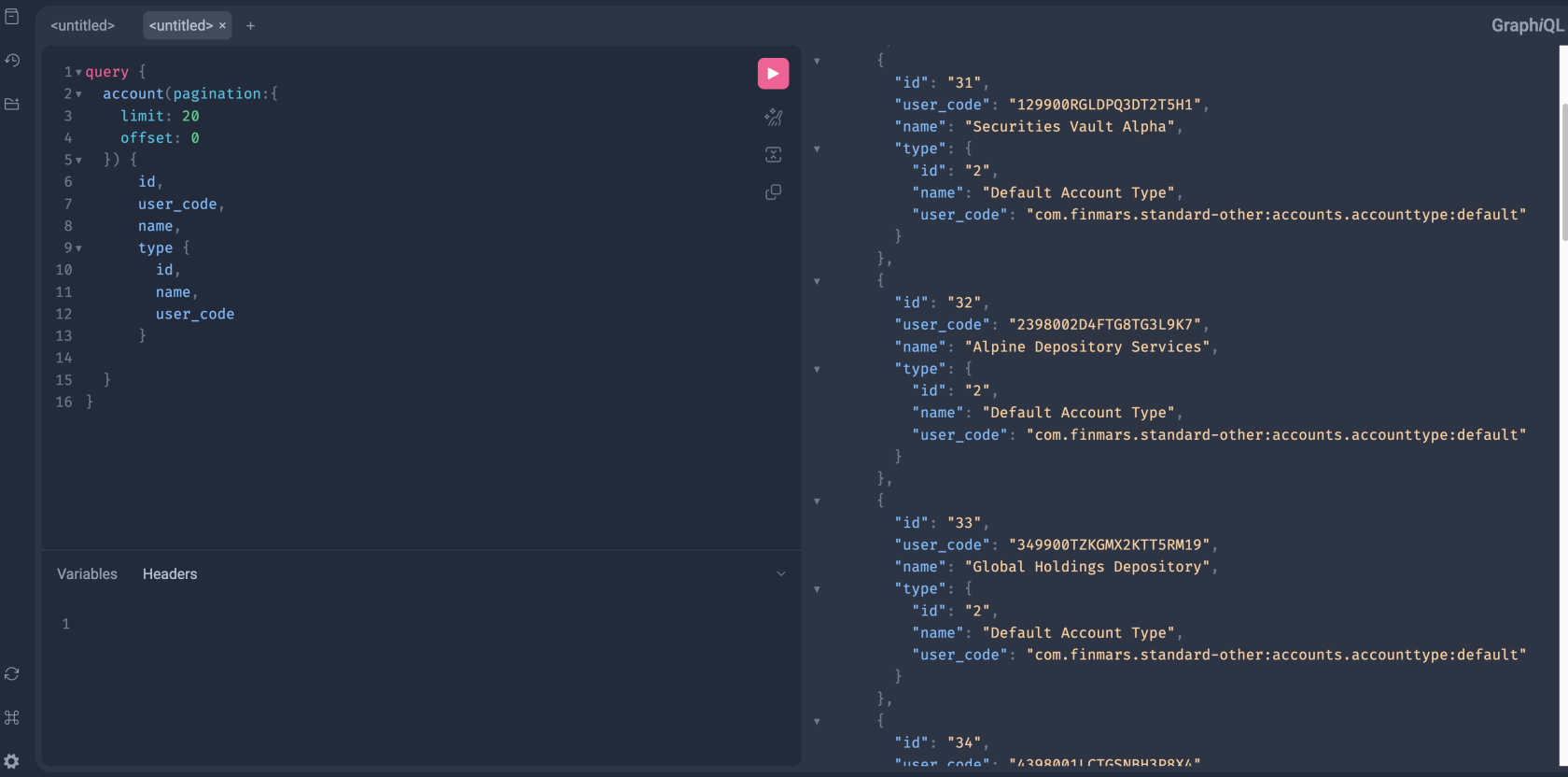](https://docs.finmars.com/uploads/images/gallery/2025-12/screenshot-2025-12-16-at-15-49-17.png)
---
### You can access Documentation
Click ob button with Book icon in top left corner
[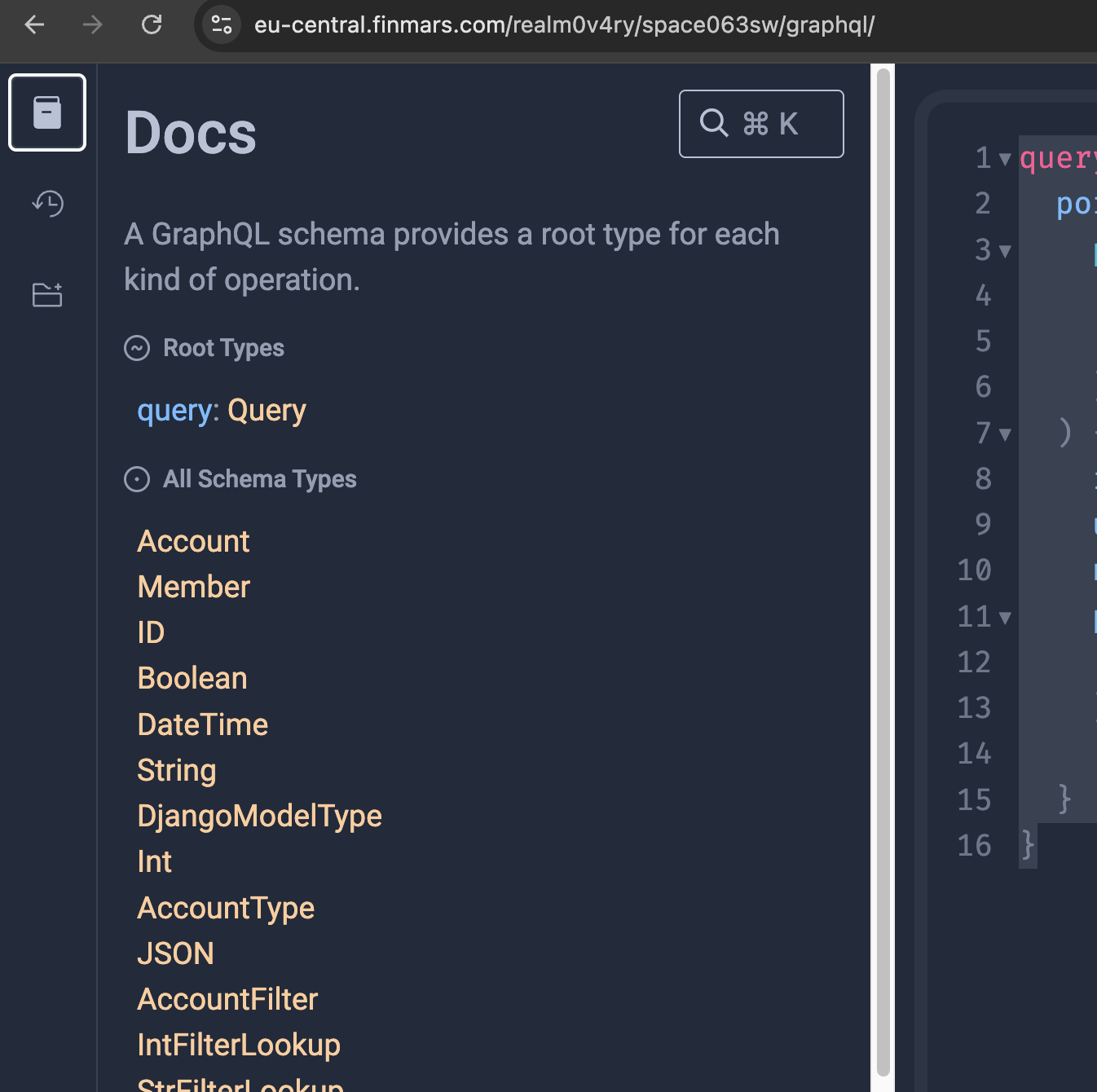](https://docs.finmars.com/uploads/images/gallery/2025-12/screenshot-2025-12-16-at-17-04-47.png)
Now you can navigate on Schema
To see what operation you could call, click on "Query"
[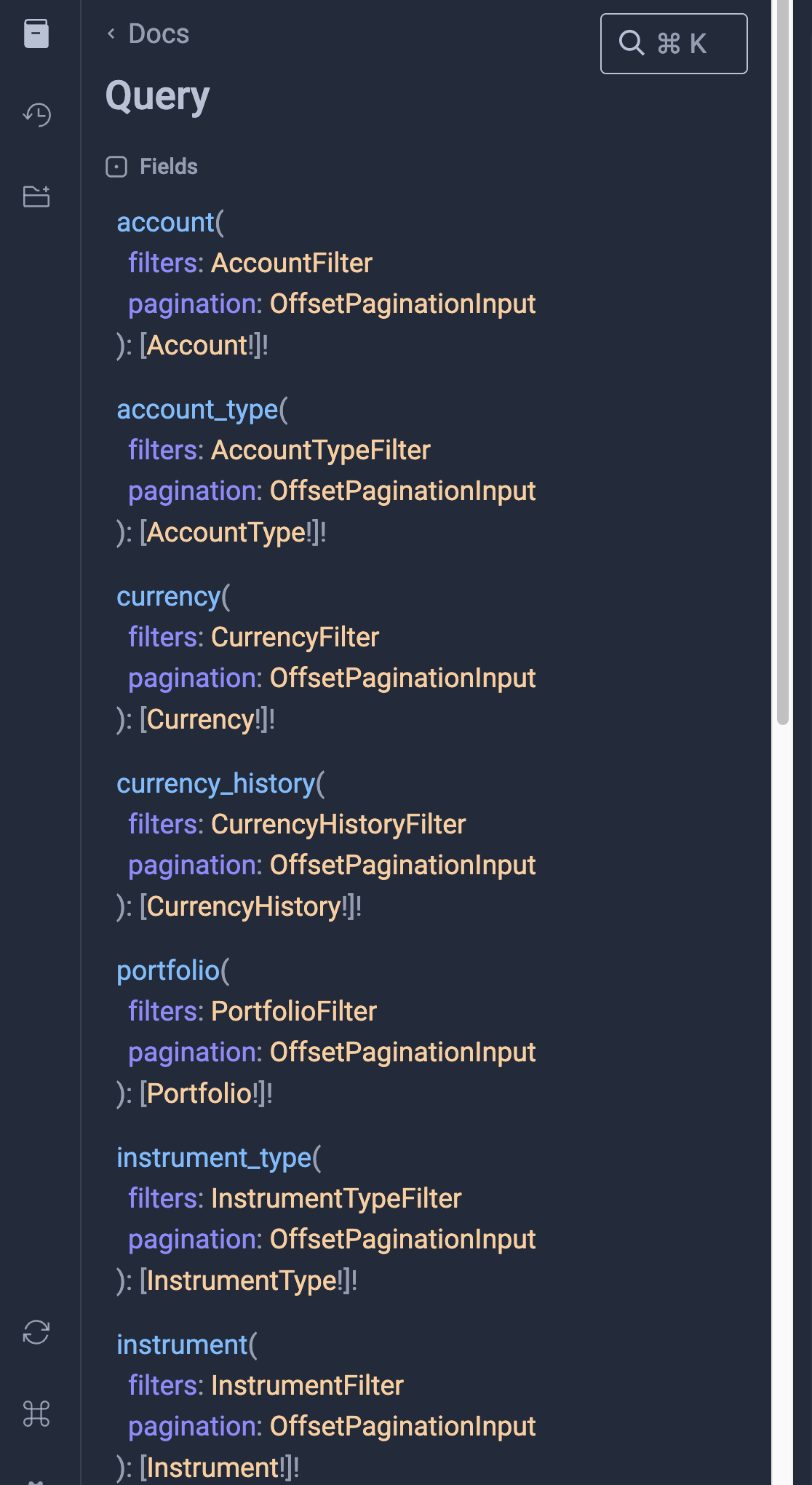](https://docs.finmars.com/uploads/images/gallery/2025-12/screenshot-2025-12-16-at-17-05-41.png)
Here is the list of supported operations.
[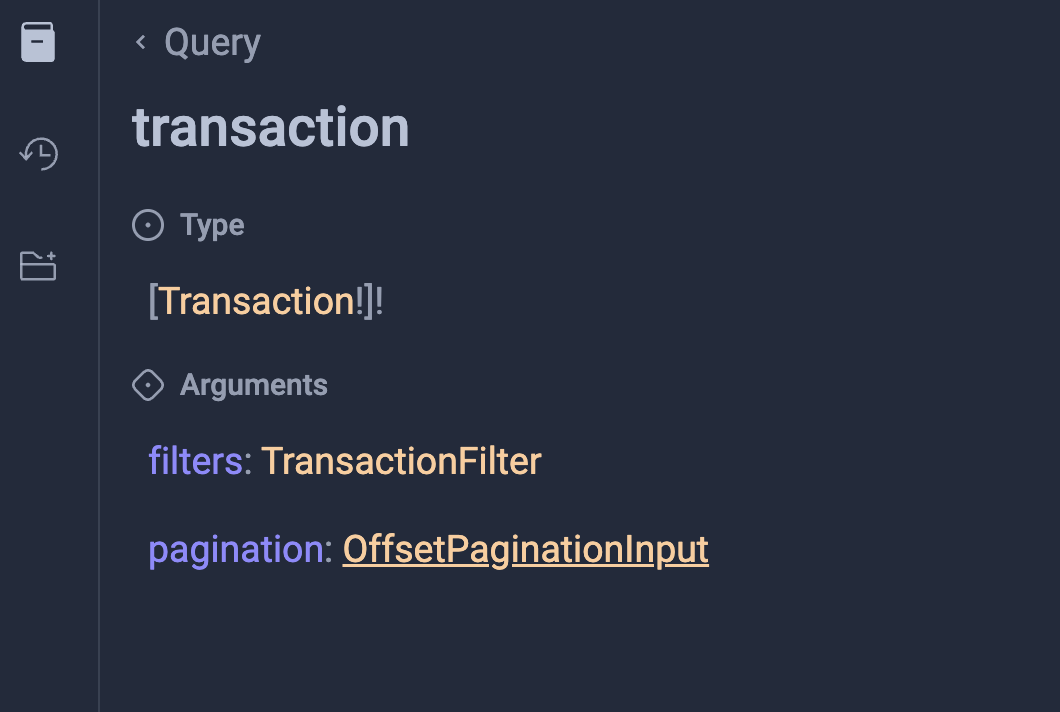](https://docs.finmars.com/uploads/images/gallery/2025-12/screenshot-2025-12-16-at-17-06-16.png)
So, here you can see "Type" it will show to you all available Fields to work with in your Query
Also you can see "Filters" and "Pagination". These sections will show you how to configure your Query to work with data
[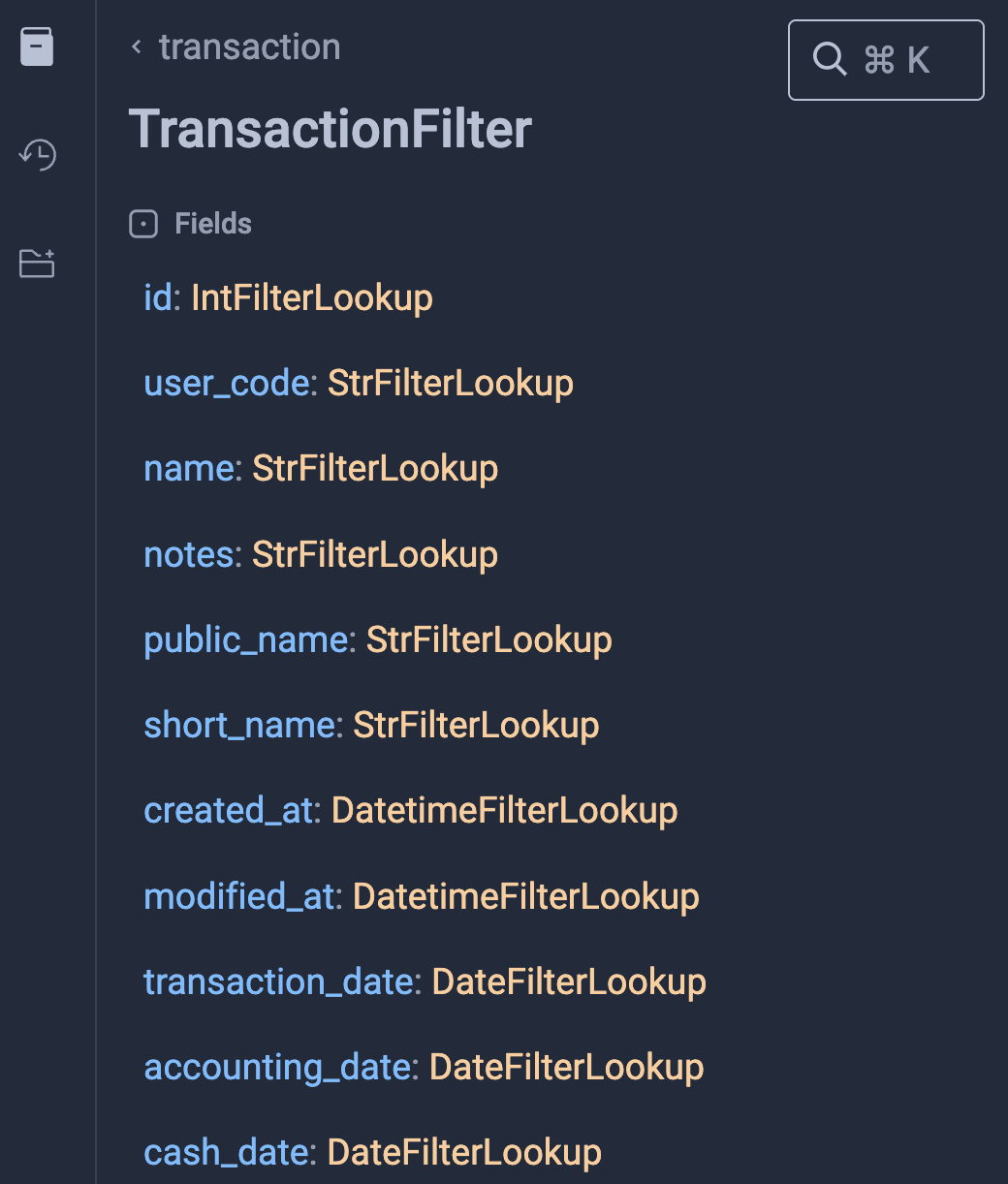](https://docs.finmars.com/uploads/images/gallery/2025-12/screenshot-2025-12-16-at-17-08-10.png)
For example you could see that there is String filters and Data Filters. Other Relations fields also could be filters
# Access to Graphql from code
## GraphQL Endpoint
Finmars exposes GraphQL via a single endpoint.
```
:realm_code:/:space_code:/graphql/
```
This endpoint supports:
- Queries
- Mutations
- Schema introspection
---
## How to Access the Endpoint
### Authentication
GraphQL uses the **same authentication** as the REST API.
Usually:
- Keycloak Auth Token (web)
- Authorization header (JWT tokens) You can get Token here: [https://docs.finmars.com/books/api-access-key/page/generate-and-use-access-token](https://docs.finmars.com/books/api-access-key/page/generate-and-use-access-token)
```
"DEFAULT_AUTHENTICATION_CLASSES": (
"poms.common.authentication.JWTAuthentication",
"poms.common.authentication.KeycloakAuthentication",
),
```
If you are not authenticated:
- Requests will fail
- Data will not be returned
---
### From Code
Send a **POST** request to `/graphql/`.
```python
import requests
url = "https://finmars.example.com/:realm_code:/:space_code:/graphql/"
headers = {
"Authorization": "Bearer JWT_TOKEN",
"Content-Type": "application/json"
}
query = """
query {
account(pagination: {
limit: 20
offset: 0
}) {
id
user_code
name
type {
id
name
user_code
}
}
}
"""
payload = {
"query": query
}
response = requests.post(url, json=payload, headers=headers)
if response.status_code == 200:
print(response.json())
else:
print(response.status_code, response.text)
```
And Response
```python
{
"data": {
"account": [
{
"id": "11",
"user_code": "129900RGLDPQ3DT2T5H1",
"name": "Securities Vault Alpha",
"type": {
"id": "2",
"name": "Default Account Type",
"user_code": "com.finmars.standard-other:accounts.accounttype:default"
}
},
{
"id": "12",
"user_code": "2398002D4FTG8TG3L9K7",
"name": "Alpine Depository Services",
"type": {
"id": "2",
"name": "Default Account Type",
"user_code": "com.finmars.standard-other:accounts.accounttype:default"
}
}
]
}
}
```
Well done!
# Get Accounts in Graphql
This query returns a list of accounts with basic fields and account type.
---
[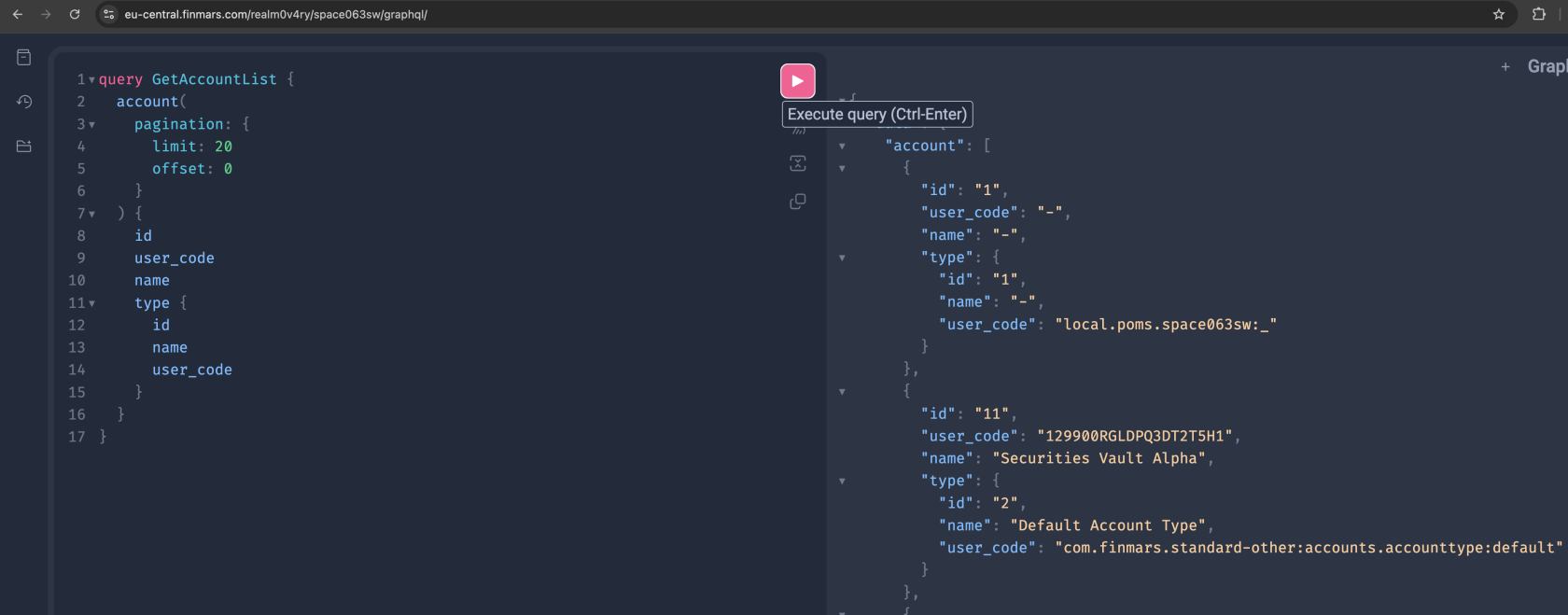](https://docs.finmars.com/uploads/images/gallery/2025-12/screenshot-2025-12-16-at-17-01-09.png)
### GraphQL Query
```graphql
query GetAccountList {
account(
pagination: {
limit: 20
offset: 0
}
) {
id
user_code
name
type {
id
name
user_code
}
}
}
```
---
### Python Example
```python
import requests
url = "https://///graphql/"
headers = {
"Authorization": "Bearer ",
"Content-Type": "application/json"
}
payload = {
"query": """
query GetAccountList {
account(
pagination: {
limit: 20
offset: 0
}
) {
id
user_code
name
type {
id
name
user_code
}
}
}
"""
}
response = requests.post(url, json=payload, headers=headers)
print(response.json())
```
---
### What This Query Does
- Fetches a paginated list of accounts
- Returns only required fields
- Includes related account type
- Uses a single API call
---
### Notes
- Change `limit` and `offset` for paging
- Add or remove fields as needed
- Query name helps with debugging and logs
# Get Portfolios in Graphql
This query returns a list of portfolios with basic fields.
---
[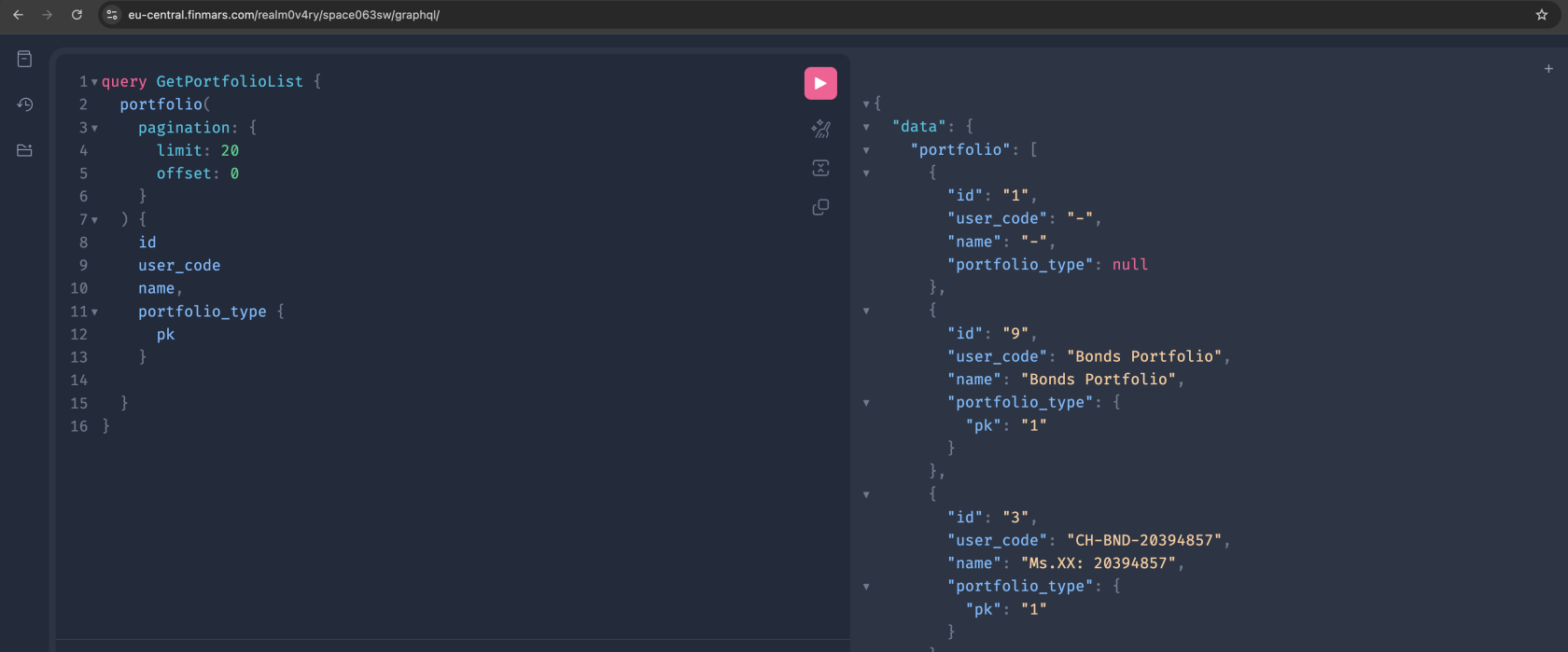](https://docs.finmars.com/uploads/images/gallery/2025-12/screenshot-2025-12-16-at-17-03-42.png)
### GraphQL Query
```graphql
query GetPortfolioList {
portfolio(
pagination: {
limit: 20
offset: 0
}
) {
id
user_code
name,
portfolio_type {
pk
}
}
}
```
---
### Python Example
```python
import requests
url = "https://///graphql/"
headers = {
"Authorization": "Bearer ",
"Content-Type": "application/json"
}
payload = {
"query": """
query GetPortfolioList {
portfolio(
pagination: {
limit: 20
offset: 0
}
) {
id
user_code
name
portfolio_type {
pk
}
}
}
"""
}
response = requests.post(url, json=payload, headers=headers)
print(response.json())
```
---
### What This Query Does
- Fetches a paginated list of portfolios
- Returns core portfolio fields
- Includes portfolio currency
- Uses one GraphQL request
---
# Get Portfolio History in Graphql
This query returns historical NAV values for portfolios.
[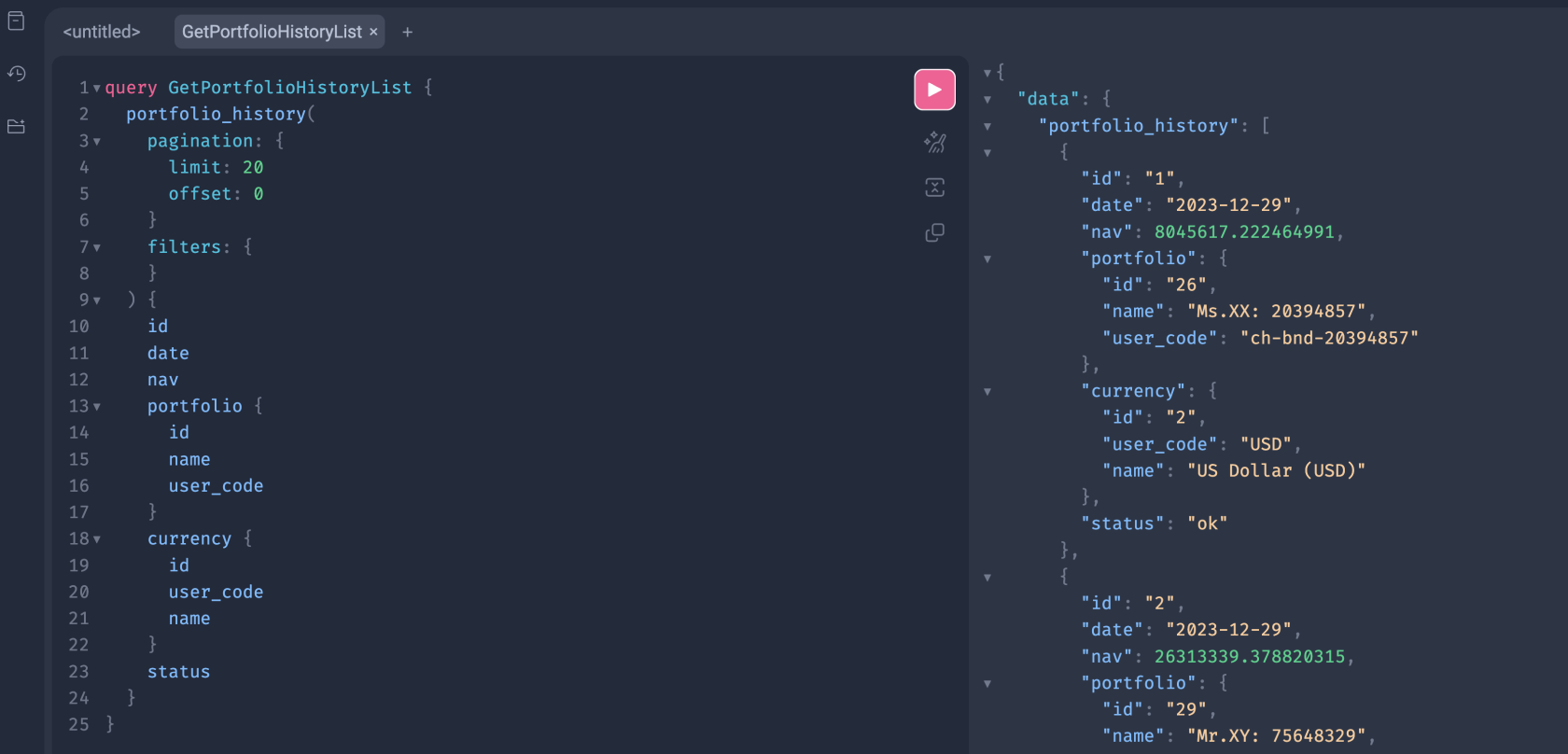](https://docs.finmars.com/uploads/images/gallery/2025-12/screenshot-2025-12-16-at-18-27-45.png)
---
### GraphQL Query
```graphql
query GetPortfolioHistoryList {
portfolio_history(
pagination: {
limit: 20
offset: 0
}
filters: {
}
) {
id
date
nav
portfolio {
id
name
user_code
}
currency {
id
user_code
name
}
status
}
}
```
---
### Python Example
```python
import requests
url = "https://///graphql/"
headers = {
"Authorization": "Bearer ",
"Content-Type": "application/json"
}
payload = {
"query": """
query GetPortfolioHistoryList {
portfolio_history(
pagination: {
limit: 20
offset: 0
}
filters: {
}
) {
id
date
nav
portfolio {
id
name
user_code
}
currency {
id
user_code
name
}
status
}
}
"""
}
response = requests.post(url, json=payload, headers=headers)
print(response.json())
```
---
## Notes
- Empty `filters` block is valid
- Add filters to limit results
Example filter:
```graphql
portfolio: {
user_code: { exact: "Commodity Portfolio" }
}
```
- Pagination is required
- Dates use ISO format
- `status` shows calculation state
# Get Currencies in Graphql
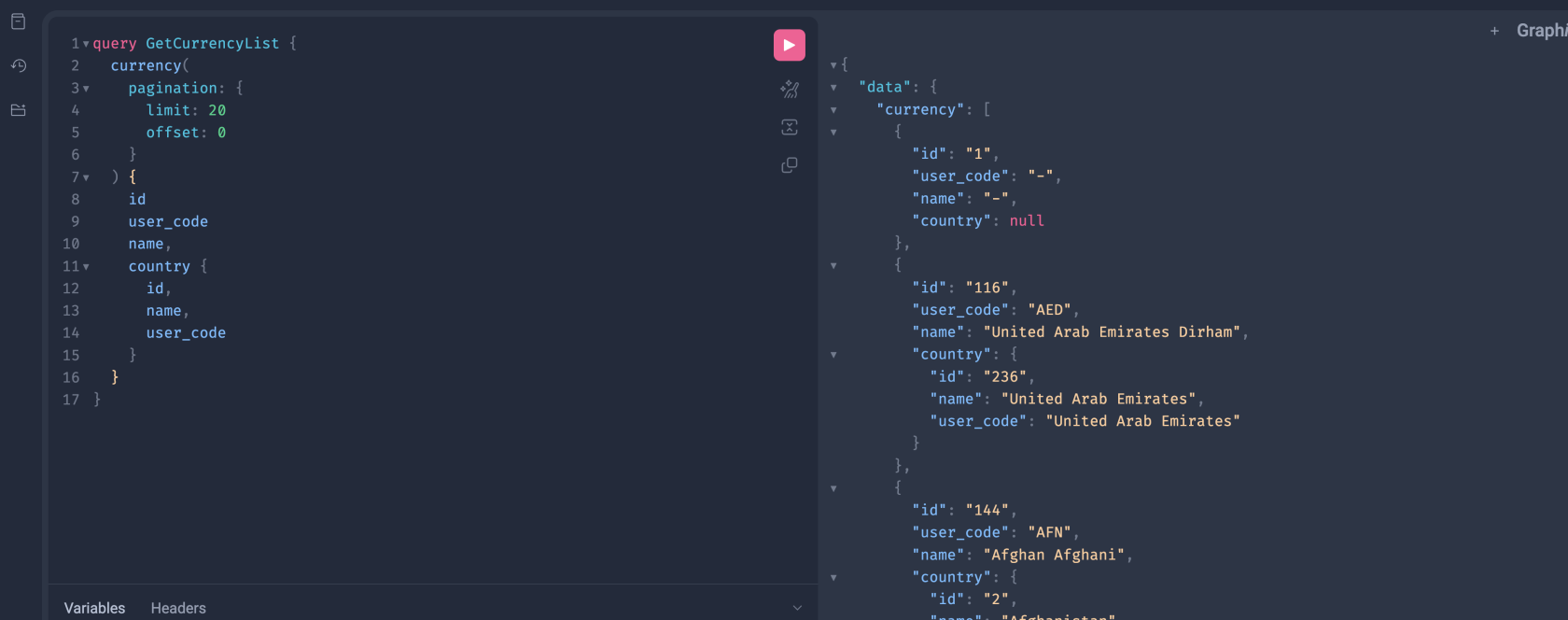
This query returns a list of currencies.
---
[](https://docs.finmars.com/uploads/images/gallery/2025-12/screenshot-2025-12-16-at-17-11-35.png)
### GraphQL Query
```graphql
query GetCurrencyList {
currency(
pagination: {
limit: 20
offset: 0
}
) {
id
user_code
name,
country {
id,
name,
user_code
}
}
}
```
---
### Python Example
```python
import requests
url = "https://///graphql/"
headers = {
"Authorization": "Bearer ",
"Content-Type": "application/json"
}
payload = {
"query": """
query GetCurrencyList {
currency(
pagination: {
limit: 20
offset: 0
}
) {
id
user_code
name
country {
id,
name,
user_code
}
}
}
"""
}
response = requests.post(url, json=payload, headers=headers)
print(response.json())
```
---
### What This Query Does
- Fetches a paginated list of currencies
- Returns standard currency fields
- One request, no extra endpoints
---
# Get FX Rates in Graphql
---
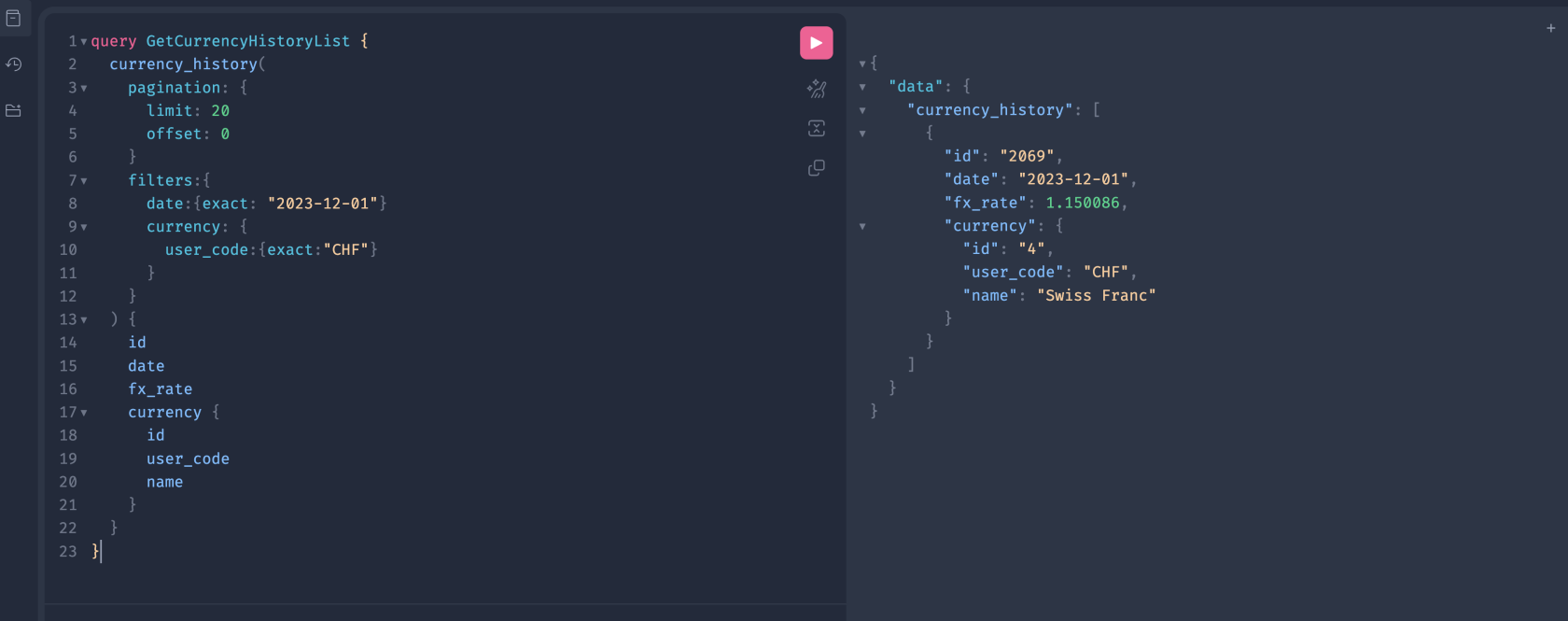
This query returns currency rates for a **specific date** and **specific currency**.
[](https://docs.finmars.com/uploads/images/gallery/2025-12/screenshot-2025-12-16-at-17-19-02.png)
---
### GraphQL Query
```graphql
query GetCurrencyHistoryList {
currency_history(
pagination: {
limit: 20
offset: 0
}
filters: {
date: {
exact: "2023-12-01"
}
pricing_policy: {
user_code:{
exact: "com.finmars.standard-pricing:standard"
}
}
currency: {
user_code: {
exact: "CHF"
}
}
}
) {
id
date
fx_rate
currency {
id
user_code
name
}
}
}
```
---
### Python Example
```python
import requests
url = "https://///graphql/"
headers = {
"Authorization": "Bearer ",
"Content-Type": "application/json"
}
payload = {
"query": """
query GetCurrencyHistoryList {
currency_history(
pagination: {
limit: 20
offset: 0
}
filters: {
date: {
exact: "2023-12-01"
}
pricing_policy: {
user_code:{
exact: "com.finmars.standard-pricing:standard"
}
}
currency: {
user_code: {
exact: "CHF"
}
}
}
) {
id
date
fx_rate
currency {
id
user_code
name
}
}
}
"""
}
response = requests.post(url, json=payload, headers=headers)
print(response.json())
```
---
## Filter Highlights
### Exact Match
```graphql
date: {
exact: "2023-12-01"
}
```
- Matches one exact value
- Type must match schema
- Dates are strings in ISO format
---
### Nested Filters
```graphql
currency: {
user_code: {
exact: "CHF"
}
}
```
- Filters on related objects
- Works through foreign keys
- Depth depends on schema rules
---
### Common Filter Types
Typical filters you may see:
- `exact`
- `in`
- `contains`
- `gte`, `lte`
- `isnull`
Available filters depend on the field type.
---
### Important Notes
- Filters are optional
- Multiple filters are combined with **AND**
- Wrong field names cause schema errors
- Always check the schema panel
This pattern applies to all list queries in Finmars GraphQL.
# Get Instruments in Graphql
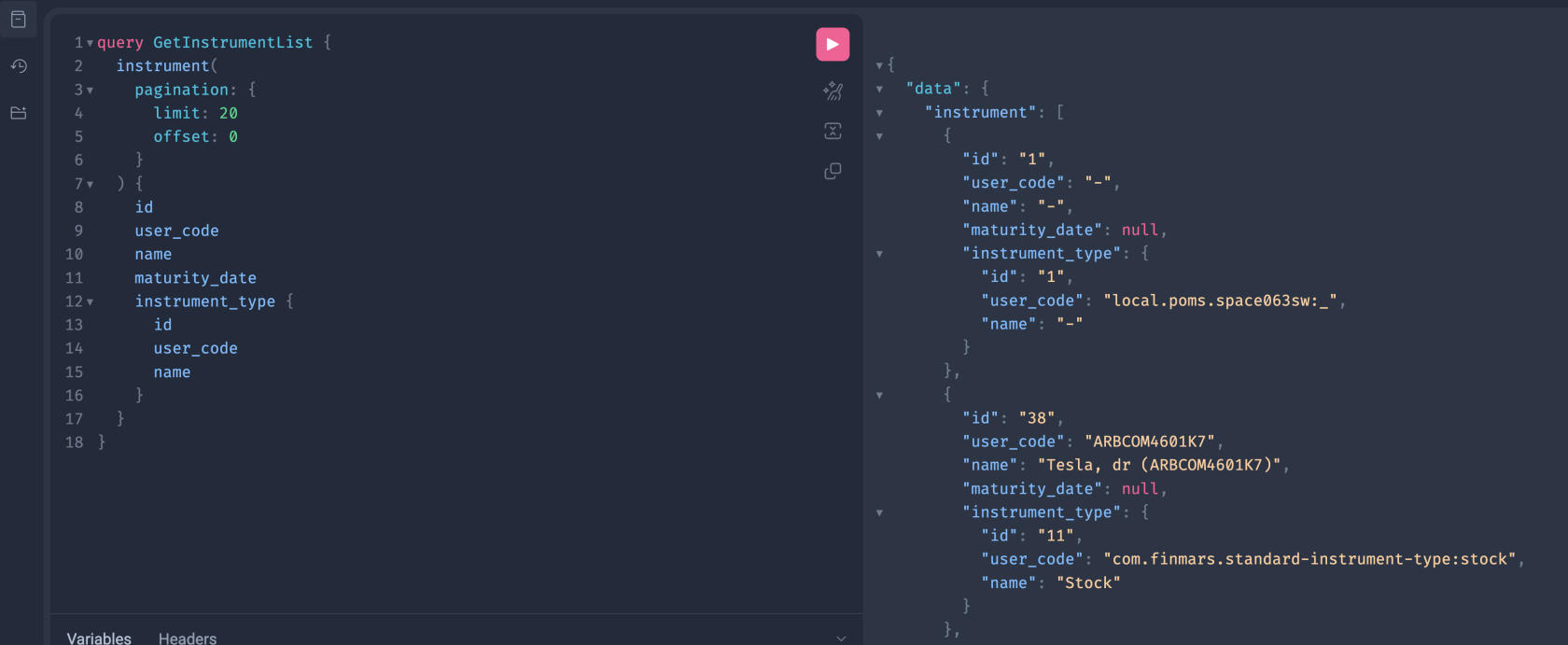
This query returns a list of instruments with basic fields and instrument type.
---
[](https://docs.finmars.com/uploads/images/gallery/2025-12/screenshot-2025-12-16-at-17-42-03.png)
### GraphQL Query
```graphql
query GetInstrumentList {
instrument(
pagination: {
limit: 20
offset: 0
}
) {
id
user_code
name
maturity_date
instrument_type {
id
user_code
name
}
}
}
```
---
### Python Example
```python
import requests
url = "https://///graphql/"
headers = {
"Authorization": "Bearer ",
"Content-Type": "application/json"
}
payload = {
"query": """
query GetInstrumentList {
instrument(
pagination: {
limit: 20
offset: 0
}
) {
id
user_code
name
maturity_date
instrument_type {
id
user_code
name
}
}
}
"""
}
response = requests.post(url, json=payload, headers=headers)
print(response.json())
```
---
### Notes
- Field names must match the schema (`maturity_date`, `instrument_type`, etc.)
- Add filters the same way as in `currency_history` when needed (Previous documentation page)
# Get Prices in Graphql
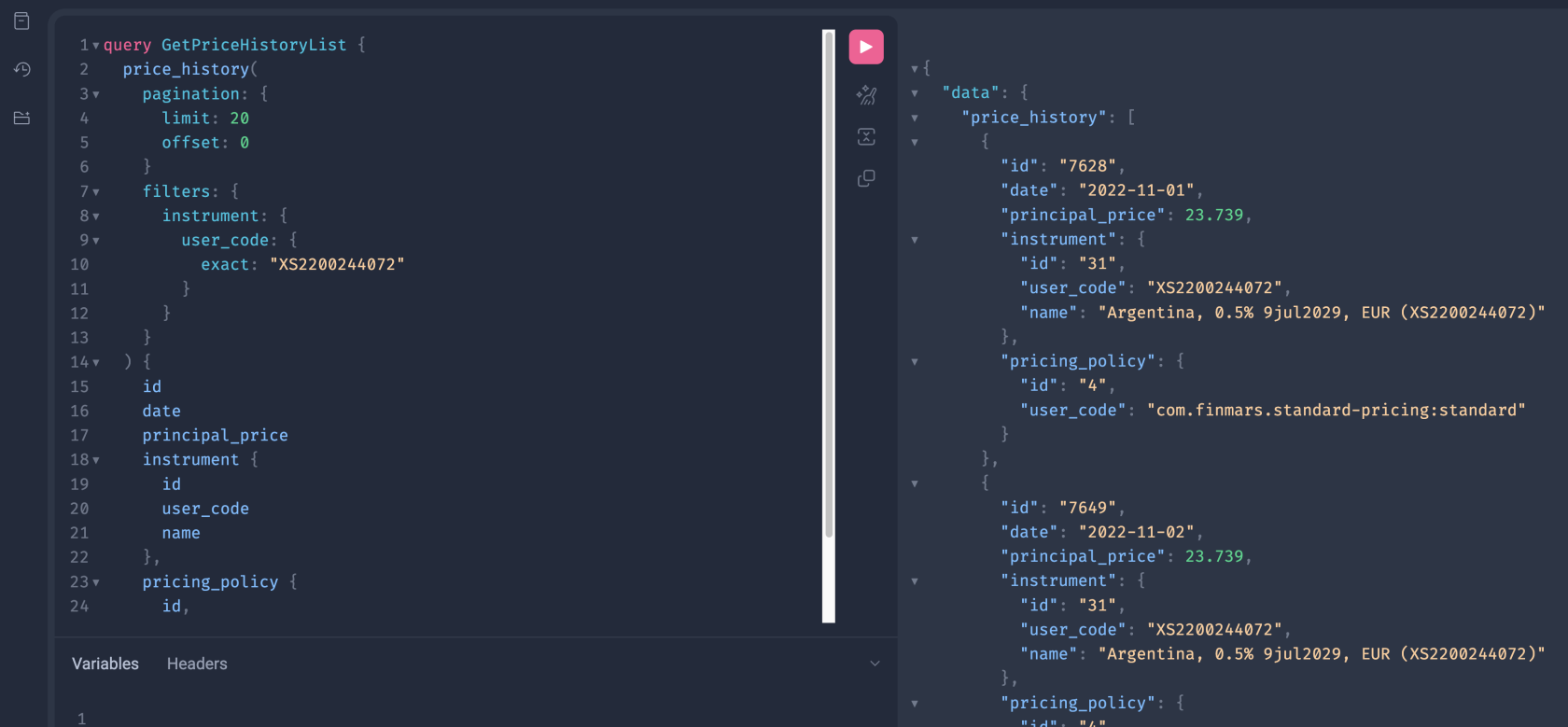
This query returns price history rows for **one instrument** (by `user_code`).
[](https://docs.finmars.com/uploads/images/gallery/2025-12/screenshot-2025-12-16-at-17-49-19.png)
---
### GraphQL Query
```graphql
query GetPriceHistoryList {
price_history(
pagination: {
limit: 20
offset: 0
}
filters: {
instrument: {
user_code: {
exact: "XS2200244072"
}
}
pricing_policy: {
user_code:{
exact: "com.finmars.standard-pricing:standard"
}
}
}
) {
id
date
principal_price
instrument {
id
user_code
name
}
pricing_policy {
id
user_code
}
}
}
```
---
## Filter Highlights
### Filter by Related Object Field
```graphql
filters: {
instrument: {
user_code: { exact: "XS2200244072" }
}
}
```
- `instrument` is a related object.
- You can filter it by its fields.
- `exact` means strict match.
---
### Why Use `user_code`
- Stable identifier for business use.
- No need to know internal `id`.
---
### Notes
- Add a date filter if you want one day only:
```graphql
date: { exact: "2023-12-01" }
```
- Pagination stays the same for list queries.
# Get Transactions in Graphql
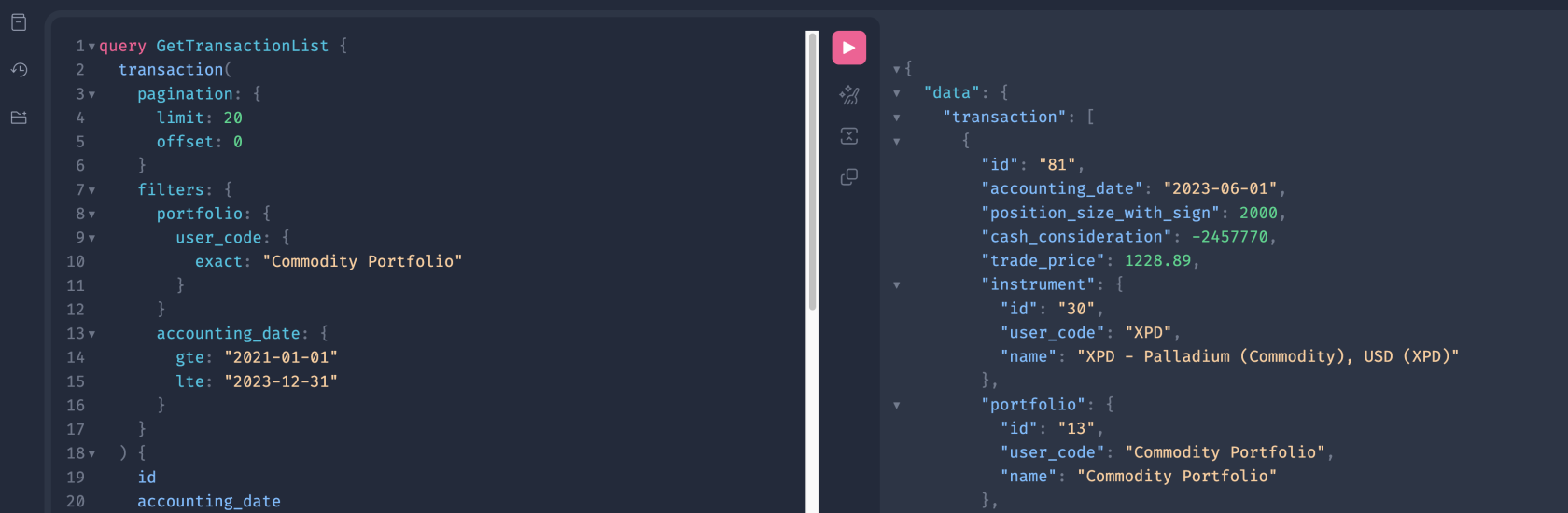
This query returns transactions for one portfolio and an accounting date range.
[](https://docs.finmars.com/uploads/images/gallery/2025-12/screenshot-2025-12-16-at-17-57-40.png)
---
### GraphQL Query
```graphql
query GetTransactionList {
transaction(
pagination: {
limit: 20
offset: 0
}
filters: {
portfolio: {
user_code: {
exact: "Commodity Portfolio"
}
}
accounting_date: {
gte: "2021-01-01"
lte: "2023-12-31"
}
}
) {
id
accounting_date
position_size_with_sign
cash_consideration
trade_price
instrument {
id
user_code
name
}
portfolio {
id
user_code
name
}
account_cash {
id
user_code
name
}
account_position {
id
user_code
name
}
transaction_class {
id
user_code
name
}
}
}
```
---
## Filter Highlights
### Filter by Portfolio (nested filter)
```graphql
portfolio: {
user_code: { exact: "Commodity Portfolio" }
}
```
- `portfolio` is a related object.
- You filter it by its field `user_code`.
- `exact` means strict match.
---
### Filter by Date Range
```graphql
accounting_date: {
gte: "2021-01-01"
lte: "2023-12-31"
}
```
- `gte` = start date (inclusive)
- `lte` = end date (inclusive)
- Use ISO format: `YYYY-MM-DD`
---
### How filters work together
All filters in one `filters` block are combined with **AND**.
So this query means:
- portfolio user\_code is exactly `"Commodity Portfolio"`
AND
- accounting\_date is between `2021-01-01` and `2023-12-31`
---
# Get Balance Report In Graphql
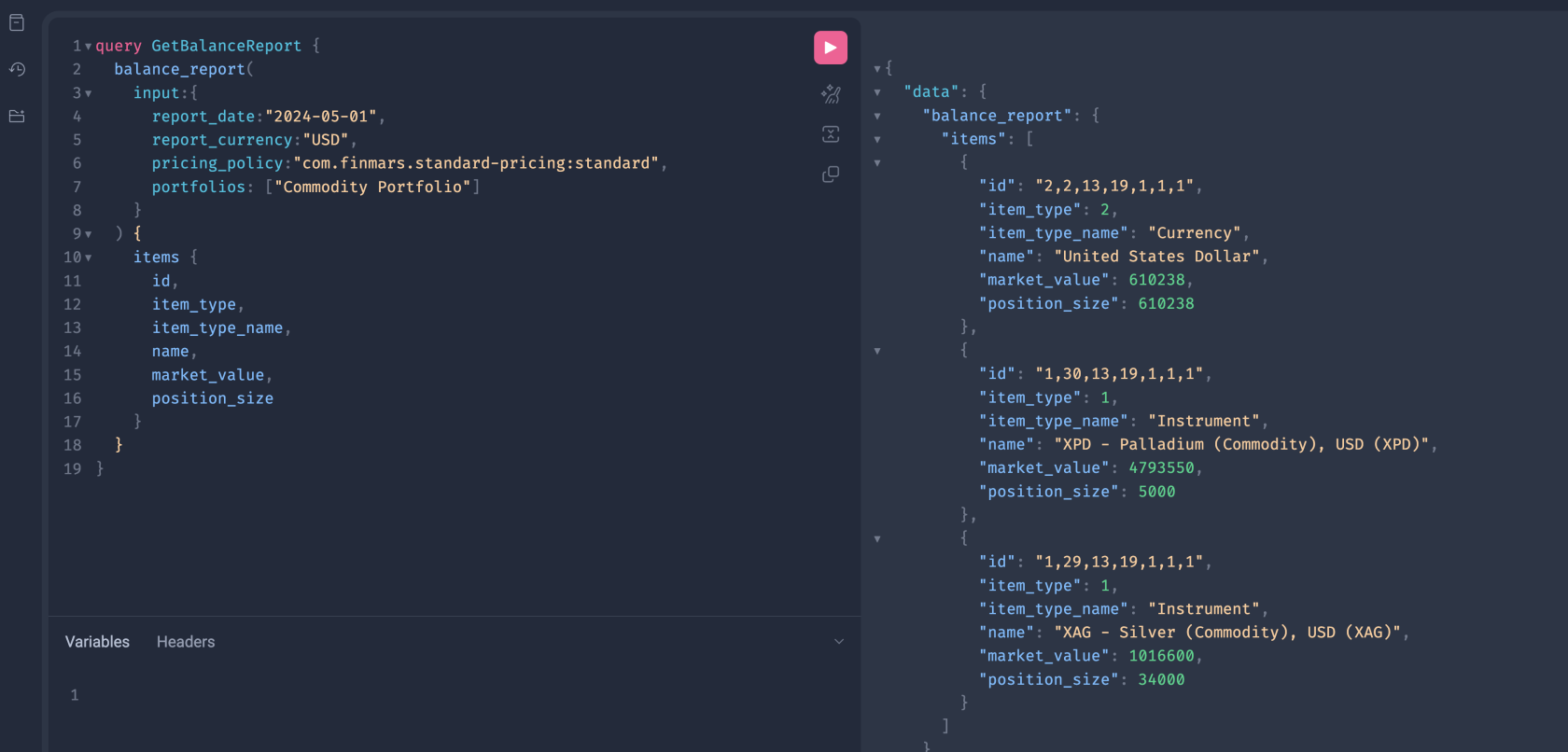
This query returns a balance report for selected portfolios on a given date.
[](https://docs.finmars.com/uploads/images/gallery/2025-12/screenshot-2025-12-16-at-18-12-20.png)
---
### GraphQL Query
```graphql
query GetBalanceReport {
balance_report(
input: {
report_date: "2024-05-01"
report_currency: "USD"
pricing_policy: "com.finmars.standard-pricing:standard"
portfolios: ["Commodity Portfolio"]
}
) {
items {
id
item_type
item_type_name
name
market_value
position_size
}
}
}
```
---
## Input Highlights
### Report Date
```graphql
report_date: "2024-05-01"
```
- Snapshot date
- ISO date format
- Required field
---
### Report Currency
```graphql
report_currency: "USD"
```
- Output currency
- Must exist in the system
---
### Pricing Policy
```graphql
pricing_policy: "com.finmars.standard-pricing:standard"
```
- Defines valuation rules
- Uses pricing engine configuration
- Required for valuation
---
### Portfolios
```graphql
portfolios: ["Commodity Portfolio"]
```
- List of portfolio user codes
- Supports multiple portfolios
---
### Python Code
```python
import requests
url = "https://///graphql/"
headers = {
"Authorization": "Bearer ",
"Content-Type": "application/json"
}
payload = {
"query": """
query GetBalanceReport {
balance_report(
input: {
report_date: "2024-05-01"
report_currency: "USD"
pricing_policy: "com.finmars.standard-pricing:standard"
portfolios: ["Commodity Portfolio"]
}
) {
items {
id
item_type
item_type_name
name
market_value
position_size
}
}
}
"""
}
response = requests.post(url, json=payload, headers=headers)
print(response.json())
```
---
### Notes
- This is **not** a list query.
- No pagination.
- Uses `input` instead of `filters`.
- Report queries execute calculations.
# Get Profit & Loss (PNL) Report in Graphql
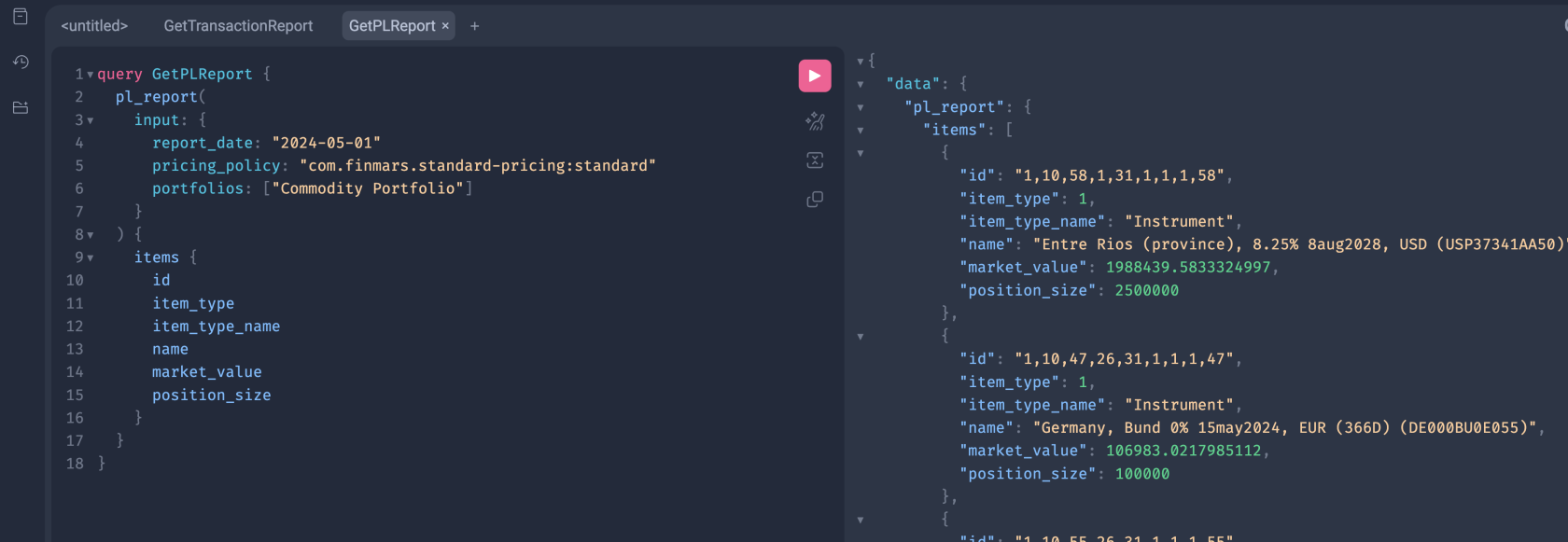
This query returns a pnl report for selected portfolios on a given date.
[](https://docs.finmars.com/uploads/images/gallery/2026-01/screenshot-2026-01-13-at-20-47-48.png)
---
### GraphQL Query
```graphql
query GetPLReport {
pl_report(
input: {
report_date: "2024-05-01"
pricing_policy: "com.finmars.standard-pricing:standard"
portfolios: ["Commodity Portfolio"]
}
) {
items {
id
item_type
item_type_name
name
market_value
position_size
}
}
}
```
---
## Input Highlights
### Report Date
```graphql
report_date: "2024-05-01"
```
- Snapshot date
- ISO date format
- Required field
### PL First Date
```graphql
pl_first_date: "2024-01-01"
```
- Snapshot date
- ISO date format
- Required field
- Basically its a "date from"
---
### Report Currency
```graphql
report_currency: "USD"
```
- Output currency
- Must exist in the system
---
### Pricing Policy
```graphql
pricing_policy: "com.finmars.standard-pricing:standard"
```
- Defines valuation rules
- Uses pricing engine configuration
- Required for valuation
---
### Portfolios
```graphql
portfolios: ["Commodity Portfolio"]
```
- List of portfolio user codes
- Supports multiple portfolios
---
### Python Code
```python
import requests
url = "https://///graphql/"
headers = {
"Authorization": "Bearer ",
"Content-Type": "application/json"
}
payload = {
"query": """
query GetPLReport {
pl_report(
input: {
report_date: "2024-05-01"
pricing_policy: "com.finmars.standard-pricing:standard"
portfolios: ["Commodity Portfolio"]
}
) {
items {
id
item_type
item_type_name
name
market_value
position_size
}
}
}
"""
}
response = requests.post(url, json=payload, headers=headers)
print(response.json())
```
---
### Notes
- This is **not** a list query.
- No pagination.
- Uses `input` instead of `filters`.
- Report queries execute calculations.
# Get Performance Report in Graphql
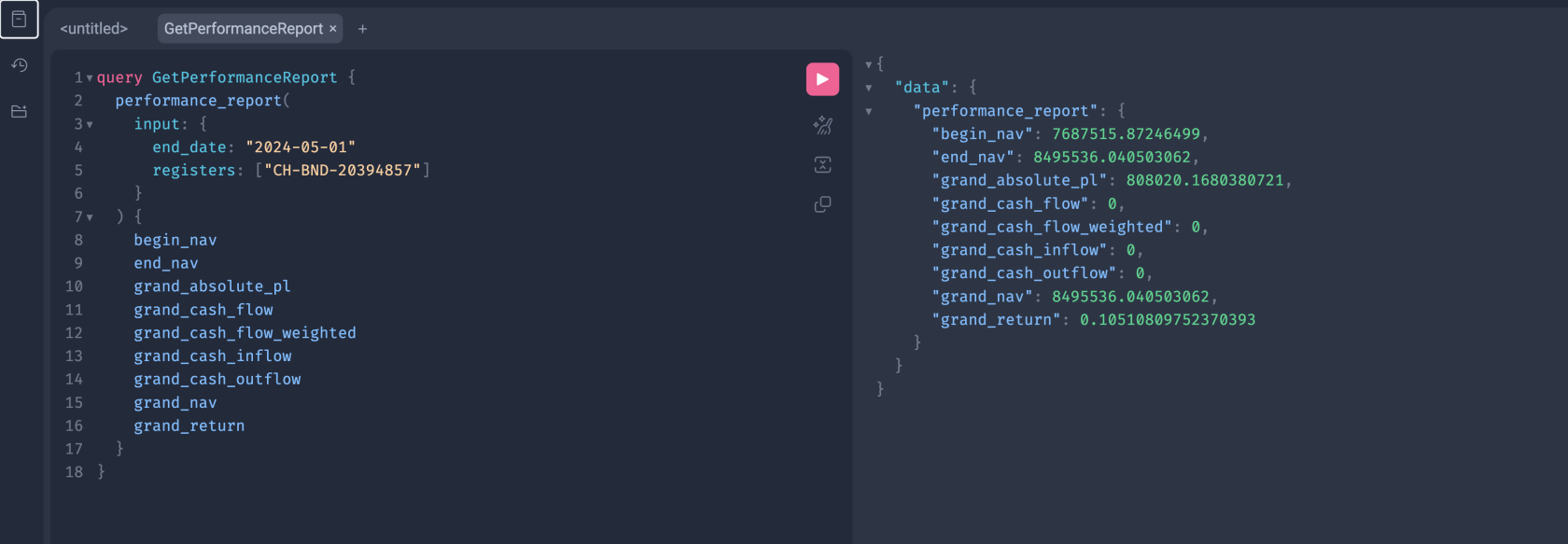
This query returns performance metrics for one or more portfolio registers.
[](https://docs.finmars.com/uploads/images/gallery/2025-12/screenshot-2025-12-16-at-19-46-38.png)
---
### GraphQL Query
```graphql
query GetPerformanceReport {
performance_report(
input: {
end_date: "2024-05-01"
registers: ["CH-BND-20394857"]
}
) {
begin_nav
end_nav
grand_absolute_pl
grand_cash_flow
grand_cash_flow_weighted
grand_cash_inflow
grand_cash_outflow
grand_nav
grand_return
}
}
```
---
## Input Fields
### `end_date`
```graphql
end_date: "2024-05-01"
```
- Report end date
- Required field
- ISO date format
---
### `registers`
```graphql
registers: ["CH-BND-20394857"]
```
- List of portfolio register user codes
- At least one register is required
- Supports multiple registers
---
## Output Fields
### NAV Values
- `begin_nav` — NAV at period start
- `end_nav` — NAV at period end
- `grand_nav` — aggregated NAV
---
### Cash Flow Metrics
- `grand_cash_flow`
- `grand_cash_flow_weighted`
- `grand_cash_inflow`
- `grand_cash_outflow`
---
### Performance Metrics
- `grand_absolute_pl` — absolute profit or loss
- `grand_return` — total return
---
## Python Code
```python
import requests
url = "https://///graphql/"
headers = {
"Authorization": "Bearer ",
"Content-Type": "application/json"
}
payload = {
"query": """
query GetPerformanceReport {
performance_report(
input: {
end_date: "2024-05-01"
registers: ["CH-BND-20394857"]
}
) {
begin_nav
end_nav
grand_absolute_pl
grand_cash_flow
grand_cash_flow_weighted
grand_cash_inflow
grand_cash_outflow
grand_nav
grand_return
}
}
"""
}
response = requests.post(url, json=payload, headers=headers)
print(response.json())
```
## Notes
- This is a **calculated report**
- No pagination
- Uses `input`, not `filters`
- Default calculation method is applied if not provided
- Execution time depends on data volume
# Get Transaction Report in Graphql
---
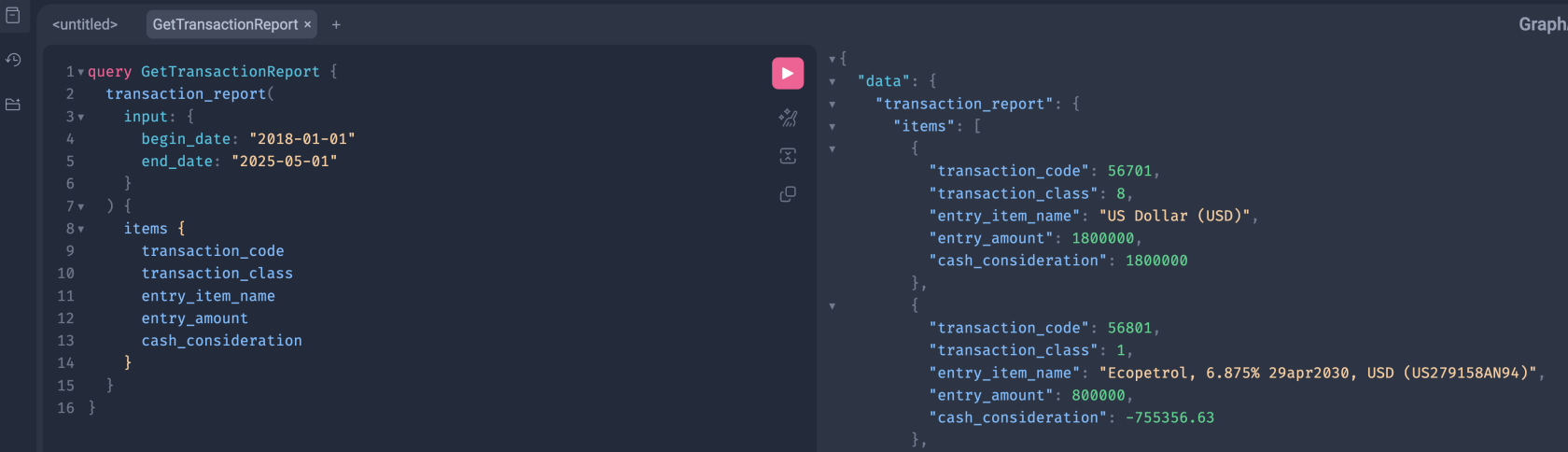
This query returns calculated transaction report rows for a given date range.
[](https://docs.finmars.com/uploads/images/gallery/2025-12/screenshot-2025-12-16-at-20-57-06.png)
---
### GraphQL Query
```graphql
query GetTransactionReport {
transaction_report(
input: {
begin_date: "2018-01-01"
end_date: "2025-05-01"
}
) {
items {
transaction_code
transaction_class
entry_item_name
entry_amount
cash_consideration
}
}
}
```
---
## Input Fields
### `begin_date`
```graphql
begin_date: "2018-01-01"
```
- Report start date
- Optional in some setups
- ISO format
---
### `end_date`
```graphql
end_date: "2025-05-01"
```
- Report end date
- Required
- ISO format
---
## Output Fields
Each item represents one report row.
- `transaction_code` — internal transaction identifier
- `transaction_class` — transaction type
- `entry_item_name` — report entry name
- `entry_amount` — calculated amount
- `cash_consideration` — cash movement value
Only requested fields are returned.
---
## Python Example
```python
import requests
url = "https://///graphql/"
headers = {
"Authorization": "Bearer ",
"Content-Type": "application/json"
}
payload = {
"query": """
query GetTransactionReport {
transaction_report(
input: {
begin_date: "2018-01-01"
end_date: "2025-05-01"
}
) {
items {
transaction_code
transaction_class
entry_item_name
entry_amount
cash_consideration
}
}
}
"""
}
response = requests.post(url, json=payload, headers=headers)
print(response.json())
```
---
## Notes
- This is a **report query**, not a list endpoint
- No pagination
- Uses `input`, not `filters`
- Execution time depends on date range
- Add more fields to `items` if needed
# Get Price History Check
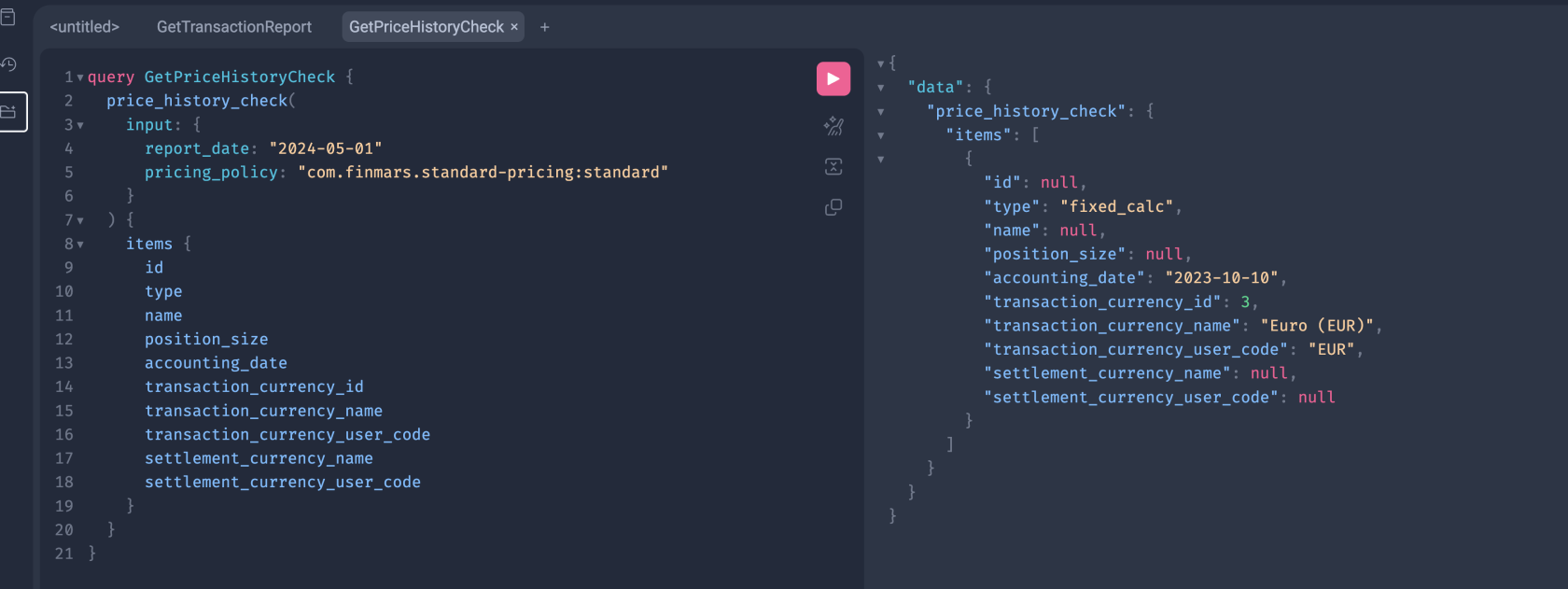
This query returns a price history check report on a given date.
[](https://docs.finmars.com/uploads/images/gallery/2026-01/screenshot-2026-01-13-at-20-52-41.png)
---
### GraphQL Query
```graphql
query GetPriceHistoryCheck {
price_history_check(
input: {
report_date: "2024-05-01"
pricing_policy: "com.finmars.standard-pricing:standard"
}
) {
items {
id
type
name
position_size
accounting_date
transaction_currency_id
transaction_currency_name
transaction_currency_user_code
settlement_currency_name
settlement_currency_user_code
}
}
}
```
---
## Input Highlights
### Report Date
```graphql
report_date: "2024-05-01"
```
- Snapshot date
- ISO date format
- Required field
### PL First Date
```graphql
pl_first_date: "2024-01-01"
```
- Snapshot date
- ISO date format
- Required field
- Basically its a "date from"
---
### Report Currency
```graphql
report_currency: "USD"
```
- Output currency
- Must exist in the system
---
### Pricing Policy
```graphql
pricing_policy: "com.finmars.standard-pricing:standard"
```
- Defines valuation rules
- Uses pricing engine configuration
- Required for valuation
---
### Portfolios
```graphql
portfolios: ["Commodity Portfolio"]
```
- List of portfolio user codes
- Supports multiple portfolios
---
### Python Code
```python
import requests
url = "https://///graphql/"
headers = {
"Authorization": "Bearer ",
"Content-Type": "application/json"
}
payload = {
"query": """
query GetPriceHistoryCheck {
price_history_check(
input: {
report_date: "2024-05-01"
pricing_policy: "com.finmars.standard-pricing:standard"
}
) {
items {
id
type
name
position_size
accounting_date
transaction_currency_id
transaction_currency_name
transaction_currency_user_code
settlement_currency_name
settlement_currency_user_code
}
}
}
"""
}
response = requests.post(url, json=payload, headers=headers)
print(response.json())
```
---
### Notes
- This is **not** a list query.
- No pagination.
- Uses `input` instead of `filters`.
- Report queries execute calculations.