# Dashboard Setup

# Integration to 3rd party

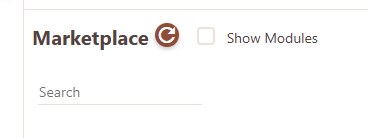
1. Go to the `Settings -> Configuration -> Marketplace`
2. Click checkbox `Show Modules`<br>
   [![](https://docs.finmars.com/uploads/images/gallery/2024-07/scaled-1680-/image-1721398559046.png)](https://docs.finmars.com/uploads/images/gallery/2024-07/image-1721398559046.png)
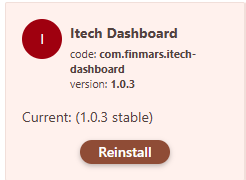
3. Install `Itech dashboard` module
   <br>[![](https://docs.finmars.com/uploads/images/gallery/2024-07/scaled-1680-/image-1721398657750.png)](https://docs.finmars.com/uploads/images/gallery/2024-07/image-1721398657750.png)
4. Generate a token by visiting the link
```bash
https://eu-central-2.finmars.com/{realm_code}/{space_code}/api/v1/auth-tokens/personal-access-token/create-token/
```
5. Enter:
    * the `name` and `user_code` of the token (at your discretion),
    * set `access_level` - `admin`,
    * `days to live` - at your discretion
6. Prepare to embed a script with JS code on an external site from the example below:
   * add the token to it
   * change `realm_code` and `space_code` in the `loadSecureModule` function
   * change the values for the variables in `realCode` and `spaceCode`
   * change the identifier for the selector from the HTML page where the dashboard element needs to be inserted
```html
<!DOCTYPE html>
<html>
<head>
    <meta charset="utf-8">
    <meta name="viewport" content="width=device-width, initial-scale=1">
    <title>Itech External Dashboard</title>
    <style type="text/css">
      html {
        font-size: 100%;
      }
      
      body {
        font-family: helvetica;
      }

    </style>
</head>
<body>

<h1>Itech</h1>

<div style="display: flex;">

<div style="margin-right: 20px;">
  <div><label>External Date Picker</label></div>
  <input class="date-picker" type="date" name="" value="2024-07-16">
</div>

<div>
  <div><label>External Portfolio Picker</label></div>
  <select class="portfolio-picker">
    <option>IKF1218.001</option>
  </select>
</div>

</div>

<div>

  <div class="finmars-holder" style="padding: 20px;  margin: 20px;">
    
    <div style="margin-bottom: 1rem;">Section for Finmars Dashboard</div>
    

    <div id="dashboardContainer"></div>

  </div>  
</div>


<script>

    var FINMARS_API_KEY = "YOUR_API_KEY"

    function loadSecureModule(url, apiKey) {
        return fetch(url, {
            headers: {
                'Authorization': `Bearer ${apiKey}`
            }
        })
        .then(response => {
            if (!response.ok) {
                throw new Error(`HTTP error! Status: ${response.status}`);
            }
            return response.text();
        })
        .then(scriptText => {
            const blob = new Blob([scriptText], { type: 'application/javascript' });
            const scriptURL = URL.createObjectURL(blob);
            return import(scriptURL);
        });
    }

    loadSecureModule('https://eu-central-2.finmars.com/realm0sqjq/space00ql8/api/storage/workflows/com/finmars/itech-dashboard/dashboard.js', FINMARS_API_KEY)
        .then(async (module) => {

          const FinmarsDashboard = module.default;

          const dashboard = new FinmarsDashboard({
                apiKey: FINMARS_API_KEY,
                selector: '#dashboardContainer',
                realmCode: "realm00000",
                spaceCode: "space00000",
                domain: "eu-central-2.finmars.com",
            });

          await dashboard.init();

          dashboard.dashboardStore.setDateTo("2024-07-16");
          dashboard.dashboardStore.setPortfolios(["IKF1218.001"]);
          dashboard.renderDashboard();

          document.querySelector('.date-picker').addEventListener("change", function(event) {

            console.log('datePicker.event', event);

            dashboard.dashboardStore.setDateTo(event.target.value);
            dashboard.renderDashboard();


          })

          document.querySelector('.portfolio-picker').addEventListener("change", function(event) {

            console.log('datePicker.event', event);

            dashboard.dashboardStore.setPortfolios([event.target.value]);
            dashboard.renderDashboard();


          })

        })
        .catch(error => console.error('Error loading the script:', error));


</script>

</body>
</html>
```
7. Next, you can change the `date-picker` and `portfolio-picker` to your own HTML elements