Entities
- For understanding core platform components and their role.
- For users who need to know the structure, examples, and purposes of each entity.
- Helpful as a quick reference to the main building blocks of the system.
- Portfolio
- Portfolio
- How to Create a Portfolio Entity
- How to Read a Portfolio Entity
- How to Update a Portfolio Entity
- How to Delete a Portfolio Entity
- Register
- Accounts
- Instrument
- Counterparty
- Currency
- Transactions
- Pricing Policy
- Bundle
- Price
- Portfolio Type
- Portfolio Reconcile Group
- Register Records
- Instrument Type
- Base Transactions
- Entity Doc Template
- FX Rate (Currency History)
- Transaction Type
Portfolio
A collection of your investments, like stocks, bonds, or funds, all in one place.
Portfolio
Table of Contents
Description
Financial meaning
Portfolio refers to a collection of financial assets. Portfolios are held directly by investors and/or managed by financial professionals. Effective portfolio management involves diversification, asset allocation, and regular performance monitoring to optimize returns and manage risks.
Platform abstraction
Portfolio in Finmars platform is a container for financial assets (cash (currency) & instruments) allocation.
Portfolio also is used in:
- performance calculation with its registers grouped in bundles
- reconciliation using special portfolio type and portfolio reconcile group.
Examples
| User code | Portfolio Type | Name | Short name | Public name | Notes | First Transaction Date | First Cash Flow Date | Accounts | Transaction types | Responsibles | Counterparties |
| obl01 |
Manual | Bonds | Bonds | Bonds | - | 2022-12-01 | 2022-12-01 |
User code: workspace unique identifier of the portfolio with source prefix as it's multi-source entityPortfolio Type: configuration-defined criterion for reconciliationName: full nameShort name: short name, showed in other relationsPublic name: public view name for users without accessNotes: custom description for portfolioFirst Transaction Date: date of the first transaction in the portfolio (changes by the logic described below)First Cash Flow Date: date of the first transaction in the portfolio for base transaction class == Cash-Inflow or Cash-Outflow (changes by the logic described below)Accounts: (not strict, informative) selected accounts that can be used for this portfolioTransaction types: (not strict, informative)selected transaction types that can be used for this portfolioResponsibles: (not strict, informative)selected responsibles that can be used for this portfolioCounterparties: (not strict, informative)selected counterparties that can be used for this portfolio
Portfolio has 2 attributes First Transaction Date and First Cash Flow Date which are used for performance calculations with workflow and performance report and the logic for them is defined below:
Logic for defining First Transaction Date & First Cash Flow Date based on complex transactions:
-
Portfolio entity has 2 properties:
-
first_transcation_date (name = First transaction date, value = null)
-
first_cash_flow_date (name = First cash flow date, value = null)
-
-
For complex transaction CRUD operations For each base transaction in the complex transaction:
-
if Book
-
if base transaction class == Cash-Inflow or Cash-Outflow
-
if trade_date < first_cash_flow_date
-
first_cash_flow_date = trade_date
-
-
-
if trade_date < first_transcation_date
-
first_transcation_date = trade_date
-
-
-
if Rebook !!!
-
if base transaction class == Cash-Inflow or Cash-Outflow
-
if new trade_date < first_cash_flow_date
-
first_cash_flow_date = trade_date
-
-
else
-
if old trade_date == first_cash_flow_date
-
first_cash_flow_date = find new first_cash_flow_date
-
-
-
-
if new trade_date < first_transcation_date
-
first_transcation_date = trade_date
-
-
else
-
if old trade_date == first_transcation_date
-
first_transcation_date = find new first_transcation_date
-
-
-
-
if Delete
-
if base transaction class == Cash-Inflow or Cash-Outflow
-
if trade_date == first_cash_flow_date
-
if true first_cash_flow_date = find new first_cash_flow_date
-
-
-
if trade_date == first_transcation_date
-
if true first_transcation_date = find new first_transcation_date
-
-
-
Cookbook
CRUD
-
Create: How to Create a Portfolio Entity
-
Update: How to Update a Portfolio Entity
-
Delete: How to Delete a Portfolio Entity
Use Cases
- Within a portfolio, transactions and instrument positions are grouped using registers, which feed into bundles and ultimately affect portfolio-level calculations and reporting.
- Auto-populated fields such as First Transaction Date and First Cash Flow Date are critical inputs for internal workflows, audit tracking, and performance evaluation logic.
- Leverage the Portfolio Type field to define reconciliation logic and reporting behavior (e.g., General, Manual, or Position Only).
F.A.Q.
Frequently asked questions.
API documentation
Link to API documentation.
How to Create a Portfolio Entity
Prerequisites
We assume you have all prerequisites you may need, including:
- If needed: the VPN is configured to access the Finmars resources
- If needed: access to the Virtual Machine to work with the sensitive information
- Must have: registered in Finmars in the needed region environment (self-registered or registered by Finmars)
- Must have: having permissions set to allow continue with the Action in the Guide
Creation of Portfolio Entity
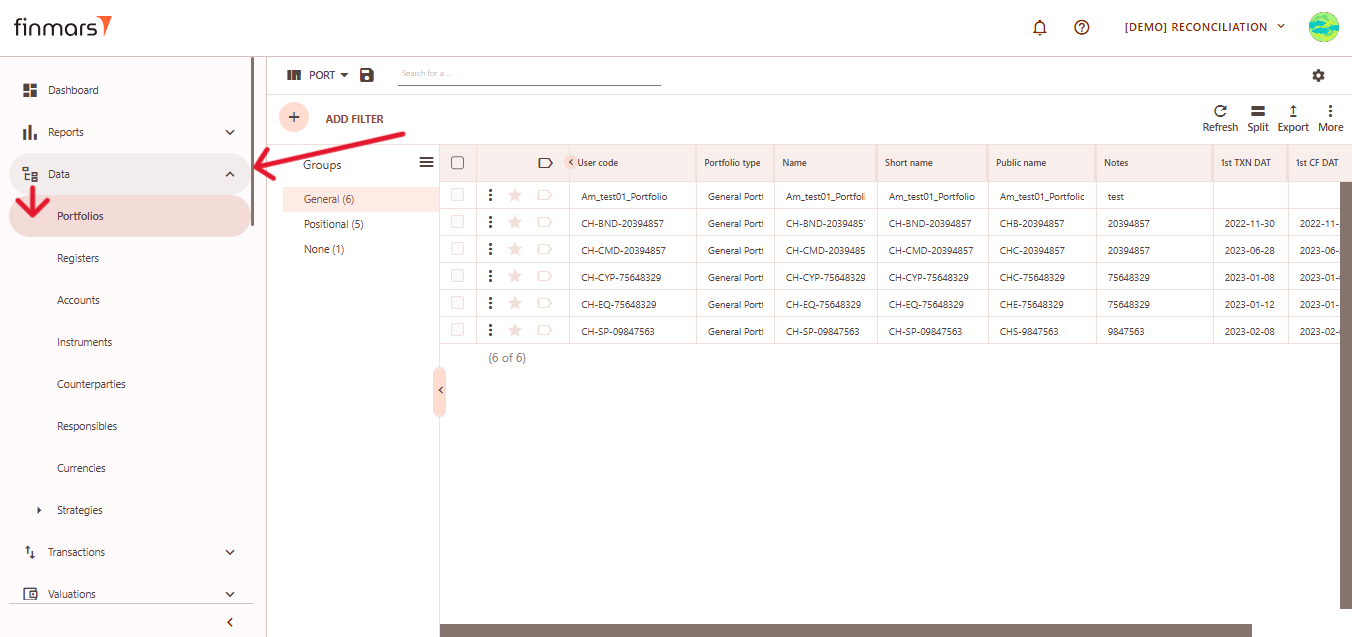
- Open the “Data” section in the left-hand side menu. Select the “Portfolios” entity from the list under Data.

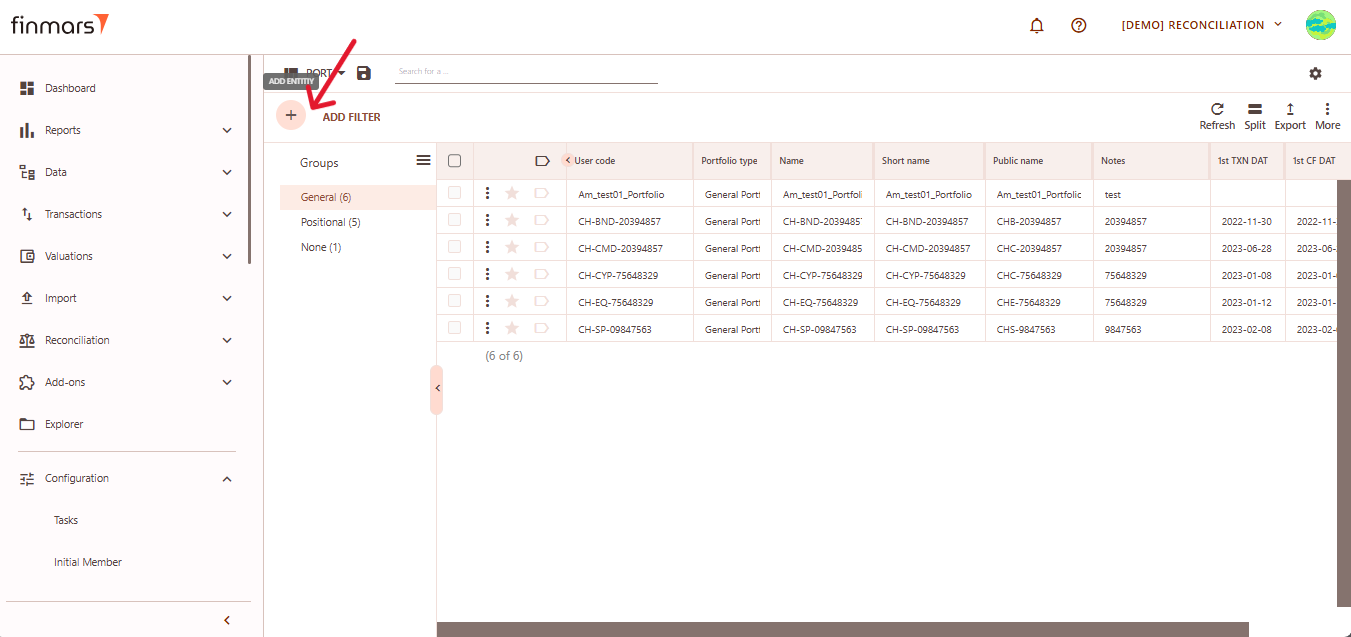
- Click the “+ Add” button located in the top-left corner of the portfolio list view.

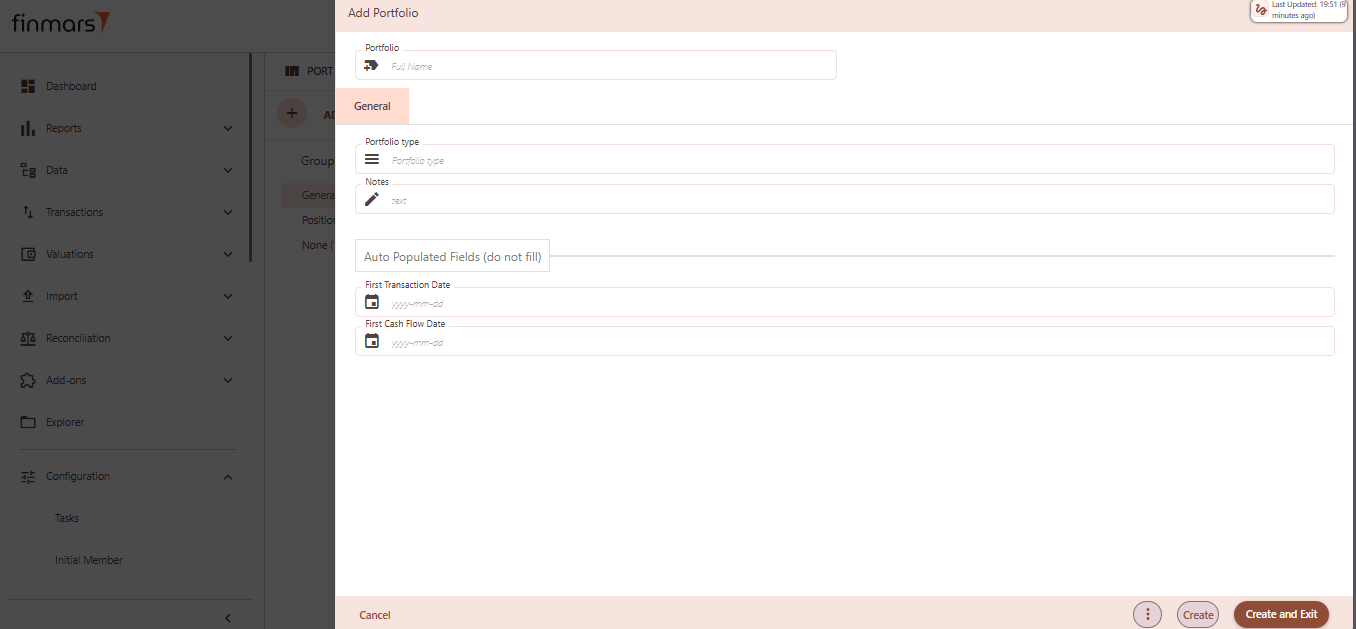
- This action opens the Add Portfolio form.

- Fill in the required fields in the creation panel:
- Portfolio (Full Name) – the unique name of the portfolio. This will be used to identify it across the platform.
- Portfolio Type – select from predefined types (e.g., General, Positional). Determines portfolio behavior and classification.
- Notes – optional field to add internal comments or details about the portfolio’s purpose or structure.
- First Transaction Date (auto populated, do not fill) – this field will automatically reflect the earliest transaction date once transactions are associated.
- First Cash Flow Date (auto populated, do not fill) – similar to the above, it will auto-fill based on actual cash flow activity.
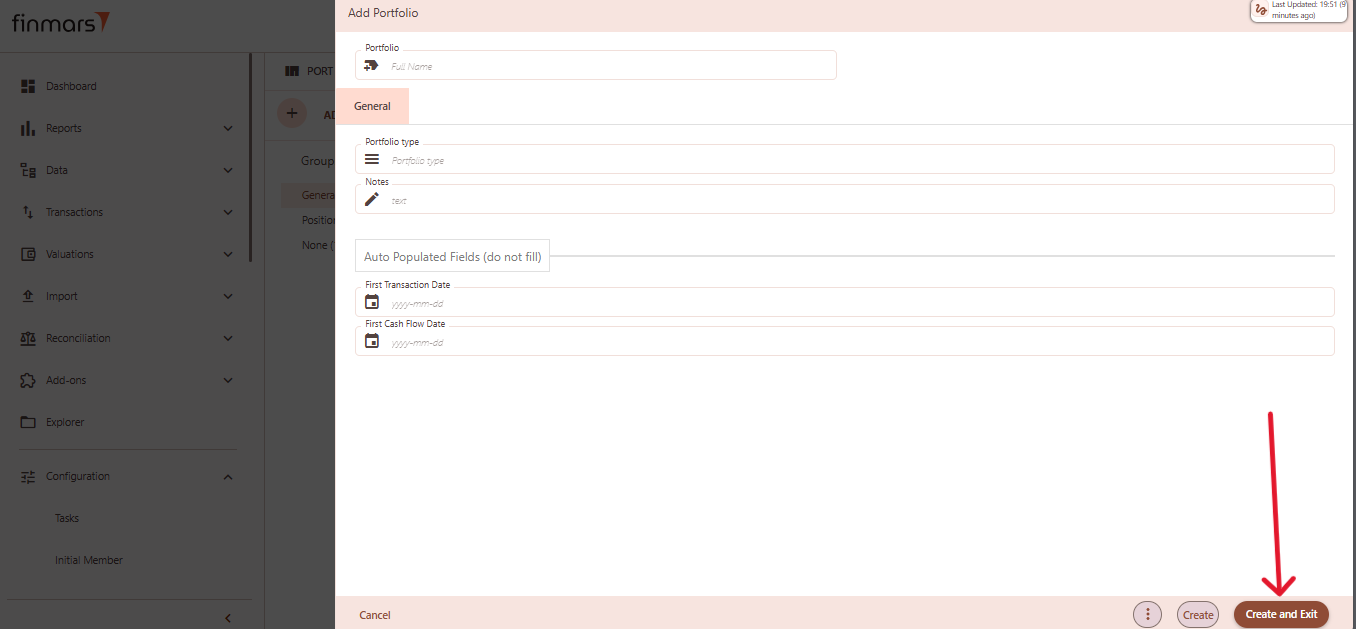
- Click “Create and Exit” to save the portfolio and return to the list view. Alternatively, use “Create” to save and continue editing.

How to Read a Portfolio Entity
Table of Contents
Description
Financial meaning
Financial meaning behind the entity (incl. diagrams and other explanatory materials).
Platform abstraction
Description of the entity in Platform (incl. diagrams, excel and other explanatory materials on how it works).
Examples
Platform screenshots with a description of a record table example.
Cookbook
CRUD
Operations within platform.
Use Cases
What for it's used.
F.A.Q.
Frequently asked questions.
API documentation
Link to API documentation.
How to Update a Portfolio Entity
Table of Contents
Description
Financial meaning
Financial meaning behind the entity (incl. diagrams and other explanatory materials).
Platform abstraction
Description of the entity in Platform (incl. diagrams, excel and other explanatory materials on how it works).
Examples
Platform screenshots with a description of a record table example.
Cookbook
CRUD
Operations within platform.
Use Cases
What for it's used.
F.A.Q.
Frequently asked questions.
API documentation
Link to API documentation.
How to Delete a Portfolio Entity
Table of Contents
Description
Financial meaning
Financial meaning behind the entity (incl. diagrams and other explanatory materials).
Platform abstraction
Description of the entity in Platform (incl. diagrams, excel and other explanatory materials on how it works).
Examples
Platform screenshots with a description of a record table example.
Cookbook
CRUD
Operations within platform.
Use Cases
What for it's used.
F.A.Q.
Frequently asked questions.
API documentation
Link to API documentation.
Register
This entity is associated with a portfolio. It is used for calculating performance, helping track and analyze the portfolio's overall returns and efficiency over time.
Register
Table of Contents
Description
Financial meaning
A register is a structured and organized record used in finance and accounting to track specific types of financial data over time. It acts like a detailed ledger where all movements or events related to a particular category (such as cash, securities, or transactions) are documented.
Platform abstraction
A Register in the Finmars platform is a structured container that stores valuation-related information about a portfolio. Each register is associated with a specific portfolio and reflects a distinct layer of financial data, such as positions, valuations, and links to financial instruments. Registers help structure and organize the way portfolio data is calculated, grouped, and displayed.
Registers are used in:
-
Each register defines the currency and pricing method for asset valuation within the platform.
-
Registers store snapshots of position and value changes that are then used to compute return metrics.
-
Registers help distinguish between cash and position data, creating a cleaner view of asset structure.
-
Registers may reference specific instruments tied to the valuation of positions.
Examples
| User code | Valuation CCY | Pricing policy | Portfolio | Linked Instrument | Notes |
| CH-BND-20394857 | USD | Standard | CH-BND-20394857 | CH-BND-20394857 |
-
User code: Unique identifier of the register, often includes portfolio and register type. -
Valuation CCY: The currency in which the register's values are stored and calculated. -
Pricing policy: The pricing rule (e.g. Standard) used for valuation. -
Portfolio: The portfolio to which the register belongs. -
Linked Instrument: Reference to a financial instrument connected with the register. -
Notes: Optional field for additional comments or context.
Cookbook
CRUD
-
Create: A new register can be created by navigating to a portfolio and selecting the Registers section. Click the plus (+) button in the top-right corner to open the “Add Portfolio Register” form.
-
Read: All existing registers are visible under the “Registers” tab. Users can review summary information (such as name, valuation currency, pricing policy, etc.)
-
Update: To edit a register, select it from the register list of the corresponding portfolio. All fields except the portfolio linkage can typically be edited. Users may update pricing policy, currency, instrument linkage, names, and default price to reflect changing valuation or reporting needs.
- Delete: Registers can be deleted directly from the management page.
Use Cases
- A register can be associated with a specific financial instrument, making it useful for focused tracking, reporting, or pricing logic on a particular asset or security.
- With separate fields for Short Name, Public Name, and Name, users can maintain clear internal identifiers while presenting clean labels externally.
- Using the Valuation Currency field, users ensure that position values are recorded consistently for performance tracking, aggregation, and risk exposure reporting.
F.A.Q.
Frequently asked questions.
API documentation
Link to API documentation.
How to Create a Register Entity
Prerequisites
We assume you have all prerequisites you may need, including:
- If needed: the VPN is configured to access the Finmars resources
- If needed: access to the Virtual Machine to work with the sensitive information
- Must have: registered in Finmars in the needed region environment (self-registered or registered by Finmars)
- Must have: having permissions set to allow continue with the Action in the Guide
Creation of Register Entity
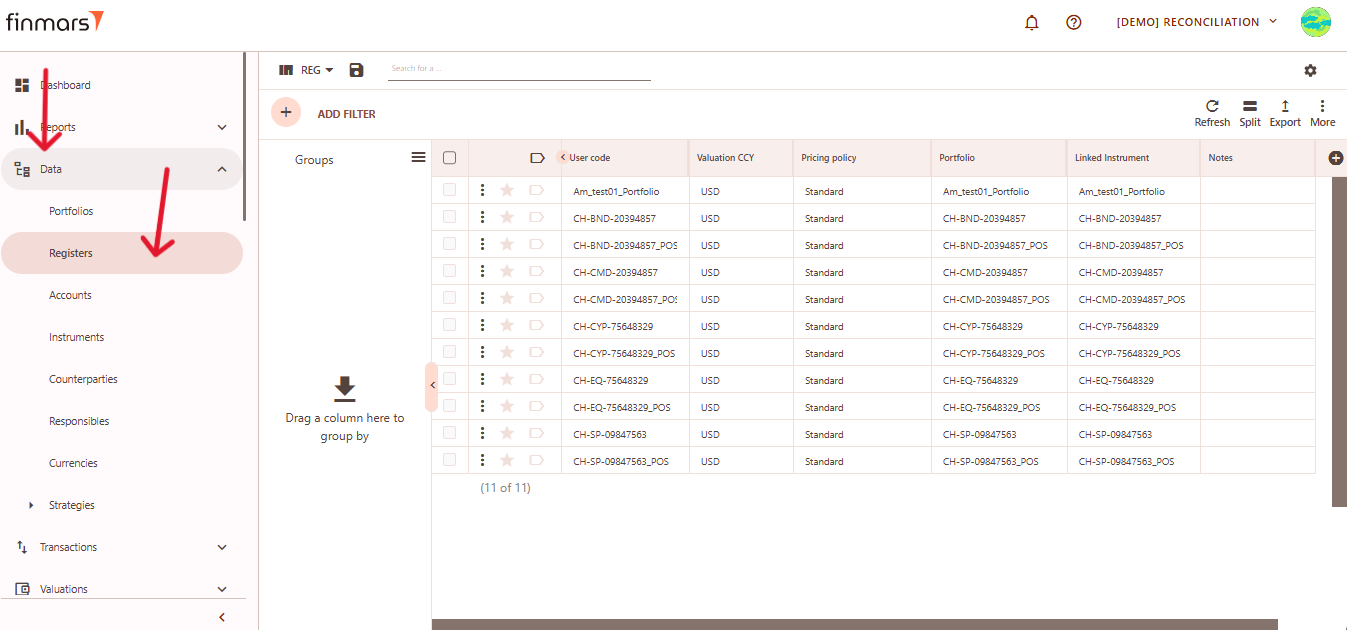
- Open the “Data” section in the left-hand side menu. Select the “Registers” entity from the list under Data.

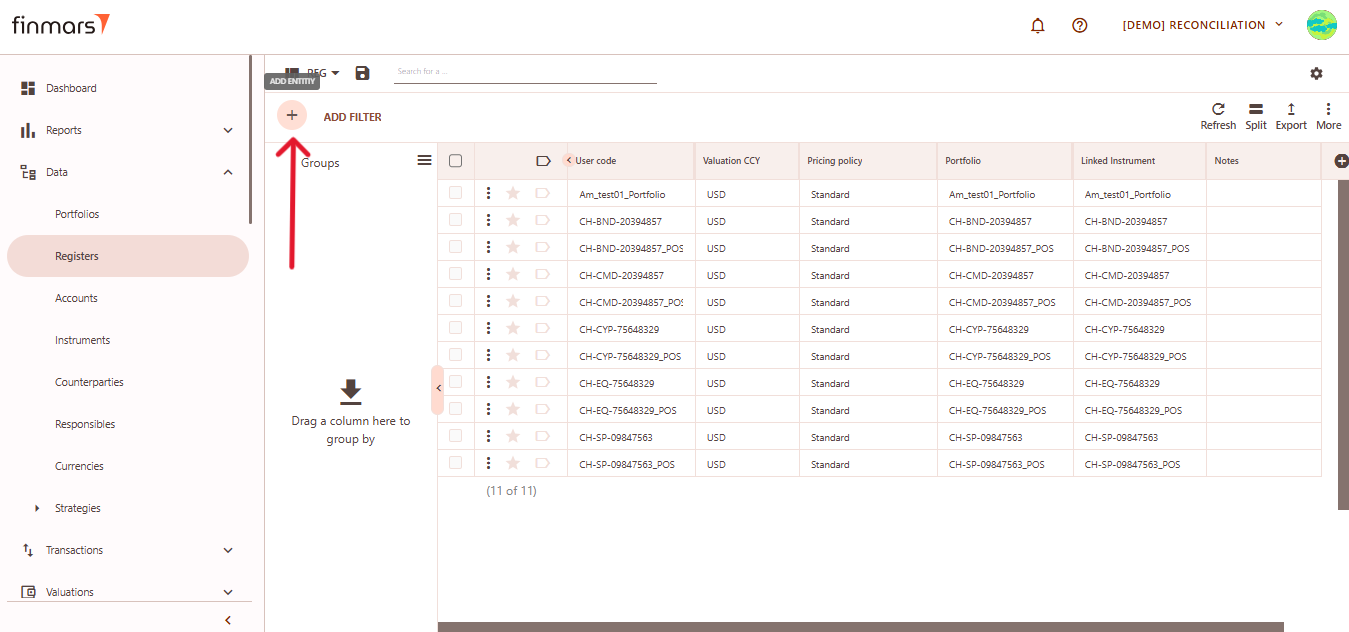
- Click the “+ Add” button located in the top-left corner of the portfolio list view.

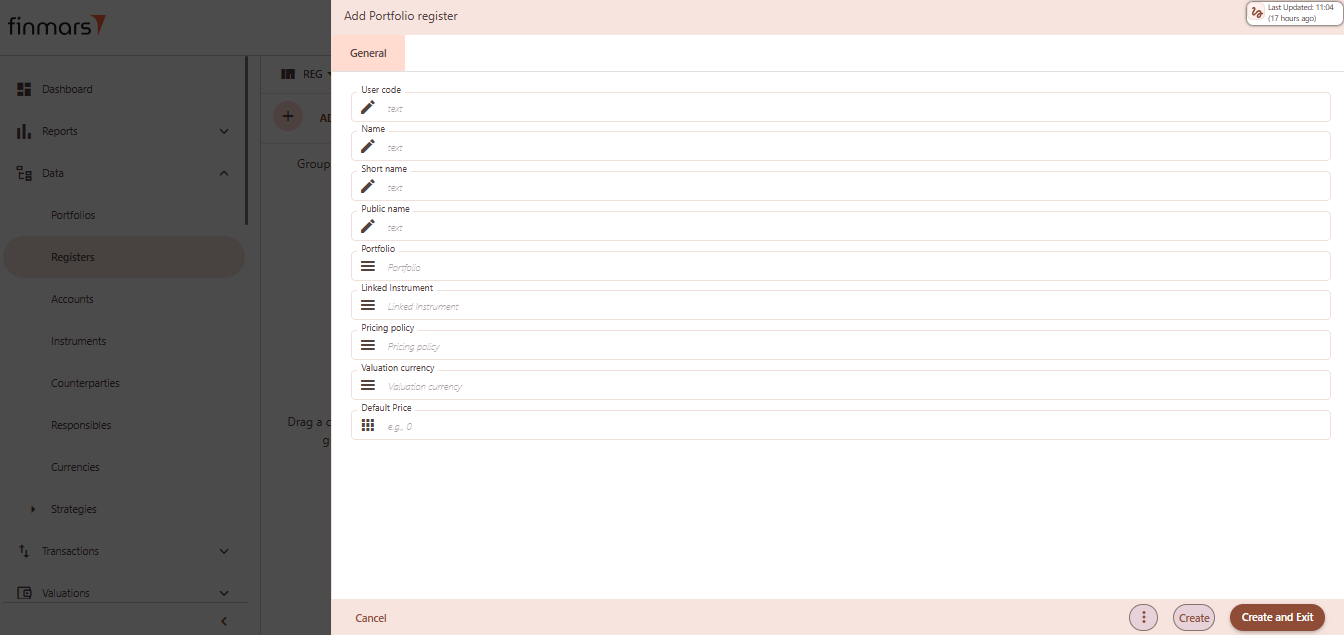
- This action opens the Add Portfolio register form.

- Fill in the required fields in the creation panel:
- User code – unique identifier for the register record. Often reflects the instrument or portfolio logic (e.g.,
CH-XYZ-Portfolio_POS). - Name – descriptive name of the register, used in views and reports.
- Short name – abbreviated version of the name, useful in condensed views or exports.
- Public name – optional field for external-facing labels, if different from internal naming.
- Portfolio – select the portfolio to which this register belongs. This links the register to a specific investment structure.
- Linked Instrument – associate a financial instrument (e.g., bond, equity) to track valuation and performance.Pricing Policy – define how prices and FX rates will be sourced for this register (e.g., Standard, Rolled Master).
- Valuation Currency – the currency in which the register will be valued. Used in NAV calculations and reporting.
- Default Price – optional value to preload a fallback price when no market price is available.

- User code – unique identifier for the register record. Often reflects the instrument or portfolio logic (e.g.,
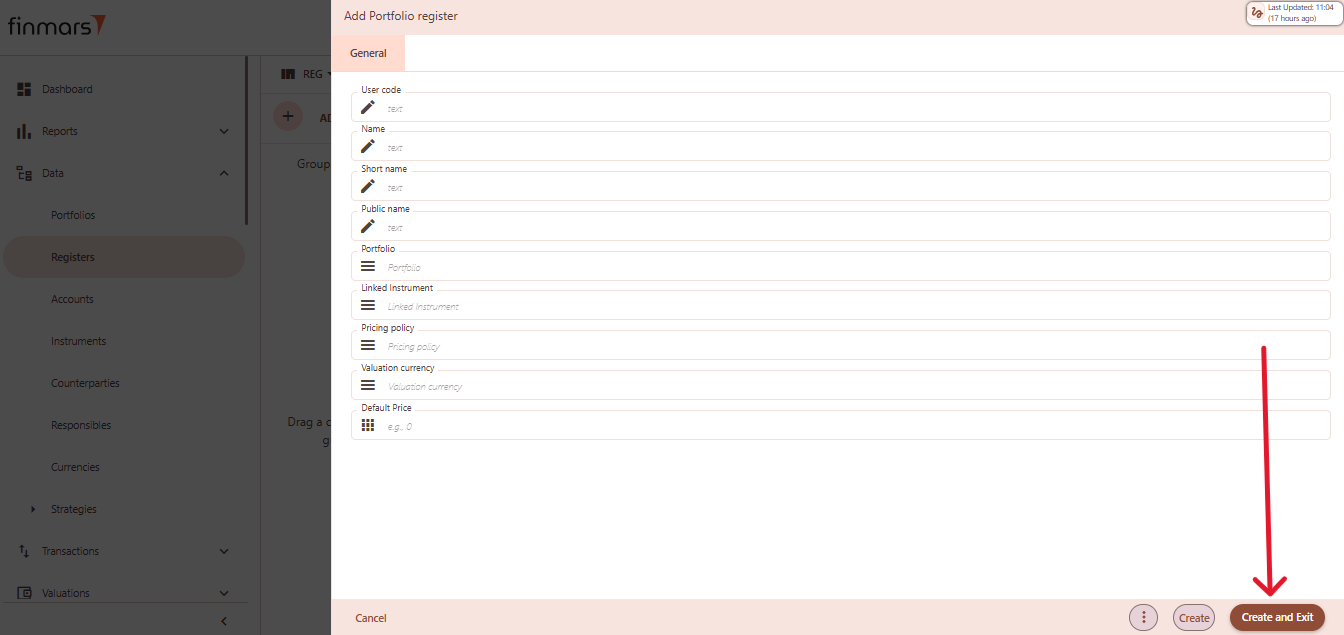
- Click “Create and Exit” to save the portfolio and return to the list view. Alternatively, use “Create” to save and continue editing.
Accounts
It's a financial entity used to track and manage transactions, balances, and holdings.
Accounts
Table of Contents
Description
Financial meaning
Accounts represent storage locations for financial assets or cash. They define where securities, cash, or other financial holdings are kept, ensuring legal ownership, custody, and safekeeping.
Platform abstraction
An Account in the Finmars platform defines a place where assets or cash are held. It carries properties like type, name, and purpose (e.g., depository, provisional account).
Accounts are essential for linking transactions, managing cash, tracking positions, and generating reports.
Accounts are used in:
- Connecting holdings to the correct location (e.g. portfolio or counterparty)
- Managing and tracking cash and asset transfers
- Verifying asset values across different accounts
- Supporting regulatory and internal financial reporting
Examples
| User Code | Type | Short Name | Name | Public Name | Notes |
| 129900RGLDPQ3DT2T5H1 | Default Account Type | SCVA | Securities Vault Alpha | SECALPHAZZXXX | Depository for Securities |
-
User code: a unique identifier of the account within the system. -
Type: classification of the account (e.g., default, provisional, etc.). -
Short name: a brief label for quick reference of the account. -
Name: the full name of the account for user clarity. -
Public name: the name displayed externally or used in reporting. -
Notes: additional information about the purpose or specifics of the account.
Cookbook
CRUD
- Create: How to Create an Account Entity
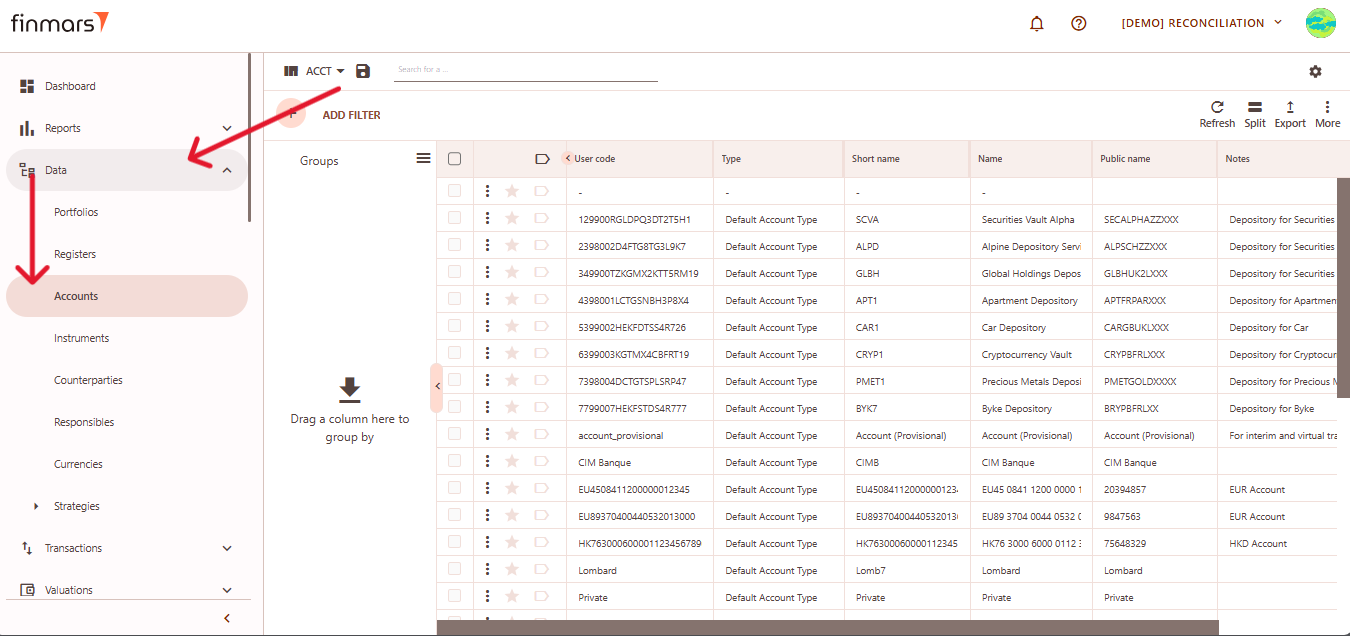
- Read: All accounts are listed in the Accounts management page. This list provides quick access to key fields such as name, type, and status. Users can filter, group, or search to locate specific accounts and review their configuration.
- Update: To edit a account, users can click on an existing entry to open the edit form. All field – except those constrained by platform rules – can be modified, including the full name, type, status or optional notes.
- Delete: Accounts can be deleted directly from the management page.
Use Cases
- Use the Type field to distinguish accounts based on purpose—such as a provisional holding account for pending transactions or a default account for general asset storage.
- Multiple name fields (Full Name, Short Name, Public Name) ensure that the same account can be clearly identified internally while presenting a different label in client-facing or compliance reports.
- Transactions are booked to accounts to reflect real-world movements of cash or securities, ensuring accurate position and cash flow tracking.
F.A.Q.
Frequently asked questions.
API documentation
Link to API documentation.
How to Create an Account Entity
Prerequisites
We assume you have all prerequisites you may need, including:
- If needed: the VPN is configured to access the Finmars resources
- If needed: access to the Virtual Machine to work with the sensitive information
- Must have: registered in Finmars in the needed region environment (self-registered or registered by Finmars)
- Must have: having permissions set to allow continue with the Action in the Guide
Creation of Account Entity
- Open the “Data” section in the left-hand side menu. Select the “Accounts” entity from the list under Data.

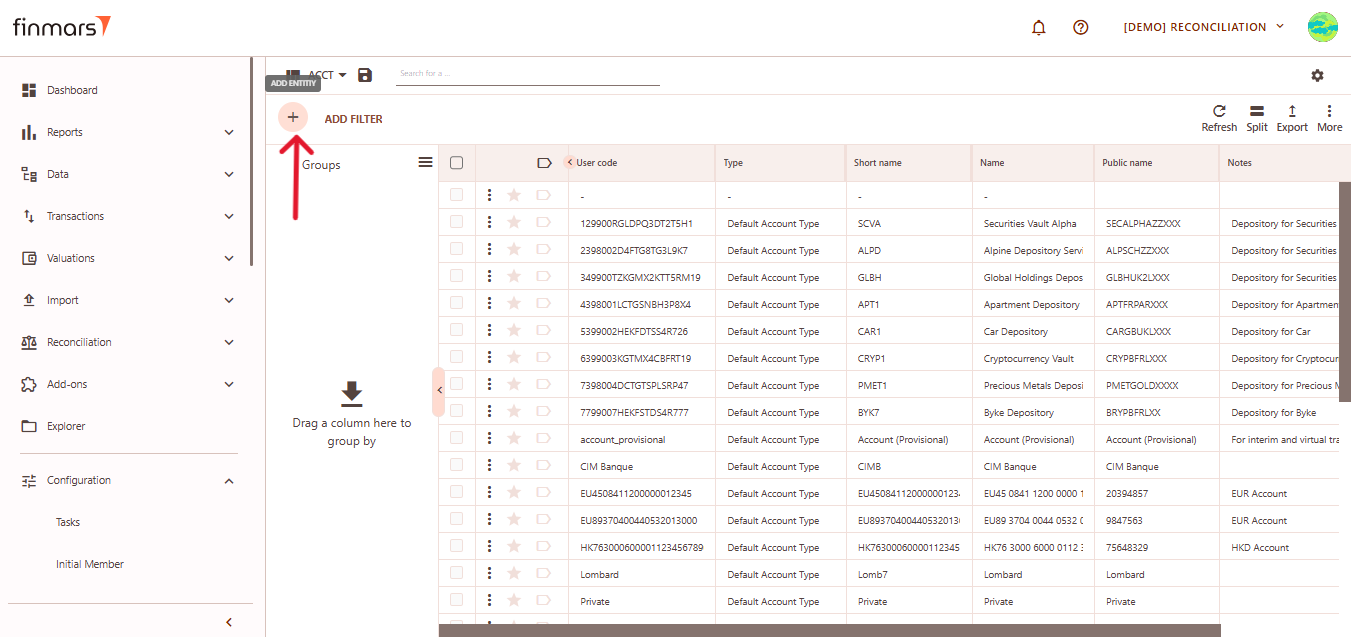
- Click the “+ Add” button located in the top-left corner of the portfolio list view.

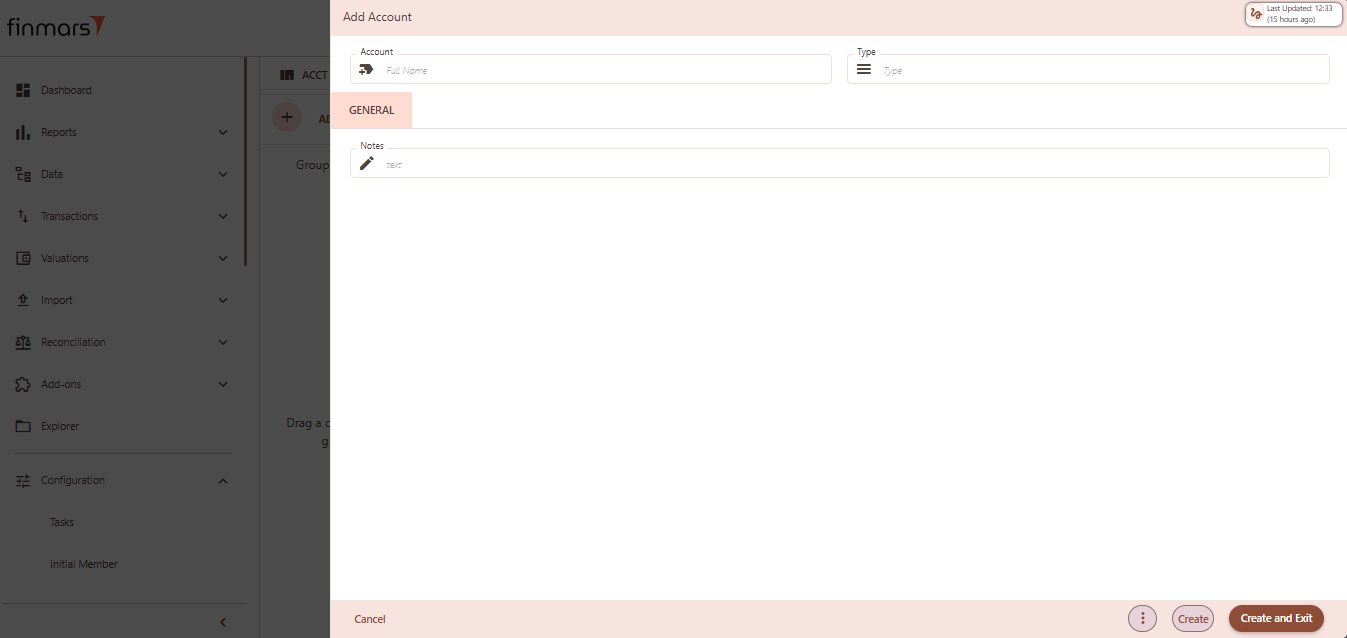
- This action opens the Add Account form.

- Fill in the required fields in the creation panel:
- Account – full name of the account. This will serve as the primary identifier in the interface and reports.
- Type – choose the account type from the dropdown (e.g., Default Account Type, FX Buy/Sell, Provision). This determines behavior in flows, reports, and reconciliations.
- Notes (optional) – any internal comments or descriptions related to the account setup.Any internal comments or descriptions related to the account setup.

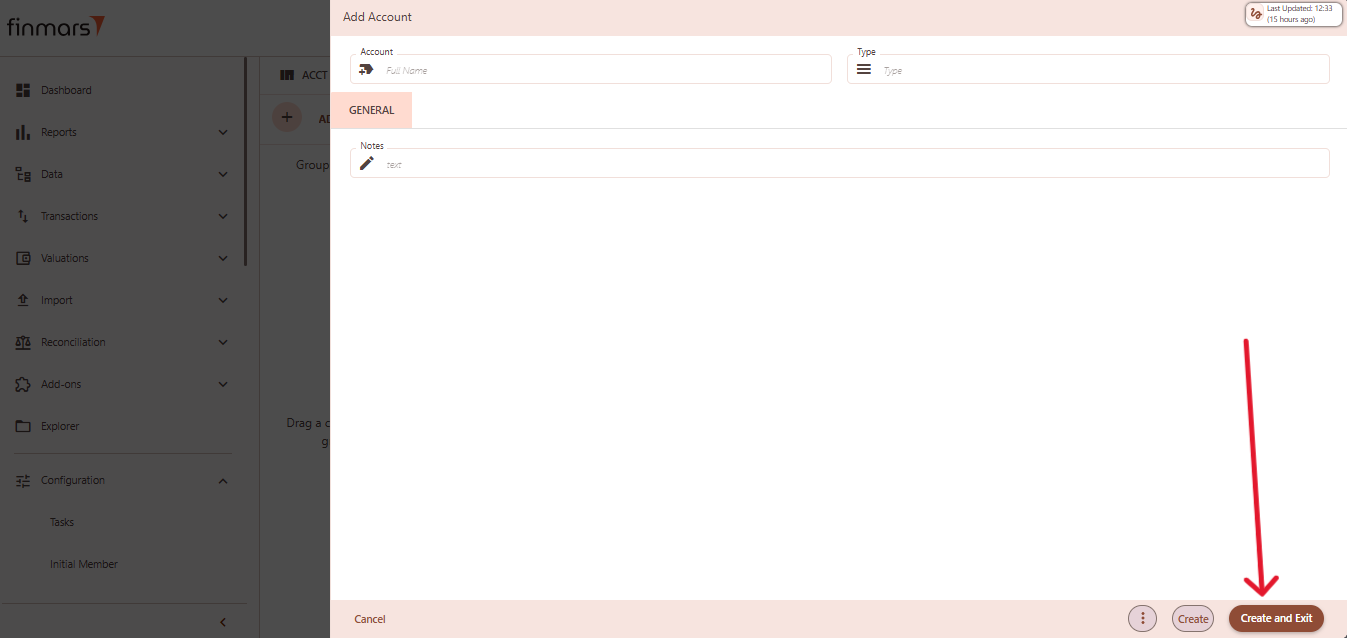
- Click “Create and Exit” to save the portfolio and return to the list view. Alternatively, use “Create” to save and continue editing.
Instrument
This entity is a unique ID for a financial asset or security involved in a transaction.
Instrument
Table of Contents
Description
Financial meaning
Financial instruments are contracts that represent a financial asset for one party and a financial liability or equity instrument for another. They are used in investing, hedging, and speculative strategies across global financial markets.
Instruments can be categorized into equity instruments (e.g., stocks), debt instruments (e.g., bonds), derivatives (e.g., options, swaps), and hybrid instruments.
Platform abstraction
In the Finmars platform, the Instrument entity represents the complete set of financial instruments under management. It serves as a central component for accounting, valuation, performance measurement, risk analysis, reconciliation, and reporting.
Instruments are used in:
-
Identifying and tracking specific financial assets or securities involved in transactions
-
Linking related transactions where instruments and cash considerations are connected (via linked instruments)
-
Ensuring accurate valuation and processing of asset movements
-
Supporting reconciliation and reporting of financial positions across portfolios and accounts
Examples
First part of table
| User code | Modified at | Asset type | Country | PRC CCY | ACCR CCY | Short name | Name |
| CH-BND-20394856 | 2025-02-10 | Other | Colombia | USD | USD | CH-BND-20394856 | Ms_XX:20394856 |
Second part of table
| Public name | MAT DT | MAT PRC | PRC MULT | ACCR MULT | INSTR TYPE | PMT SZ DTL | Notes |
| 20394856 | 9999-12-31 | 0.00 | 1.00 | 1.00 | Portfolio | Default |
User code: unique identifier assigned to the instrument. Used for internal reference and tracking.-
Modified at: date and time of the last modification to the instrument data. -
Asset type: classification of the instrument (e.g., Bond, Derivative, Real Estate). Determines behavior and processing rules in the system. -
Country: country of issuance or jurisdiction of the instrument's issuer. Important for regulatory and risk assessment purposes. -
PRC CCY (Pricing Currency): the currency in which the instrument is quoted or priced. Used for valuation and financial reporting. -
ACCR CCY (Accrual Currency): the currency used to calculate interest or accruals. May differ from pricing currency. -
Short name: abbreviated or condensed label for quick reference. -
Name: full name of the instrument, typically including issuer, coupon/yield, and maturity details. -
Public name: market-facing or external name of the instrument, often matching how it appears on exchanges or public reports. -
MAT DT (Maturity Date): the date on which the instrument matures or principal is repaid. Key for fixed-income instruments. -
MAT PRC (Maturity Price): the expected or agreed price of the instrument at maturity. -
PRC MULT (Pricing Multiplier): factor applied to scale the market price to nominal or unit-based values (e.g., per 100 or per 1,000 units). -
ACCR MULT (Accrual Multiplier): factor used to adjust accrual amounts. Helps handle non-standard periods or calculation rules. -
INSTR TYPE (Instrument Type): instrument type code (e.g., BOND, STOCK, PORTFOLIO). Used for classification, logic, and filtering. -
PMT SZ DTL (Payment Size Detail): specifies the payment structure (e.g., default). Supports payment schedule modeling. -
Notes: free-text field for comments or special handling notes related to the instrument.
Cookbook
CRUD
Create: How to Create a Instrument entity
Use Cases
What for it's used.
F.A.Q.
Frequently asked questions.
API documentation
Link to API documentation.
How to Create an Instrument entity
Prerequisites
We assume you have all prerequisites you may need, including:
- If needed: the VPN is configured to access the Finmars resources
- If needed: access to the Virtual Machine to work with the sensitive information
- Must have: registered in Finmars in the needed region environment (self-registered or registered by Finmars)
- Must have: having permissions set to allow continue with the Action in the Guide
Creation of Register Entity
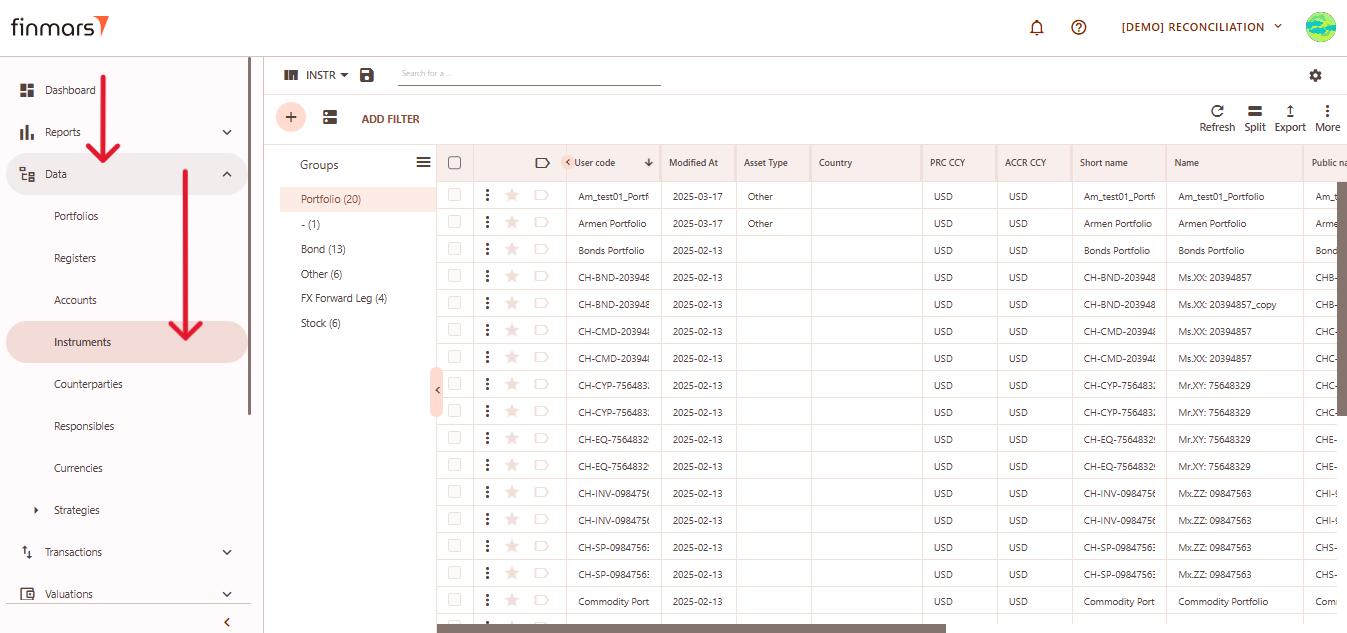
- Open the “Data” section in the left-hand side menu. Select the “Instruments” entity from the list under Data.

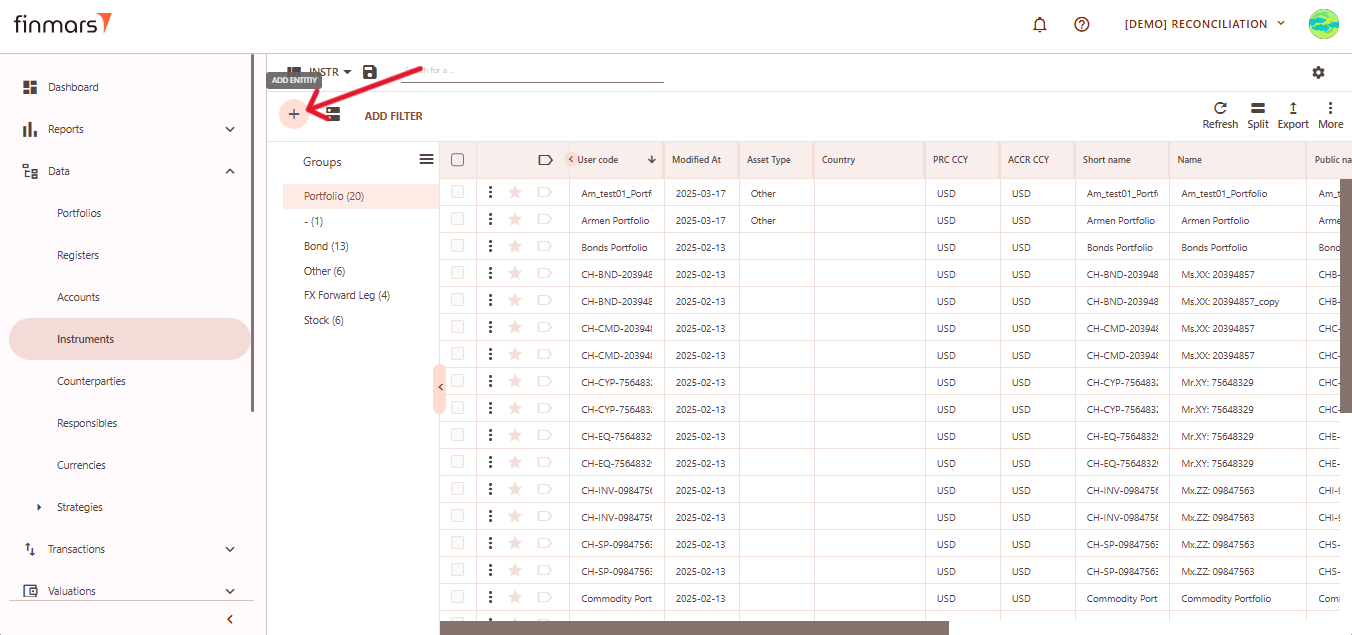
- Click the “+ Add” button located in the top-left corner of the portfolio list view. A dropdown menu will appear offering four methods to add a new instrument:
- Add Blank – manual entry with a fully blank template.
- Add Typical – pre-filled template with commonly used default values.
- Import from File – bulk import instruments using a file.
- Get from Provider – retrieve instrument data from a market data provider.
Option 1: Add Blank
This opens a completely blank form where you can manually input all instrument details.
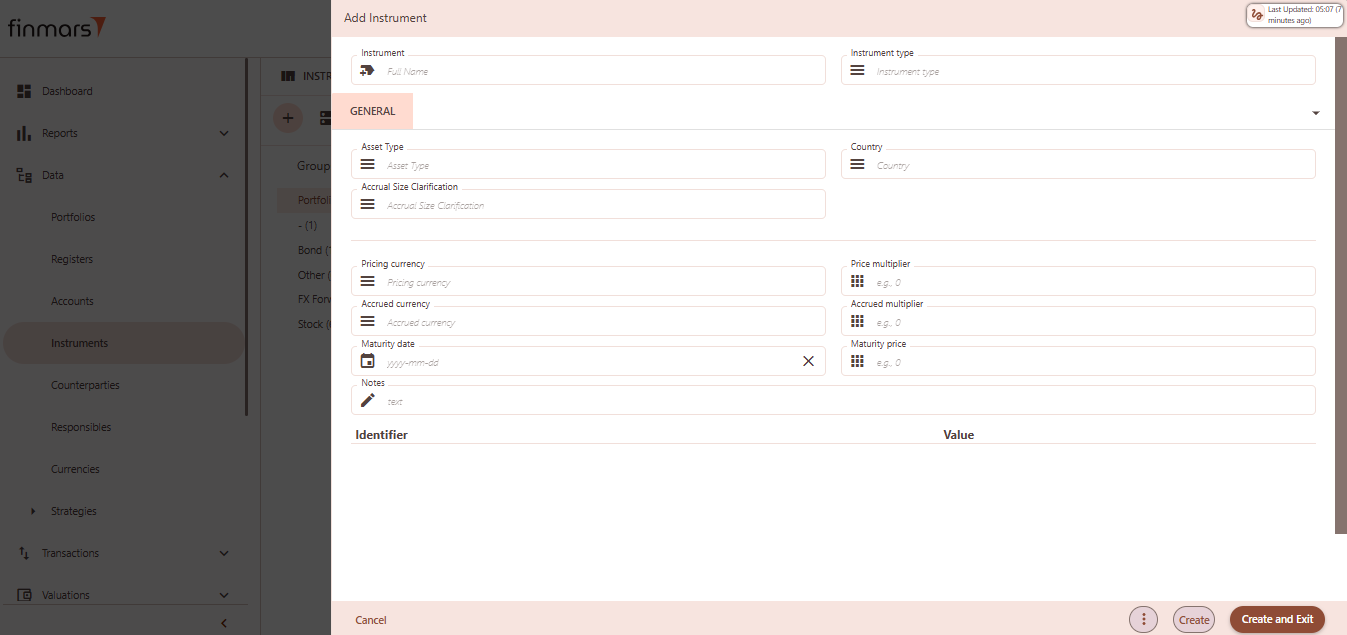
Fill out the following fields as needed:
- Instrument – full name or unique identifier (required).
- Instrument type – defines the kind of instrument (e.g., Bond, Stock, FX Forward, etc.).
- Asset Type – specifies the financial asset classification (e.g., Equity, Fixed Income).
- Country – country of issuance of the instrument.
- Accrual Size Clarification – optional explanation or note for accrual calculation basis.
- Pricing currency – the currency in which the instrument's market price is quoted.
- Accrued currency – the currency in which interest or other accruals are calculated and reported.
- Price multiplier – multiplier applied to the quoted price to calculate notional or total value (e.g., 100 if price is per 100 units).
- Accrued multiplier – multiplier used to adjust the accrual value, typically to scale interest or dividend values appropriately.
- Maturity date – the date when the instrument is due to mature and be settled (e.g., for bonds or term deposits).
- Maturity price – the expected price or value at maturity, often used in valuation or final settlement (if applicable).
- Notes – any relevant internal comments or additional metadata for this instrument.
- Identifiers – optional key-value fields such as ISIN, CUSIP, internal codes, etc., used to uniquely identify the instrument.
Click “Create and Exit” to save and return to the list, or “Create” to save and continue editing.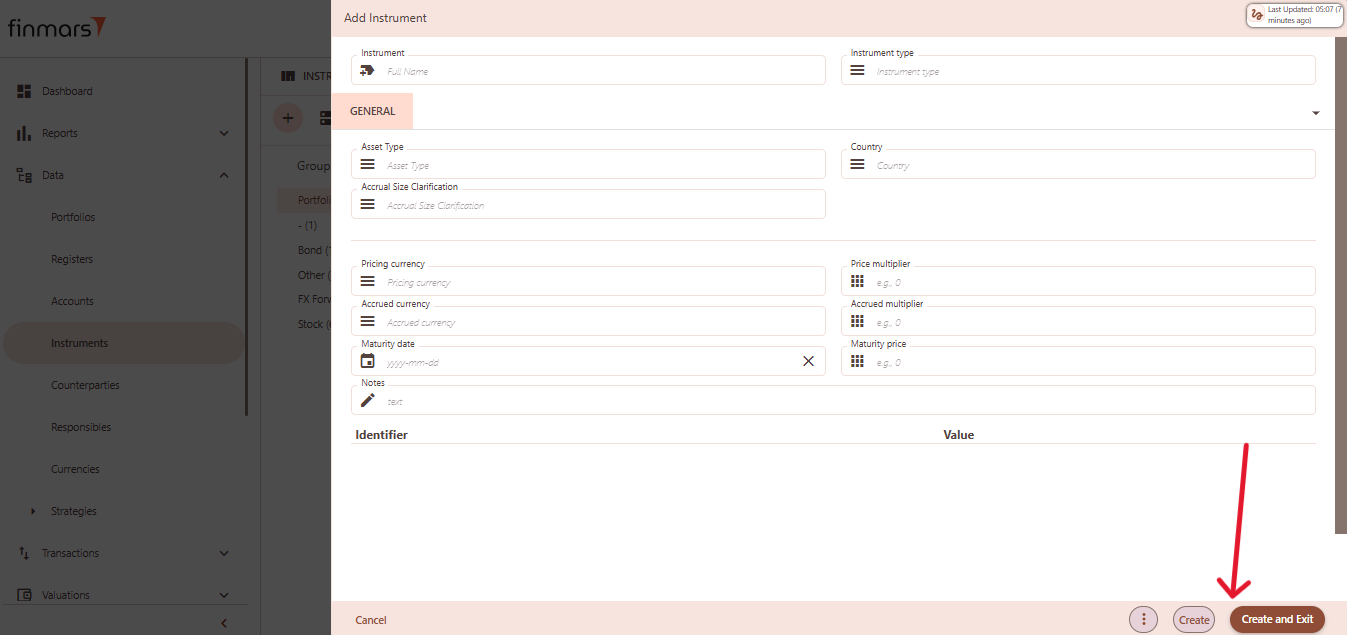
Option 2: Add Typical
This will load a pre-filled template with default values for typical instruments, which can be modified as needed. Use this option to speed up creation when working with commonly used instruments.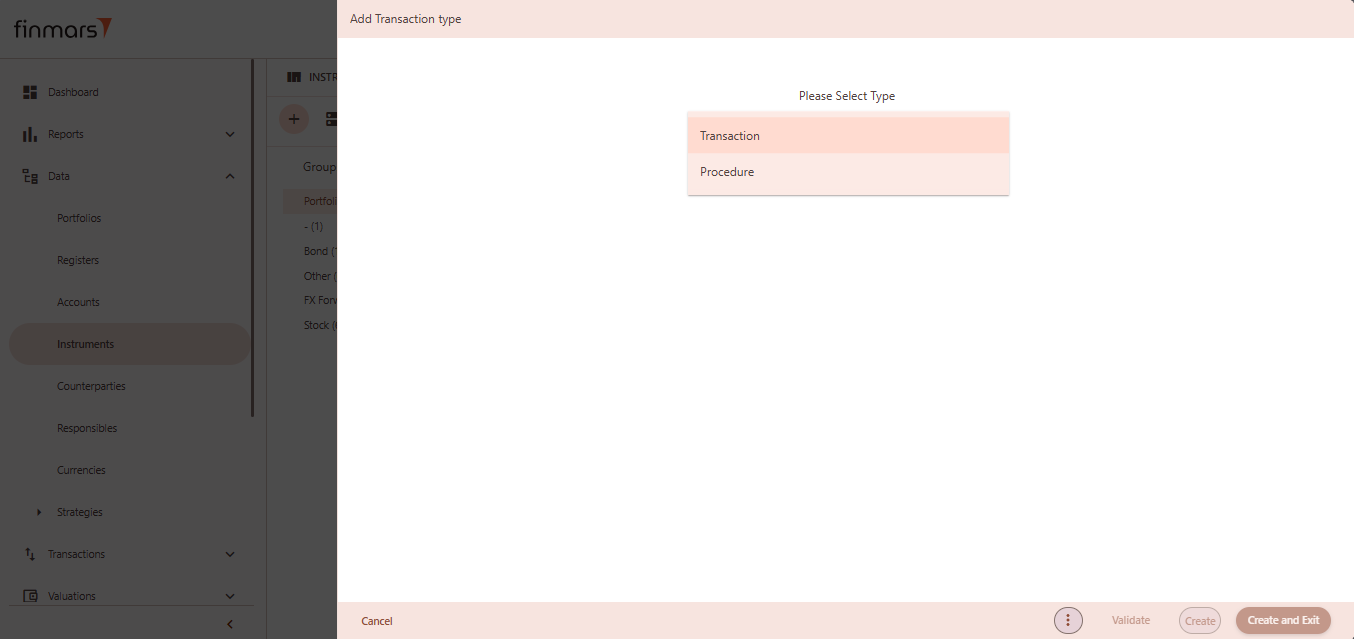
Click “Create and Exit” to save and return to the list, or “Create” to save and continue editing.
Option 3: Import from File
Use this option to import multiple instruments into the system from a prepared file (e.g., Excel or CSV).
- Name – provide a name for the import process).
- Import Scheme – select the appropriate scheme that matches the structure of your file. This determines how the system interprets and maps the data.
- Browse – click this button to choose a file from your computer. Supported formats depend on the selected import scheme (e.g., .xlsx, .csv).

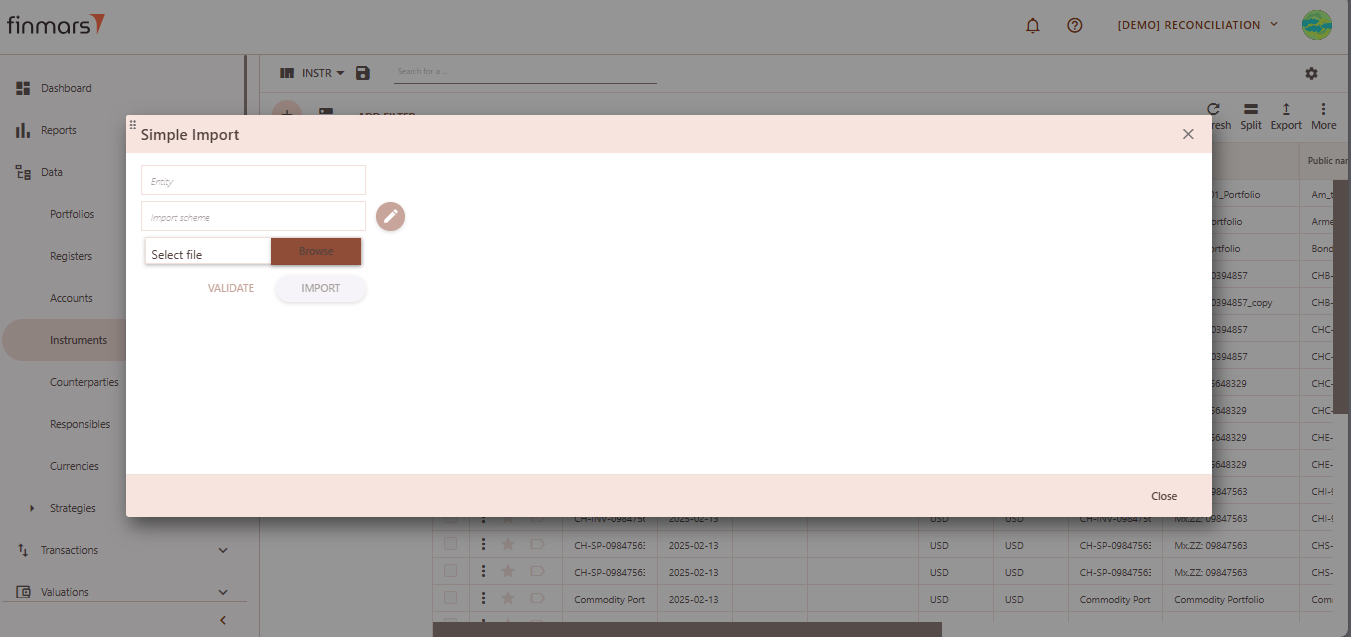
After selecting the file, click “Validate” to check the file for errors and confirm it matches the selected scheme. If the validation is successful, click “Import” to load the instruments into the database.
Option 4: Get from Provider
Automatically pull instrument data from a connected market data provider.
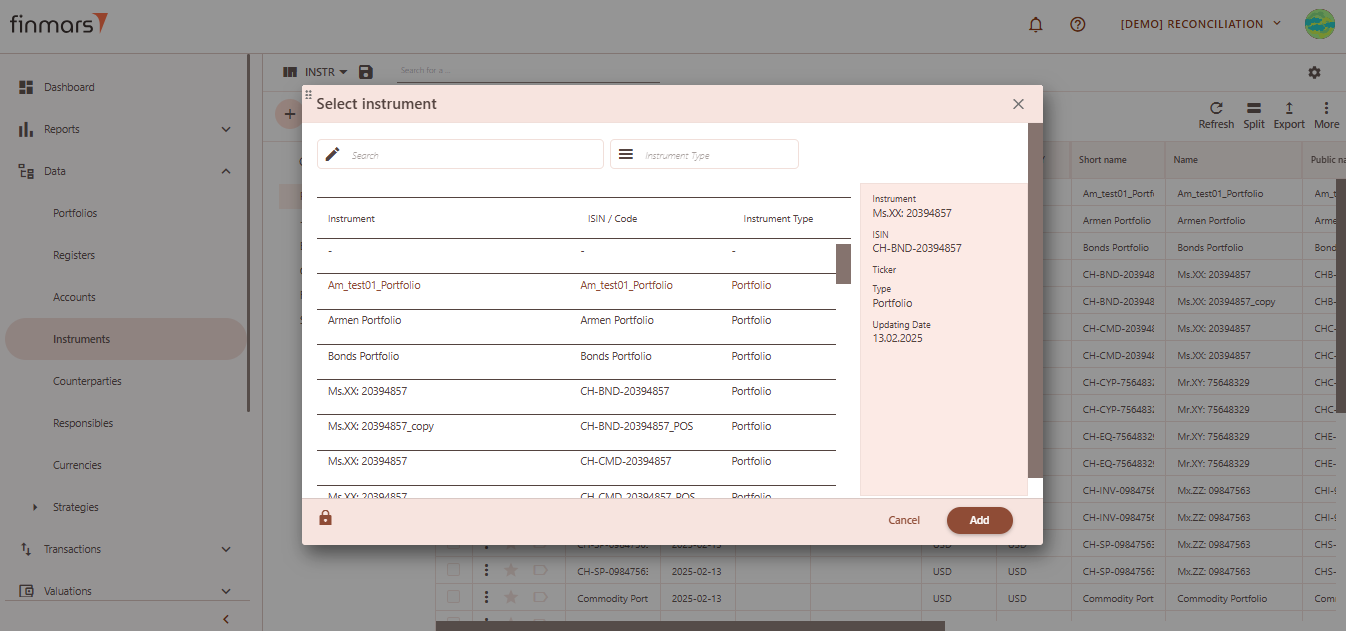
After selecting the desired instrument, click the “Add” button to load it into the system.
Counterparty
It's other party or entity involved in a transaction.
Counterparty
Table of Contents
Description
Financial meaning
A counterparty is any party — individual or organization — that participates in a financial transaction from the opposite side. In capital markets and investment platforms, counterparties include brokers, banks, issuers, custodians, and clients.
Platform abstraction
In the Finmars platform, Counterparty is a master data entity used to associate financial transactions, portfolios, and registers with external trading parties.
Counterparty also is used in:
- As a reference for identifying the external trading party involved in a transaction.
- position settlement, linked with portfolio to reflect obligations per counterparty.
- cash flow tracking, where it is associated with account to record inflows and outflows per counterparty;
Examples
| User code | Group | Short name | Name | Public name | Notes |
| CH-BND-20394857 | Am_test01_ | Am Test01 |
User code: unique identifier assigned to the counterparty. Used for internal reference and tracking.Group: a logical classification that allows grouping counterparties by type, role, or business relationship. Useful for filtering and reporting.-
Short name: abbreviated or condensed label for quick reference. -
Name: the full legal or registered name of the counterparty as used internally and in official documentation. -
Public name: market-facing or external name of the instrument, often matching how it appears on exchanges or public reports. -
Notes: free-text field for comments or special handling notes related to the counterparty.
Cookbook
CRUD
Operations within platform.
Use Cases
What for it's used.
F.A.Q.
Frequently asked questions.
API documentation
Link to API documentation.
How to Create a Counterparty Entity
Prerequisites
We assume you have all prerequisites you may need, including:
- If needed: the VPN is configured to access the Finmars resources
- If needed: access to the Virtual Machine to work with the sensitive information
- Must have: registered in Finmars in the needed region environment (self-registered or registered by Finmars)
- Must have: having permissions set to allow continue with the Action in the Guide
Creation of Counterparty Entity
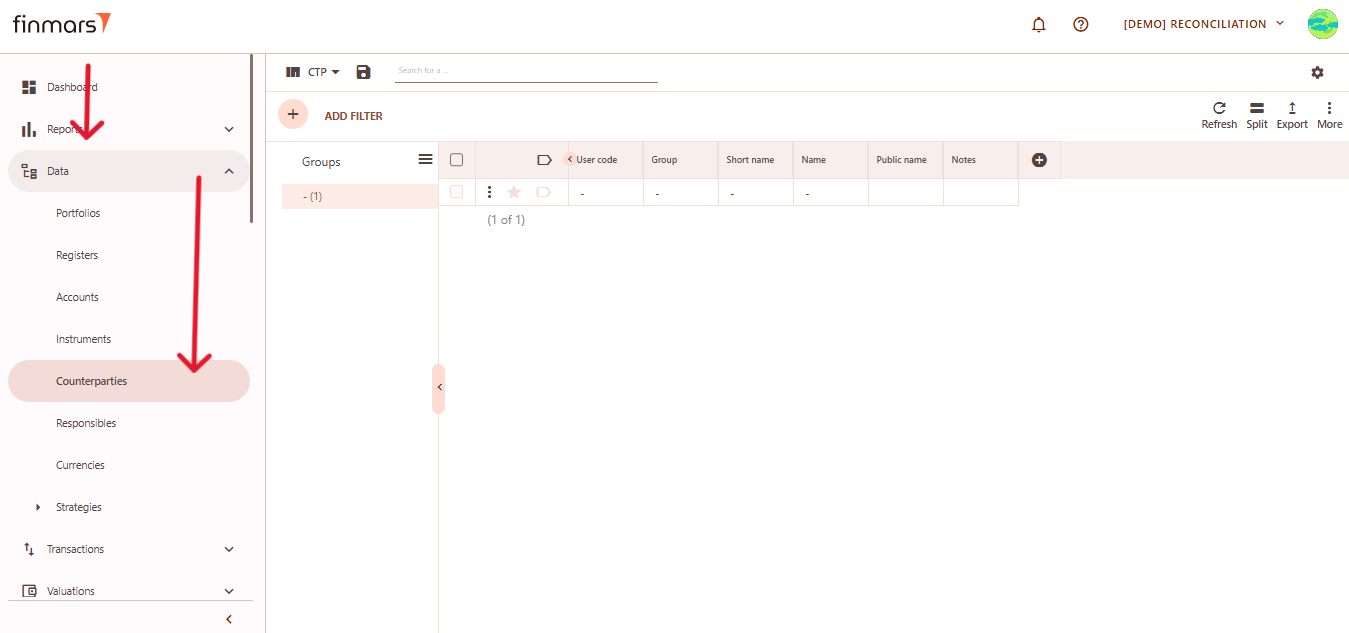
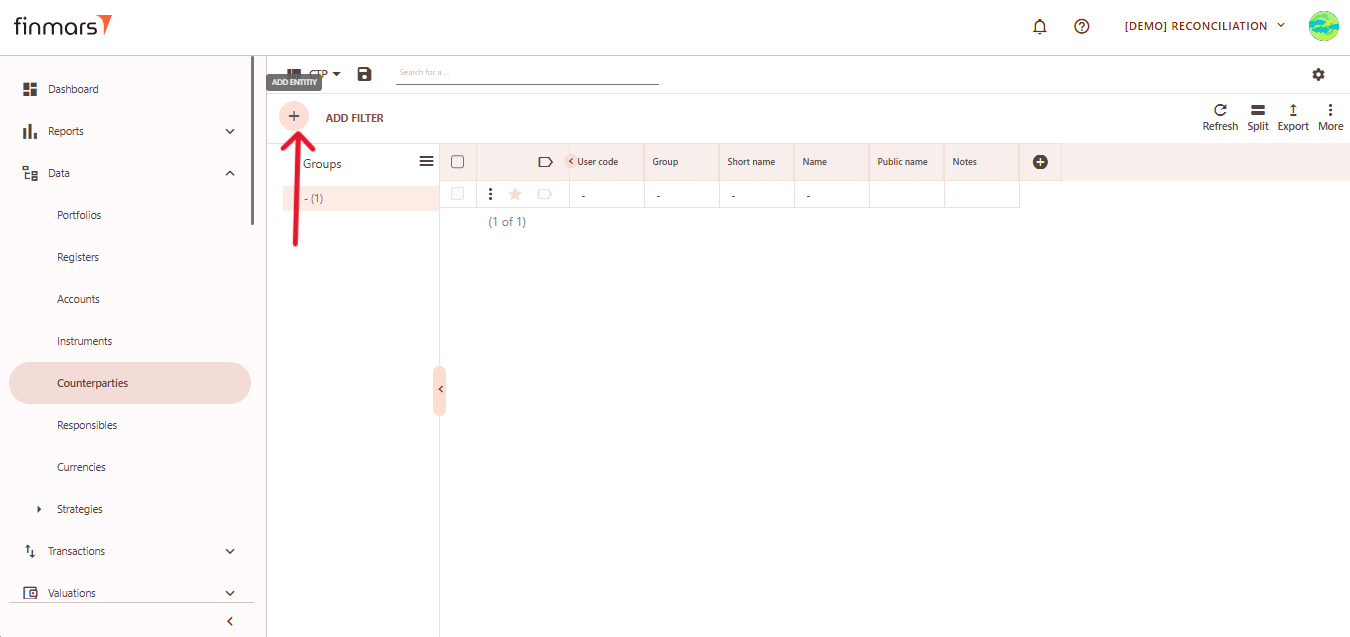
- Open the “Data” section in the left-hand side menu. Select the “Counterparties” entity from the list under Data.

- Click the “+ Add” button located in the top-left corner of the portfolio list view.

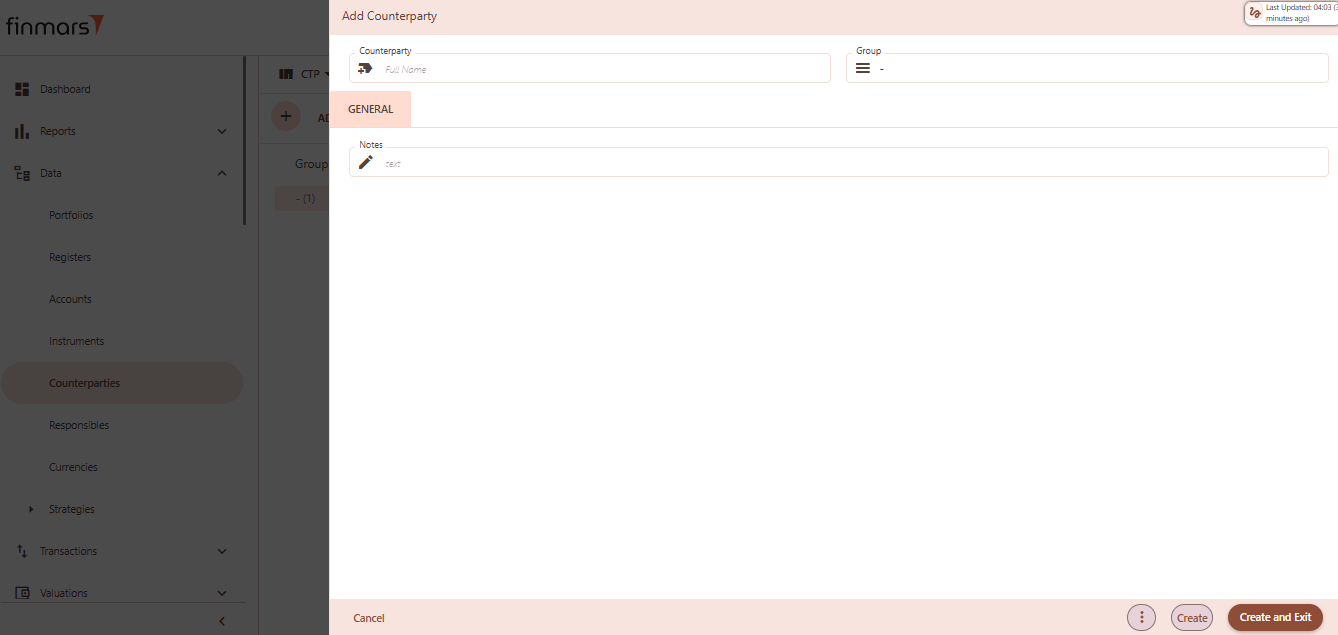
- This action opens the Add Counterparty form.

- Fill in the required fields in the creation panel:
- Counterparty – full name or identifier for the counterparty (required). This can be a bank, broker, client, or any financial entity you deal with.
- Group – used to organize counterparties into categories such as “Banks,” “Funds,” “Clients,” etc.
- Notes – any additional internal comments or metadata for the counterparty.

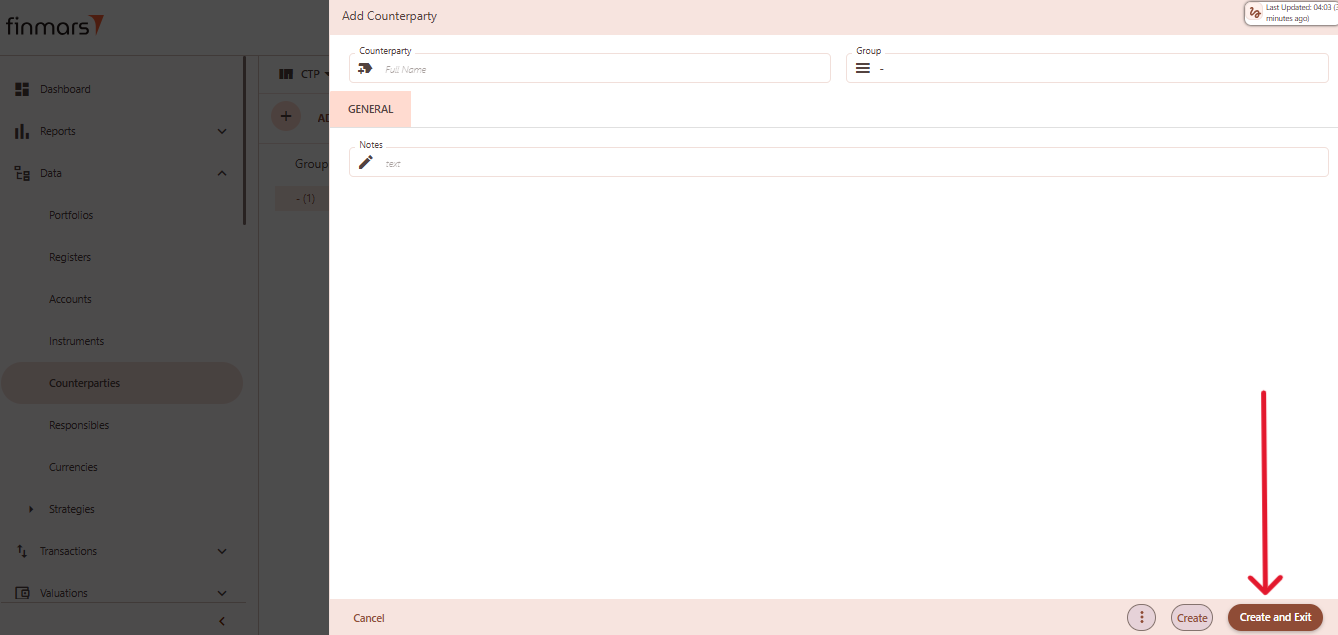
- Click “Create and Exit” to save the portfolio and return to the list view. Alternatively, use “Create” to save and continue editing.
Currency
An entity representing a standardized unit of exchange used in financial transactions and asset valuation.
Currency
Table of Contents
Description
Financial meaning
Currency is a system of money used in a particular country or region to facilitate trade, value goods/services, and store wealth. It is a medium of exchange, a unit of account, and a store of value—the three key functions of money in economics.
Platform abstraction
Currency in the Finmars platform is a reference entity that represents monetary units used across all financial operations, including transactions, valuations, and reporting. Currencies are linked to instruments, portfolios, and other modules where value tracking is required.
Currency also is used in:
-
instrument pricing and valuation with base currency association
-
cash positioning within portfolios as part of asset allocation
-
reconciliation by matching positions and transactions by currency
Examples
| User Code | Country | Short Name | Name | Public Name | Notes |
| EUR | Europe | EUR | Euro | EUR |
User code:internal system identifier for the currency.-
Country: the country or region that officially issues or predominantly uses the currency (e.g., "Switzerland" for CHF, "Europe" for EUR); "Worldwide" used for globally recognized assets like BTC, Silver (XAG), or Palladium (XPD). -
Short name: standard currency code (typically ISO 4217 format), used across the system in relations, selections, and dropdowns (e.g., "USD", "GBP", "BTC"). -
Name: full name of the currency (e.g., "US Dollar", "Pound Sterling", "Bitcoin") used in detailed views or documentation. -
Public name: display name for external users or limited-access users, often identical to the short name (e.g., "EUR", "HKD"); controls visibility in shared environments. -
Notes: optional field for internal comments, labels, or usage notes – can be left blank or filled with custom metadata (e.g., restrictions, FX rules, system flags).
Cookbook
CRUD
Operations within platform.
Use Cases
What for it's used.
F.A.Q.
Frequently asked questions.
API documentation
Link to API documentation.
How to Create a Currency entity
Prerequisites
We assume you have all prerequisites you may need, including:
- If needed: the VPN is configured to access the Finmars resources
- If needed: access to the Virtual Machine to work with the sensitive information
- Must have: registered in Finmars in the needed region environment (self-registered or registered by Finmars)
- Must have: having permissions set to allow continue with the Action in the Guide
Creation of Currency Entity
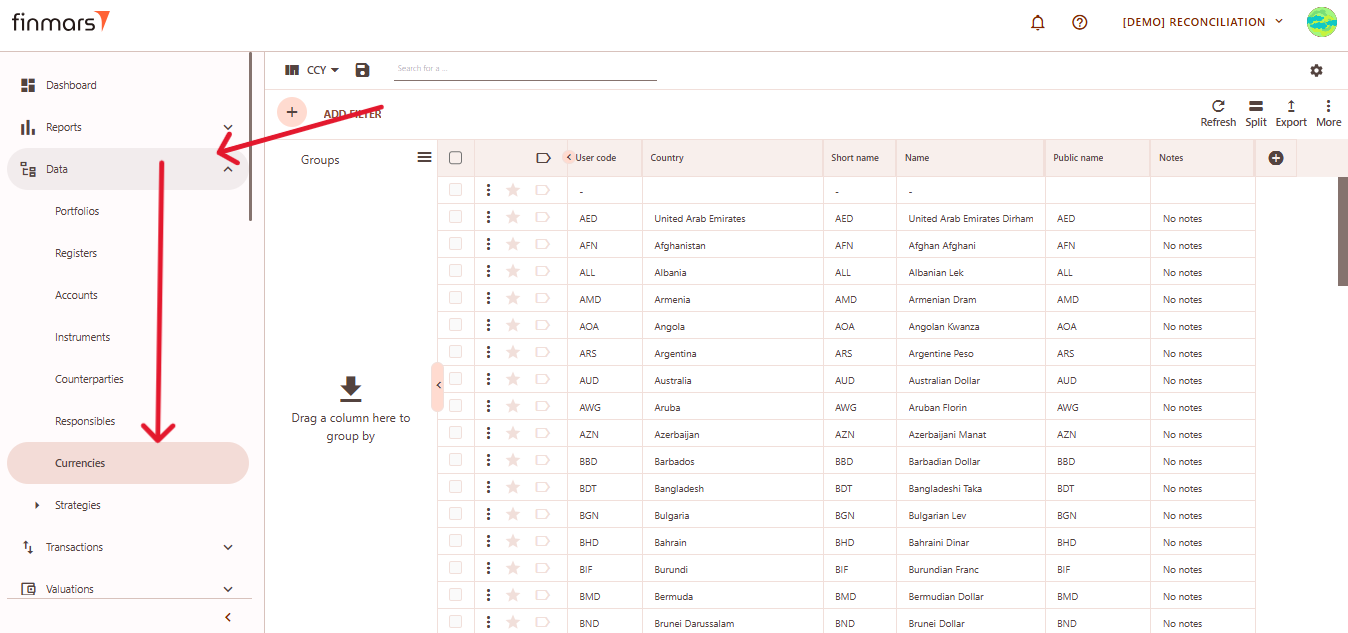
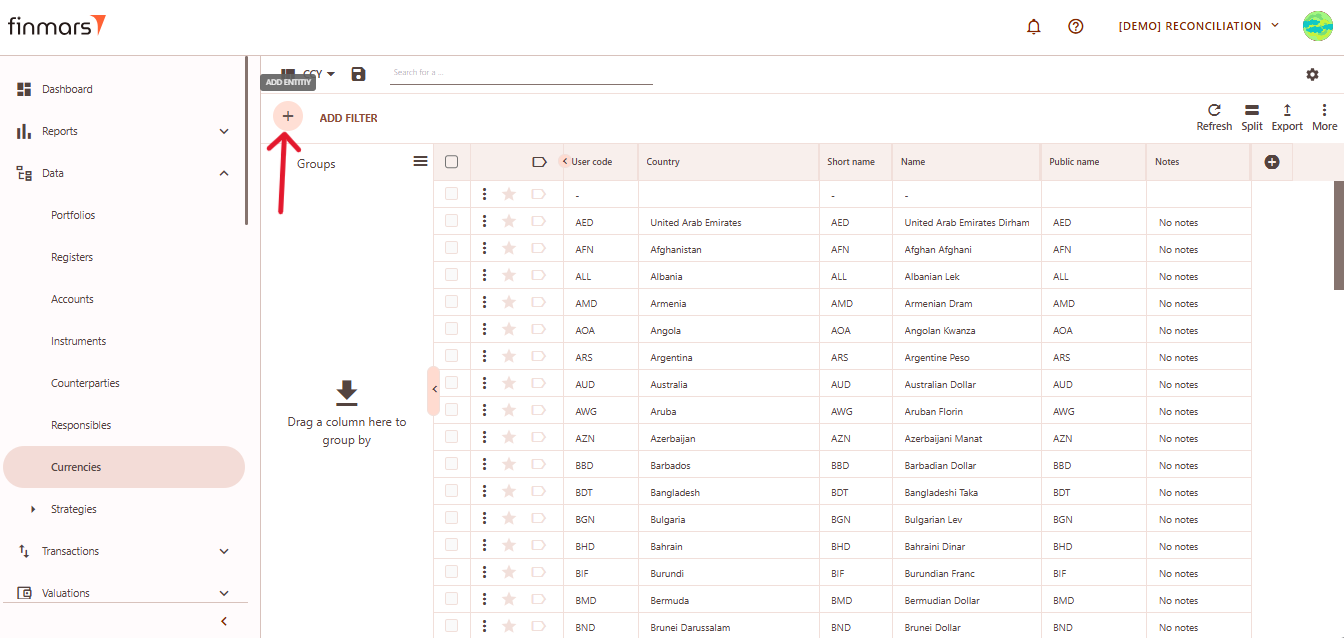
- Open the “Data” section in the left-hand side menu. Select the “Currency” entity from the list under Data.

- Click the “+ Add” button located in the top-left corner of the portfolio list view.

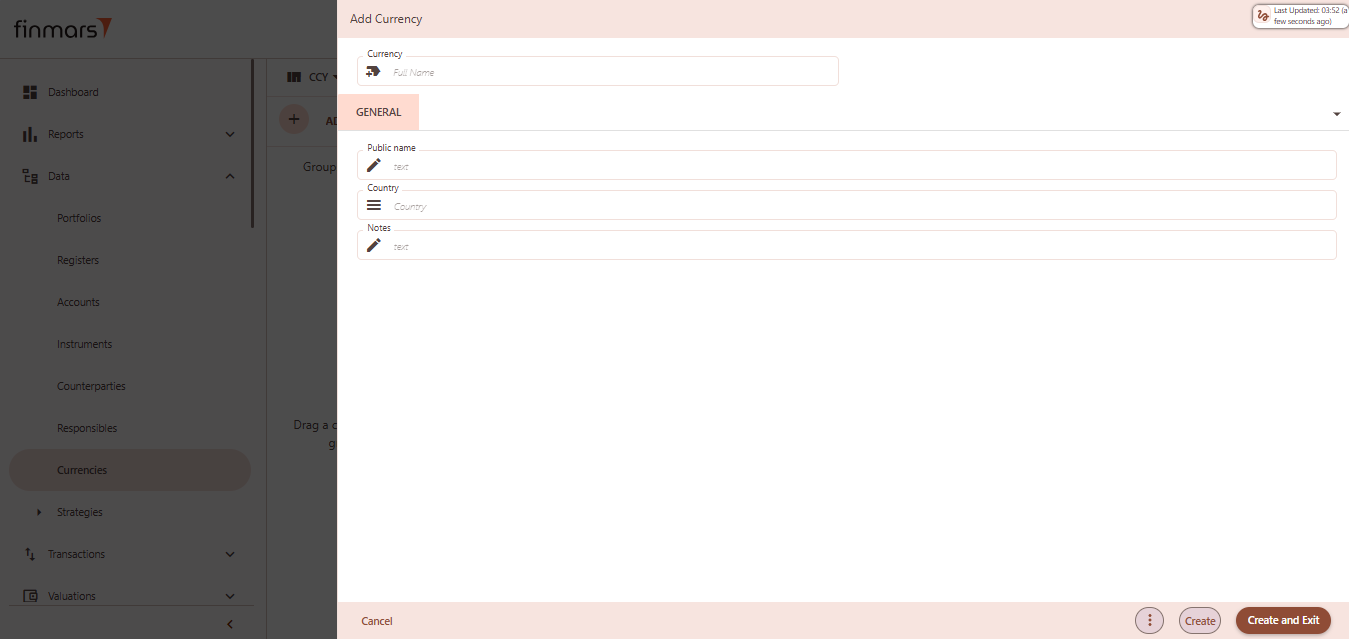
- This action opens the Add Portfolio register form.

- Fill in the required fields in the creation panel:
- Currency – enter the full name of the currency. This typically follows the ISO 4217 format (e.g., USD, EUR, CHF).
- Public name – optional field for external-facing labels, if different from internal naming.
- Country – select the issuing country for context/reference. This may be used in filters or reports.
- Notes – add any internal notes for clarification or documentation purposes.
- Click “Create and Exit” to save the portfolio and return to the list view. Alternatively, use “Create” to save and continue editing.
Transactions
Records of financial activities affecting assets or cash.
Transactions
Table of Contents
Description
Financial meaning
Transactions in an investment platform represent any economic activity that results in a change of ownership, value, or cash position of financial instruments or related accounts. They are the building blocks of portfolio management, accounting, performance analysis, and compliance.
Platform abstraction
Transaction in the Finmars platform is a fundamental entity that represents any economic action involving a financial instrument, cash, or both. Transactions serve as the source of truth for portfolio activity, capturing events such as purchases, sales, income, redemptions, and other movements.
Transaction also is used in:
-
valuation, serving as inputs for position lifecycle, pricing, and performance.
-
reconciliation, comparing expected vs. actual positions and cash events.
-
reporting, providing raw and derived data for trade activity, cash analysis, and compliance.
-
accounting, enabling P&L, fee, tax, and ledger mapping through transaction classification.
Examples
First part of table
| TXN ID | Date | Source | Date (Trade) | Description | Date (Value) | TXN TYPE | CCY STL | Cash Consideration | Instrument |
| 20240125001.0 | 2025-02-13 | std.file | 2022-12-03 | Buy : Instrument: TREASURY BILL 0.00% | 2022-12-05 | Buy | USD | -1'654'021.90 | TREASURY BILL 0.00% 25-Jan-2024 |
Second part of table
| ISIN | Position (Adjusted) | Account (Cash) | Portfolio | Status (Reversed) | Status (Cancelled) | Reference Transaction ID | Allocation (PL) | Linked Instruments | Notes |
| USP | -303.90 | US4508411200000 | CH-BND-203948 | 0.0 | - | None | TREASURY BILL 0.00% 25-Jan-2024 | TREASURY BILL 0.00% 25-Jan-2024 |
-
TXN ID (Transaction ID): unique transaction ID within the platform. -
Date: date when the transaction was recorded in the system. -
Source: origin of the transaction data (e.g.,std_filefor standard imported file). -
Date (Trade): actual trade date when the transaction was executed. -
Date (Value): value date when the transaction becomes effective in financial terms. -
Description: freeform description of the transaction (typically includes action and instrument). -
TXN TYPE (Transaction type): transaction type (e.g., Buy, Sell, Coupon, Deposit). -
CCY STL: settlement currency used in the transaction. -
Cash Consideration: monetary amount of the transaction (net cash inflow/outflow). -
Instrument: name of the financial instrument involved in the transaction. -
ISIN: international identifier for the security (International Securities Identification Number). -
Position (Adjusted): net change in instrument quantity after transaction adjustment. -
Account (Cash): cash account associated with the transaction's payment or settlement. -
Portfolio: unique portfolio identifier that the transaction is associated with. -
Status (Reversed): flag indicating whether the transaction has been reversed. -
Status (Cancelled): flag indicating whether the transaction has been cancelled. -
Reference Transaction ID: ID of a related or referenced transaction. -
Allocation (PL): categorization of the transaction for performance or reporting purposes. -
Linked Instrument: related instrument (if transaction is part of a structured deal or derivative). -
Notes: user-defined comments or notes about the transaction.
Cookbook
CRUD
Operations within platform.
Use Cases
What for it's used.
F.A.Q.
Frequently asked questions.
API documentation
Link to API documentation.
Pricing Policy
It's a set of prices for products or services, defining how they are structured and applied.
Pricing Policy
Table of Contents
Description
Financial meaning
Pricing Policy defines the methodology or rule set used to determine financial values, such as Fx Rates or instrument prices on a specific date. It ensures consistent and transparent valuation practices across portfolios and transactions.
Platform abstraction
In the Finmars platform, a Pricing Policy is a system-defined entity that determines how prices and FX rates are sourced, calculated, and maintained. It directly influences data handling in valuations, reporting, and reconciliation.
Pricing Policy types:
-
Master – Combines all other Pricing Policies in the Workspace. The compilation follows a configured order, and the Master Pricing Policy is mandatory for use in reports to ensure consistent aggregation logic.
-
Rolled Master – Designed to include rolled prices and FX rates. The rolling method is defined by a dedicated rolling pricing module, allowing dynamic calculation based on available data.
-
Standard – Applied when prices or rates are manually created or imported. It provides a straightforward structure for static or user-defined pricing.
Pricing Policy also is used in:
- valuation workflows, where it governs how instrument prices and FX rates are sourced and applied based on policy type.
- report generation, with the Master Pricing Policy ensuring consistent aggregation across portfolios and transactions.
- data imports and manual adjustments, where the Standard policy is used to apply static or user-defined prices and FX rates.
- rolling calculations, where the Rolled Master policy enables dynamic valuation using time-series data through a rolling pricing module.
- reconciliation processes, supporting comparison of expected vs. actual prices and rates.
- workspace configuration, where different Pricing Policies are assigned to ensure each portfolio or transaction type follows the appropriate pricing logic.
Examples
| Name | Unique Code | Notes |
| Standard | com.finmars.standard-pricing:standard | Pricing Policy for Manual Import and Manually Created. |
-
Name: full descriptive name of the pricing policy. -
Unique Code: system-wide unique identifier for the pricing policy ( (e.g. com.finmars.standard-pricing:standard ). -
Notes: optional free-text field for internal documentation, detailing assumptions, special rules, or customizations related to the pricing logic
Cookbook
CRUD
Operations within platform.
Use Cases
What for it's used.
F.A.Q.
Frequently asked questions.
API documentation
Link to API documentation.
How to Create a Pricing Policy entity
Prerequisites
We assume you have all prerequisites you may need, including:
- If needed: the VPN is configured to access the Finmars resources
- If needed: access to the Virtual Machine to work with the sensitive information
- Must have: registered in Finmars in the needed region environment (self-registered or registered by Finmars)
- Must have: having permissions set to allow continue with the Action in the Guide
Creation of Pricing Policy Entity
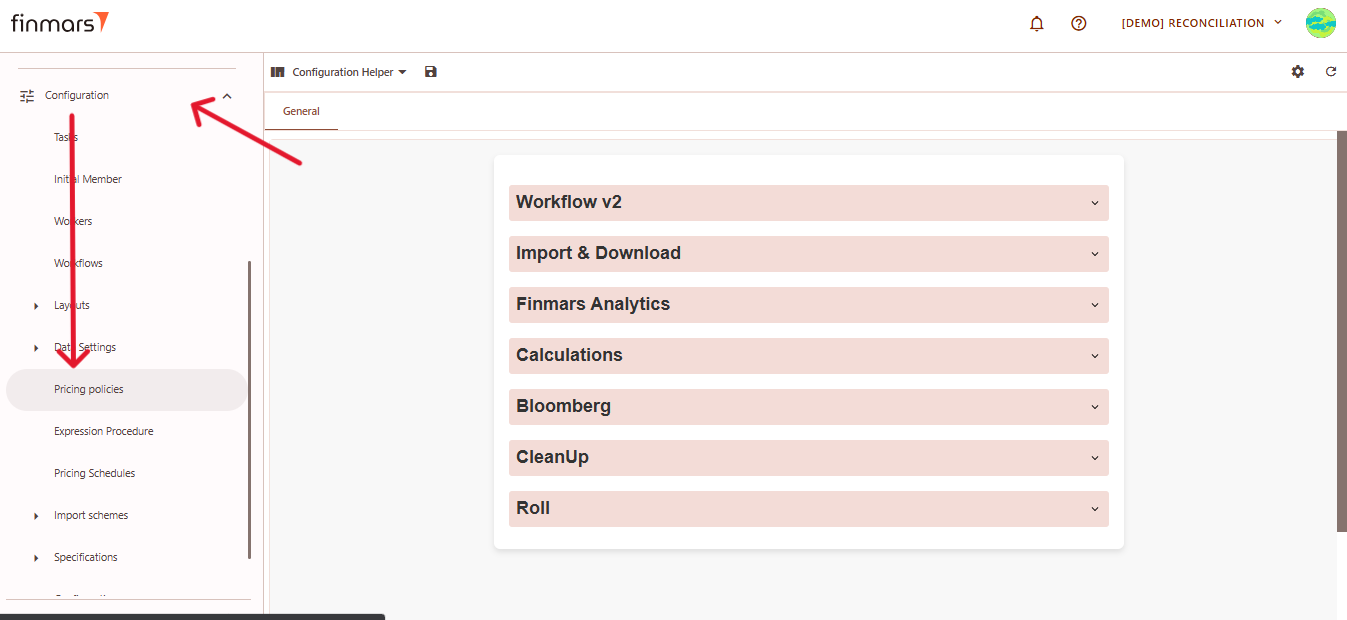
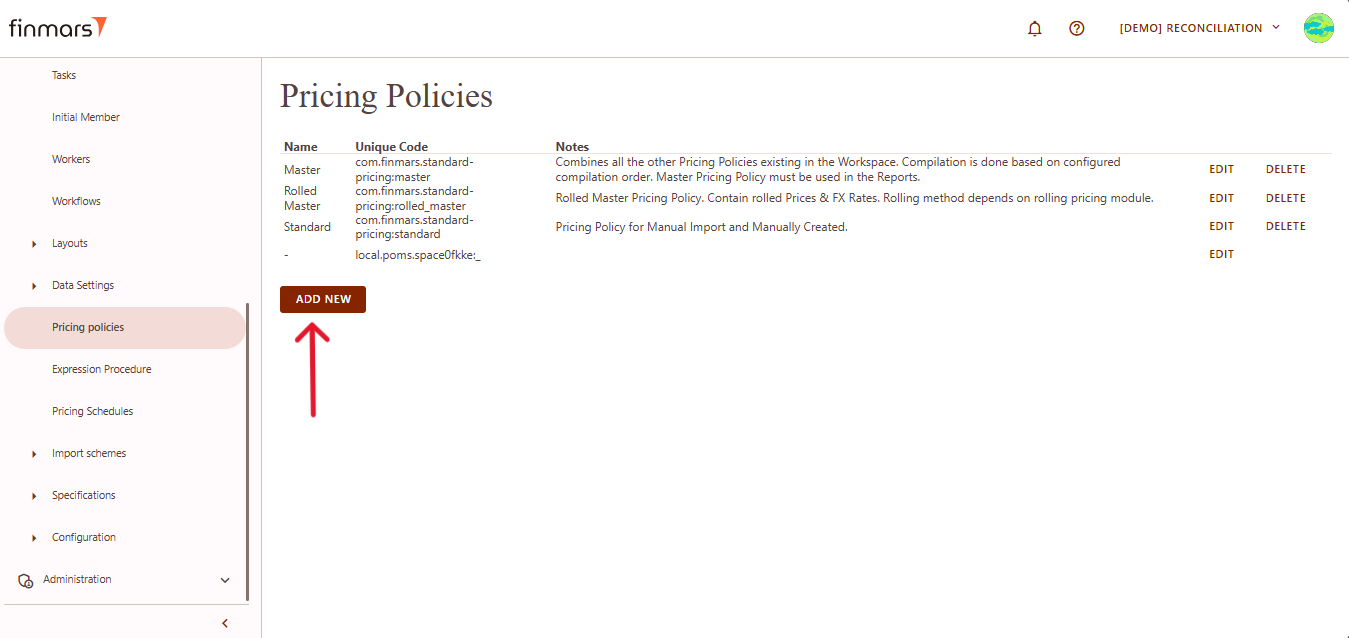
- Open the “Configuration” section in the left-hand side menu. Select the “Pricing Policies” entity.

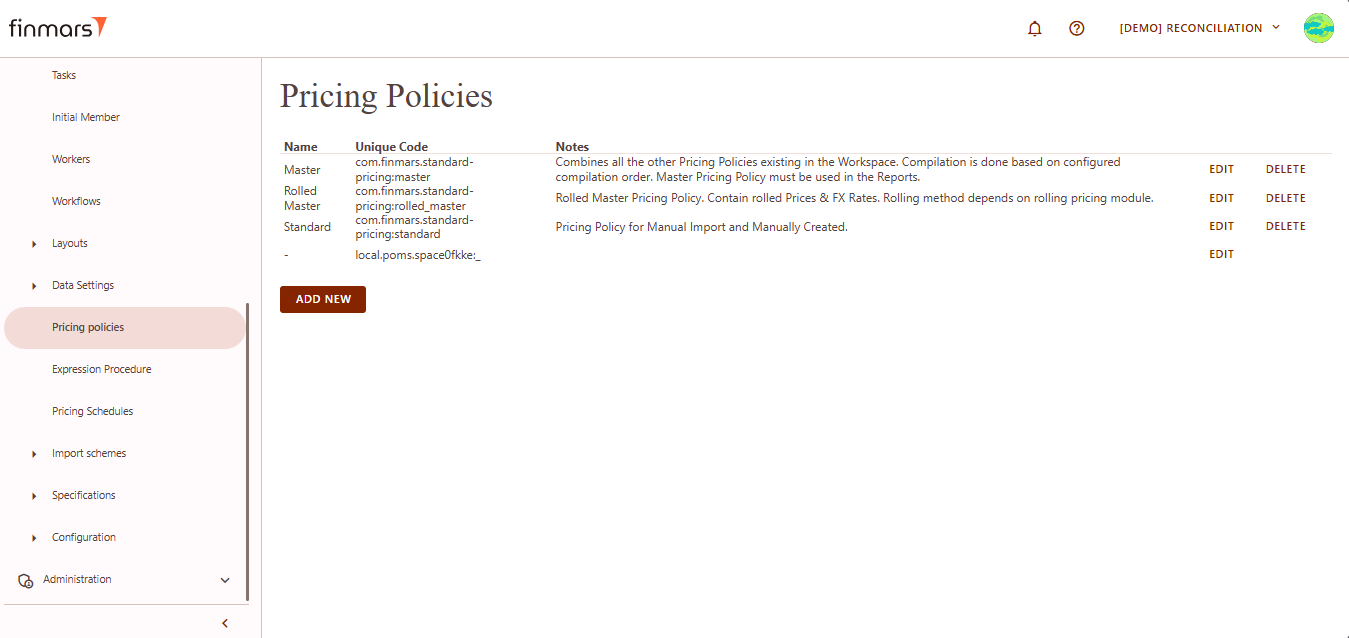
- You will be directed to a page displaying a list of existing pricing policies.

- Scroll down to the bottom of the list and click the Add new button.

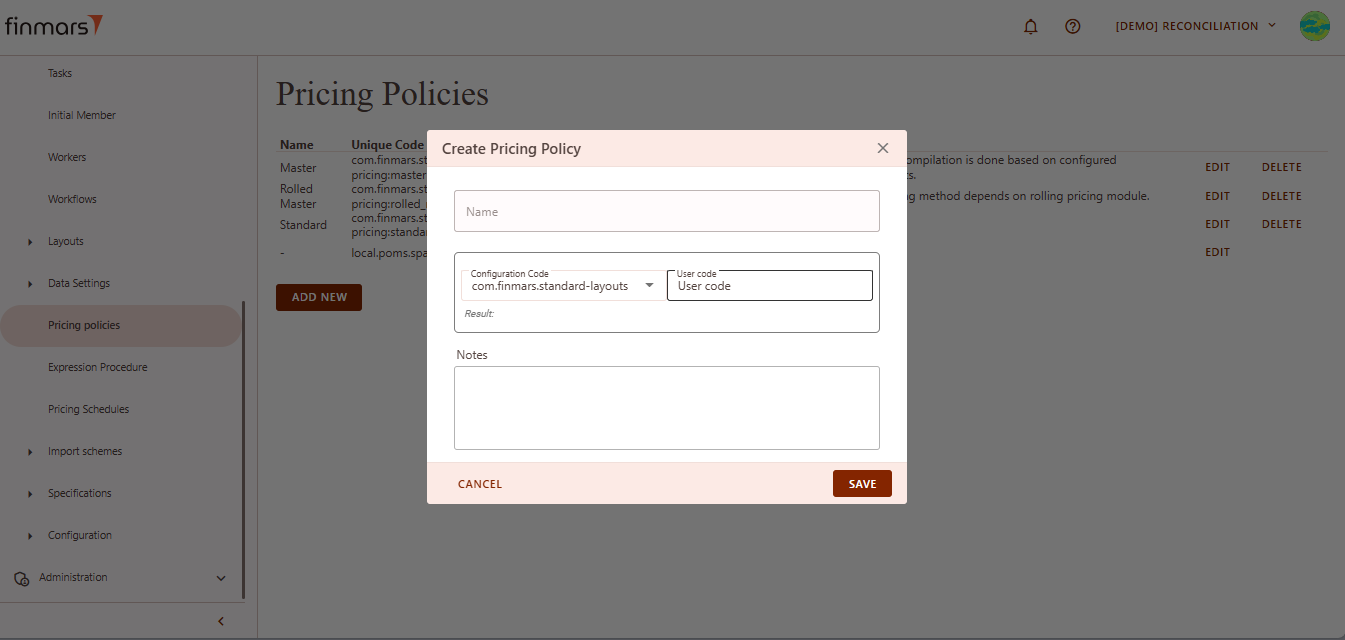
- This action opens the Create Pricing Policy form.

- Fill in the following fields:
- Name – the name of the pricing policy.
- Configuration Code – select from the dropdown menu.
- User Code – enter a user code using only lowercase letters (
a–z), numbers (0–9), and special characters: underscore (_) or dash (-). - Notes – any additional comments or context.
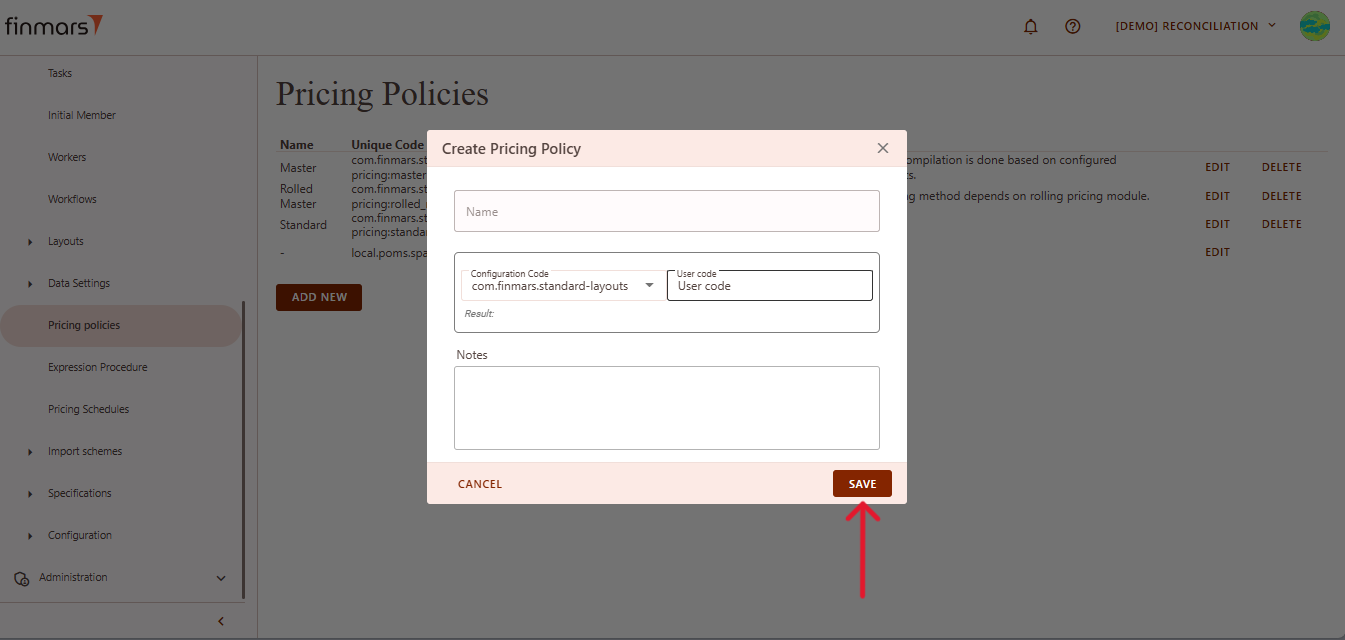
- Once all required data is filled out, click Save to create the new pricing policy.

Bundle
Group of related portfolios or registers for analysis
Portfolio Bundle
Table of Contents
Description
Financial meaning
A portfolio bundle is a logical grouping of multiple portfolios that are managed, monitored, or processed together. It allows combining different portfolios under a single structure for operational efficiency, consolidated reporting, or grouped reconciliation.
Platform abstraction
In the Finmars platform, a Portfolio Bundle serves as an entity that links several portfolios into a single operational unit.
Portfolio Bundles are used in:
-
Grouping multiple portfolios together to allow consolidated views for valuation, reporting, and performance analysis.
- Enabling aggregated reconciliation workflows by combining cash and position data across bundled portfolios.
- Allowing batch operations and monitoring across multiple portfolios in operational workflows.
Examples
| Name | Unique Code | Notes |
| CH-BND-20394857 | CH-BND-20394857 |
Name: Display name of the portfolio or bundle, used for identification in the interface.Unique Code: System-generated unique identifier for the portfolio or bundle, used for internal references and linking.Notes: Additional comments or descriptions to provide operational or contextual information.
Cookbook
CRUD
Operations within platform.
Use Cases
What for it's used.
F.A.Q.
Frequently asked questions.
API documentation
Link to API documentation.
How to Create a Portfolio Bundle Entity
Prerequisites
We assume you have all prerequisites you may need, including:
- If needed: the VPN is configured to access the Finmars resources
- If needed: access to the Virtual Machine to work with the sensitive information
- Must have: registered in Finmars in the needed region environment (self-registered or registered by Finmars)
- Must have: having permissions set to allow continue with the Action in the Guide
Creation of Counterparty Entity
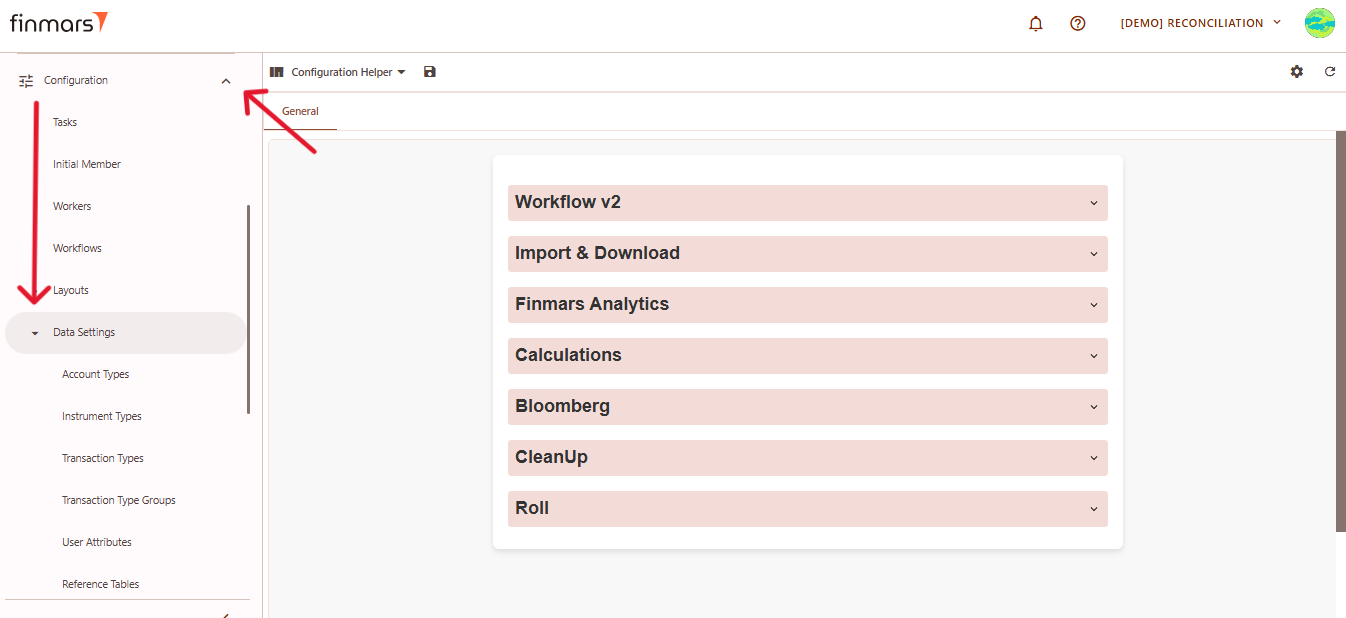
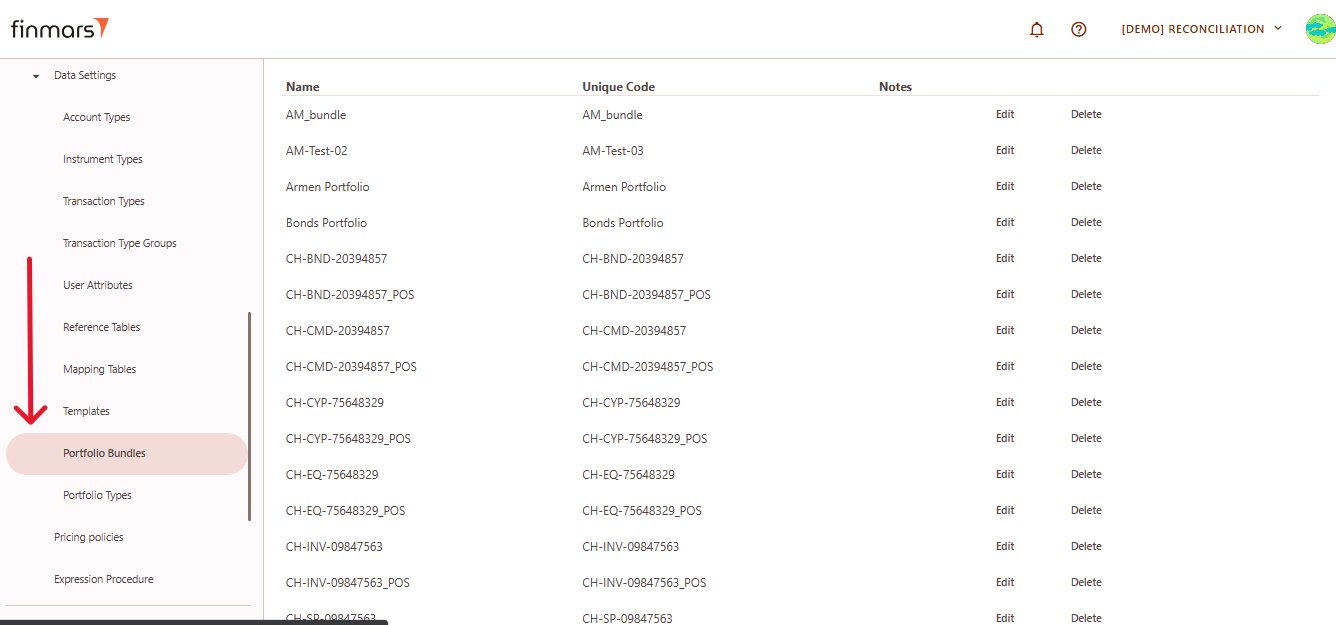
- Navigate to the “Configuration” section from the left-side menu. Under Configuration, select the “Data Settings” subsection.

- In the list of available options, click on “Portfolio Bundle.”

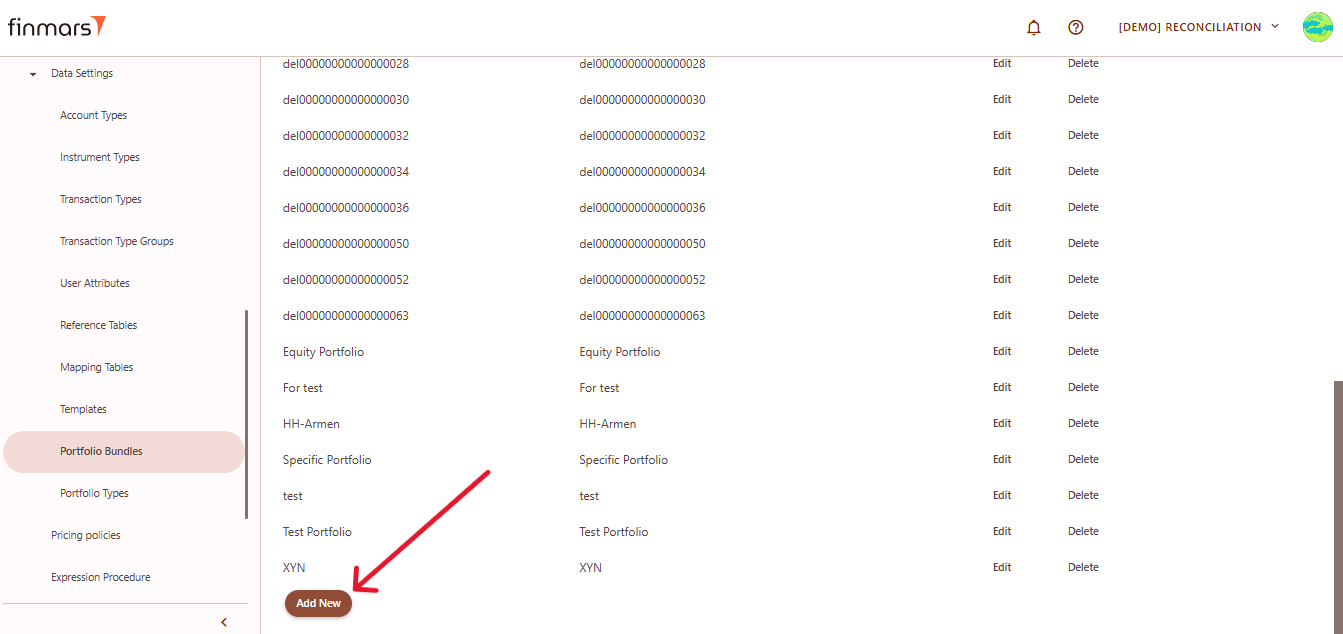
- You will see a list of existing bundles. Scroll down to the bottom of the page and click the “Add New” button.

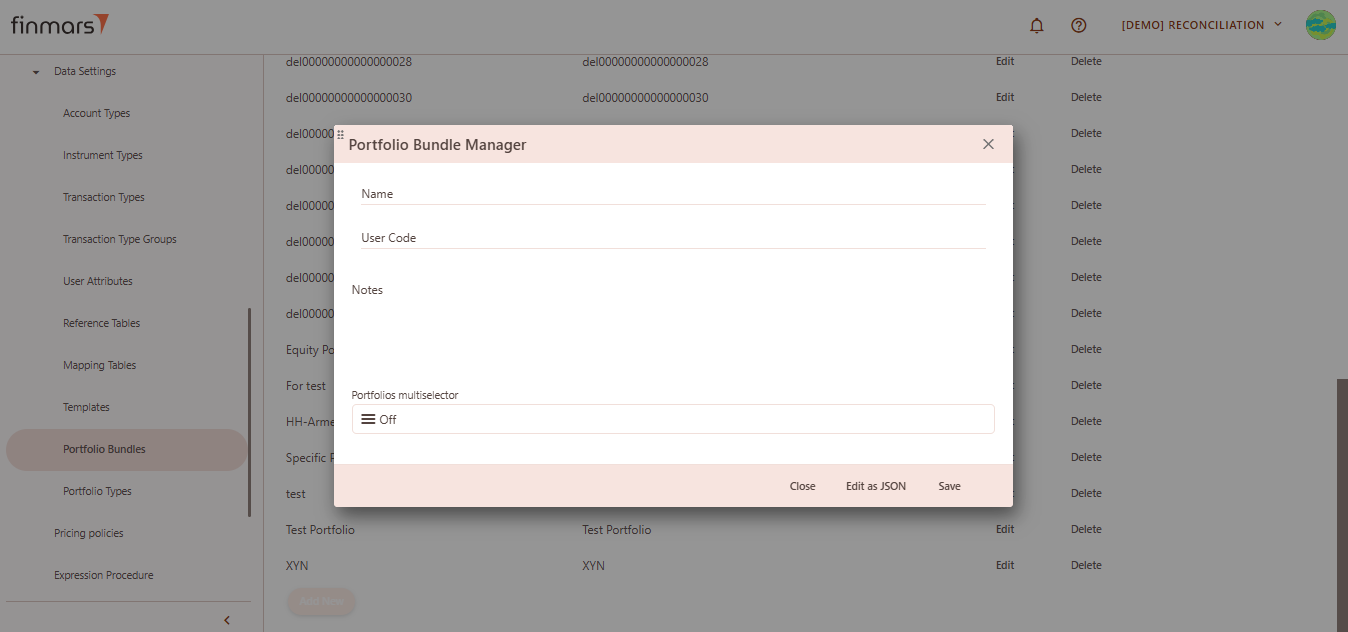
- This opens the Portfolio Bundle creation page.

- Fill in the following fields:
- Name – provide a name for the new bundle.
- User Code – enter a unique identifier or code for internal reference.
- Notes – optional field for internal comments or description.
- Portfolios Multiselector – use the multiselector to choose one or more portfolios to include in the bundle.
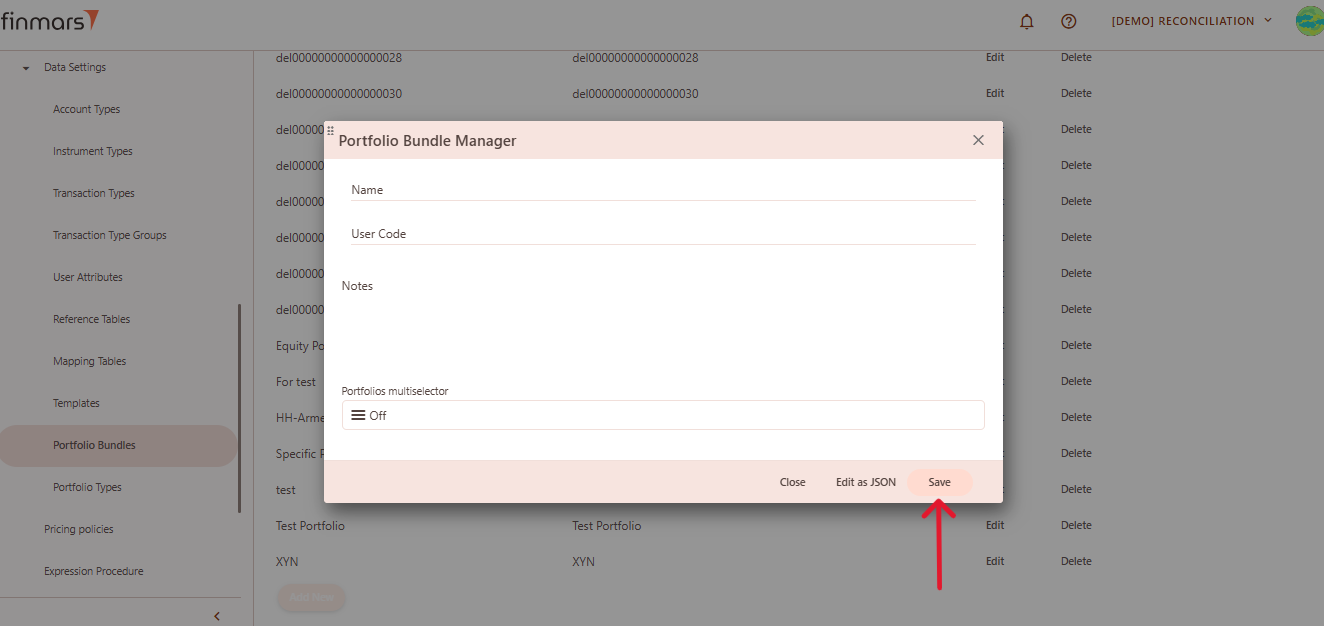
- Once all required information is entered, save the bundle using "Save" button.

Price
Market or calculated value of an instrument at a given time.
Price
Table of Contents
Description
Financial meaning
Prices represent the market value or quoted price of a financial instrument at a specific point in time. They are essential for valuation, performance measurement, and accurate reporting across financial systems.
Platform abstraction
In the Finmars platform, a Price is a separate entity linked to an Instrument and dated to a specific moment. Each price entry stores the principal value, accrued interest component (for debt instruments), a pricing policy identifier (e.g., Standard, Custom), and valuation-related fields like Yield to Maturity (YTM) and Duration.
Prices are used in:
-
Providing market or modeled values for instruments held in portfolios.
-
Defining end-of-day valuations and snapshots for asset positions.
-
Supporting duration, yield, and factor-based sensitivity analyses.
-
Assisting in generating fair value reports, P&L, and balance sheet entries.
Examples
| Instrument | Date | Pricing Policy | Principal Price | Accrued Price | Factor | YTM | Modified Duration | Is Temporary Price |
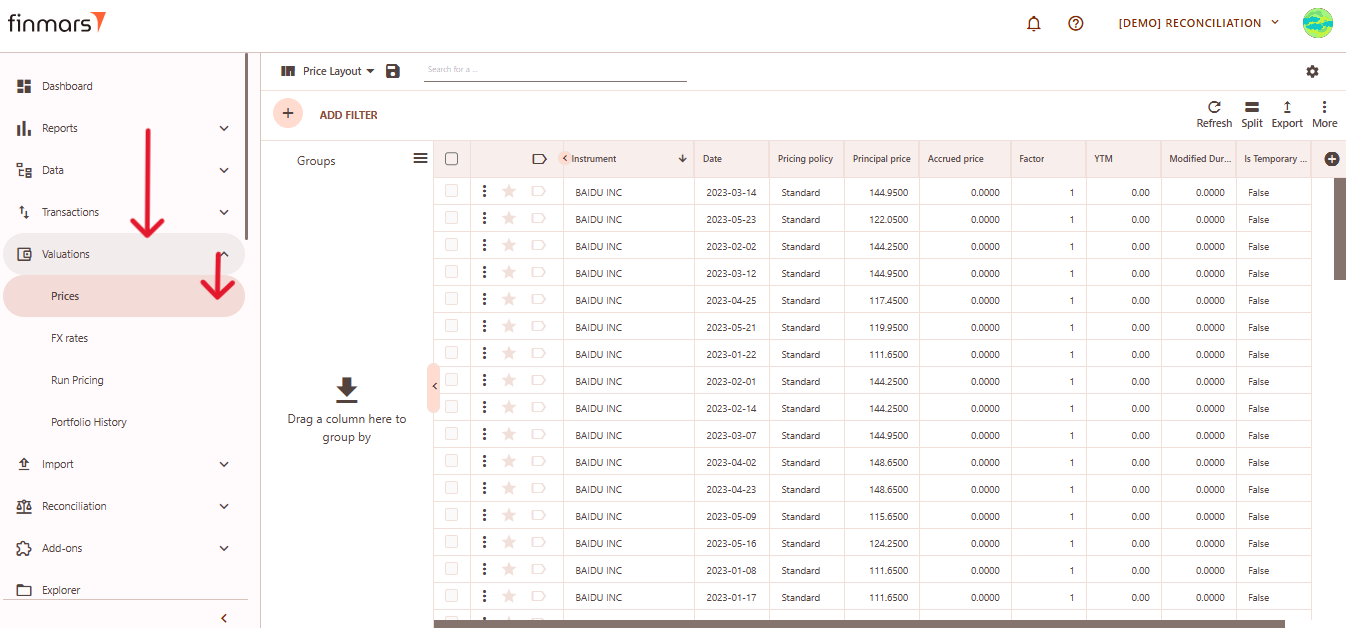
| BAIDU INC | 2023-03-14 | Standard | 144.9500 | 0.000 | 1 | 0.00 | 0.000 | False |
-
Instrument: name or identifier of the financial instrument. -
Date: the date for which the price is recorded. -
Pricing Policy: method used for price calculation (e.g., Standard). -
Principal Price: main price of the instrument excluding accrued interest. -
Accrued Price: accumulated interest up to the pricing date. -
Factor: multiplier used to adjust the nominal or market value of the instrument. -
YTM: yield to maturity, representing the expected return if the instrument is held until maturity. -
Modified Duration: measure of the price sensitivity of the instrument to interest rate changes. -
Is Temporary Price: flag indicating if the price is temporary (TrueorFalse).
Cookbook
CRUD
Operations within platform.
Use Cases
What for it's used.
F.A.Q.
Frequently asked questions.
API documentation
Link to API documentation.
How to Create a Price Entity
Prerequisites
We assume you have all prerequisites you may need, including:
- If needed: the VPN is configured to access the Finmars resources
- If needed: access to the Virtual Machine to work with the sensitive information
- Must have: registered in Finmars in the needed region environment (self-registered or registered by Finmars)
- Must have: having permissions set to allow continue with the Action in the Guide
Creation of Price Entity
- Open the “Valuation” section in the left-hand side menu. Select the “Price” entity from the list under Valuation.

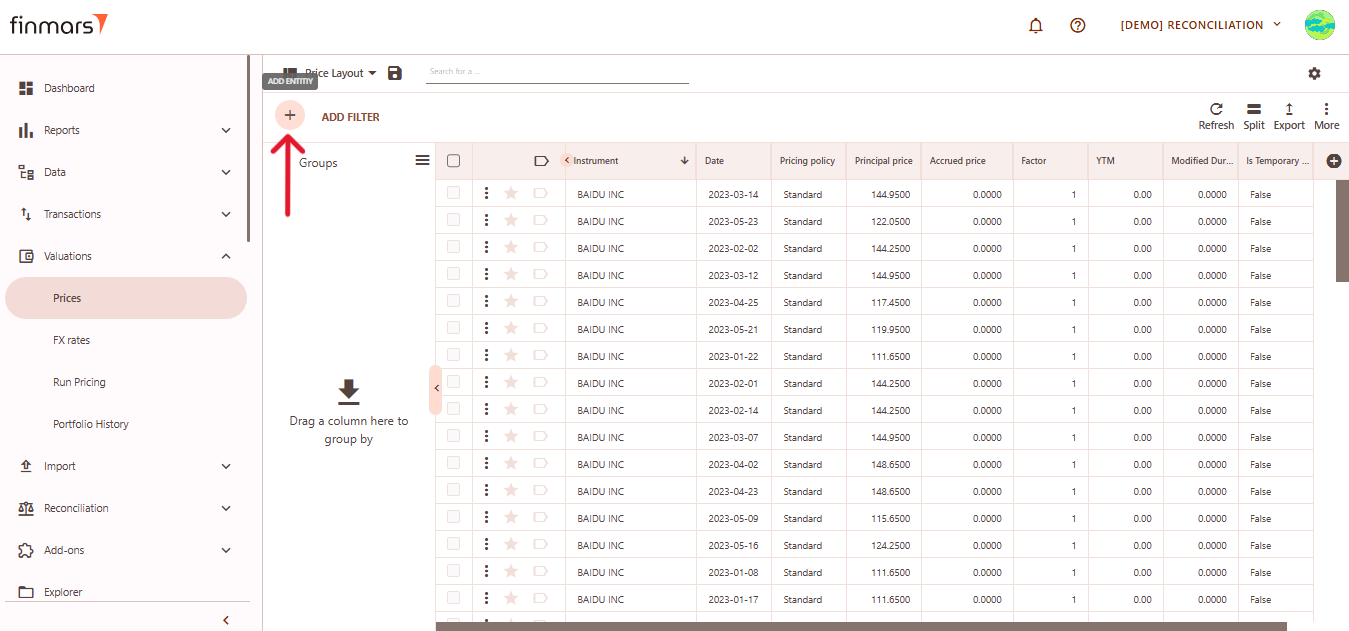
- Click the “+ Add” button located in the top-left corner of the portfolio list view.

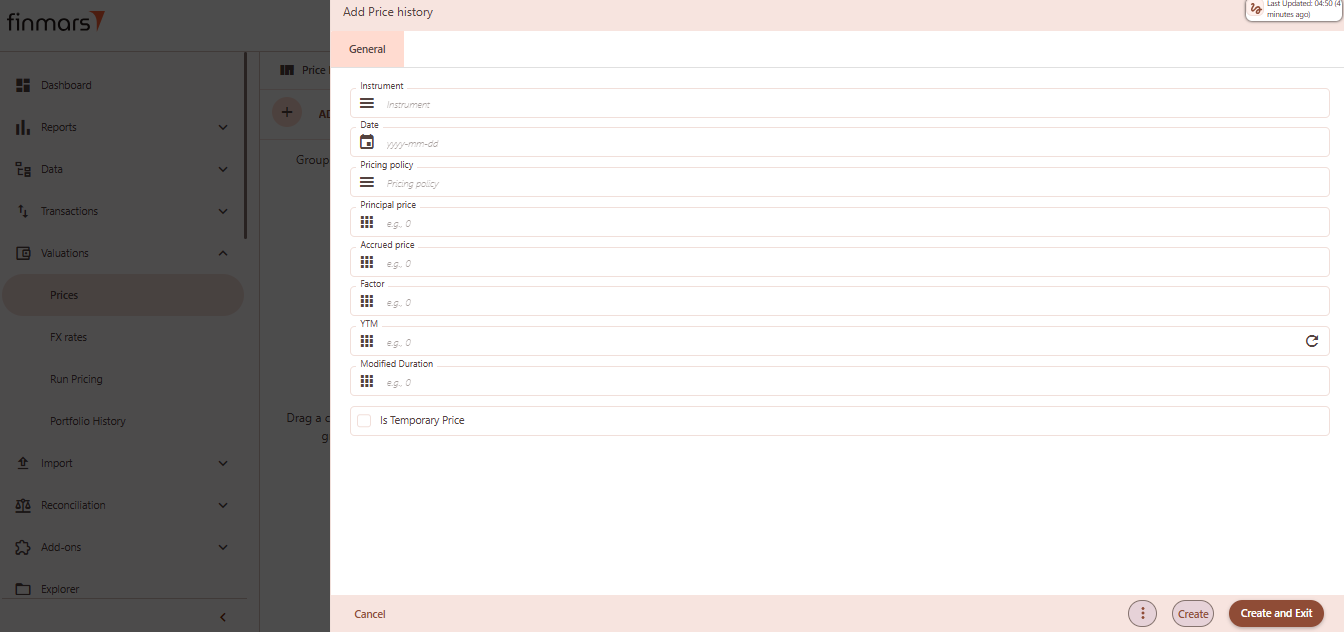
- This action opens the Add Price history form.

- Fill out the following fields as needed:
- Instrument – select the full name or unique identifier of the instrument (required).
- Date – the date when the price is recorded, in
yyyy-mm-ddformat (required). - Pricing Policy – select the pricing policy used for valuation.
- Principal Price – main market price of the instrument (e.g., 100).
- Accrued Price – the accrued interest or price component (e.g., 0).
- Factor – scaling factor for partial repayments or amortization (e.g., 1 or 0.95).
- YTM – yield to maturity as a percentage (e.g., 4.5).
- Modified Duration – interest rate sensitivity measure (e.g., 2.3).
- Is Temporary Price – optional checkbox; leave empty or check to mark the price as temporary.
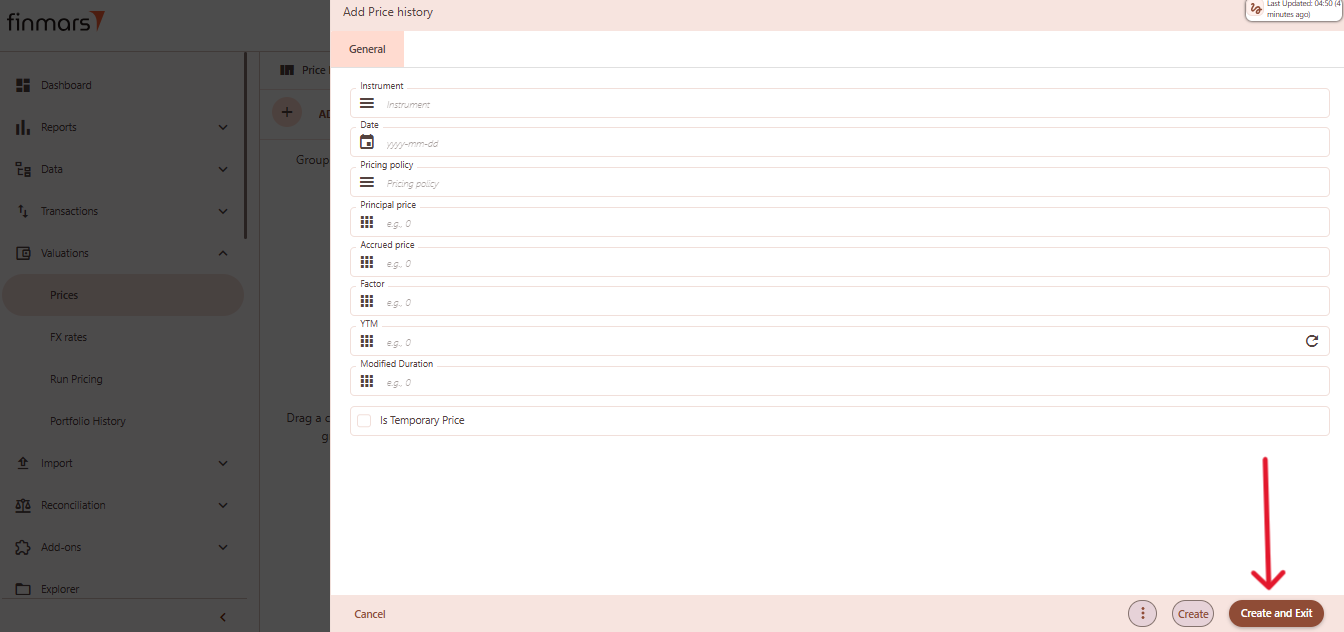
- Click “Create and Exit” to save the portfolio and return to the list view. Alternatively, use “Create” to save and continue editing.

Portfolio Type
Table of Contents
Description
Financial meaning
Portfolio Type has no specific financial meaning, it's a logical configure-defined classification of the portfolios, help to differentiate manual portfolios from transaction and position based portfolios.
Platform abstraction
Portfolio Type is an entity designed as a criterion for comparing portfolios against each other, defining configured-defined groups with the Portfolio Classes. Portfolio Classes represents the primary attribute, with pre-defined classes for reconciliation calculation and filtering purposes in the reports, entity viewers:
General Portfolio: Consists of banking transactions and/or a combination of initial positions and banking transactions.Manual Managed Portfolio: Managed through manual transaction booking within the system or imported from the client's internal manual tracking systems for bank verification purposes.Position Only Portfolio: Focuses on importing balance states for a specific day using Daily Positions/Cash transaction types.
It's used in:
- reconciliation using portfolio and portfolio reconcile group.
Examples
| User code | Portfolio class | Short name | Name | Public name | Notes | Configuration code |
| com.finmars.standard-other:portfolios.portfoliotype:general | General Portfolio | General Portfolio | General Portfolio | com.finmars.standard-other |
-
User code: workspace-unique identifier of the portfolio type with source prefix -
Portfolio class: classification used to define general behavior or usage category of the portfolio (e.g., General, Manual Managed) -
Short name: compact label shown in lists and relations for easier navigation -
Name: full descriptive name of the portfolio type -
Public name: label shown to users without configuration access; often used in reports -
Notes: optional custom description or comment field for internal purposes -
Configuration code: reference to the configuration source that governs the behavior of this portfolio type
Cookbook
CRUD
- Create: A new portfolio type can be created using the "+" button in the upper-right corner of the page. Users must provide the configuration code, user code, portfolio class, short name, name, public name, and optional notes.
- Read: The same page provides a list of all existing portfolio types. Users can search, filter, and review attributes such as class, names, and configuration references.
- Update: To edit a portfolio type, users can click on an existing entry to open the edit form. All fields—except those constrained by platform rules—can be modified, including the classification and public-facing labels.
- Delete: Portfolio types can be deleted directly from the management page.
Use Cases
- Portfolio Types help categorize portfolios by behavior, such as whether they are general-purpose, manually managed, or used solely for reconciliation. These classifications are leveraged in reporting filters and entity viewers.
- Fields like Short Name and Public Name allow different representations for internal use and external presentation. This is useful in environments where access permissions differ across user roles.
F.A.Q.
Frequently asked questions.
API documentation
Link to API documentation.
Portfolio Reconcile Group
Register Records
Table of Contents
Description
Financial meaning
Register Records represent individual transaction entries that record cash movements, share transactions, and valuation events within a portfolio. They ensure that all changes in portfolio value and structure are properly documented and traceable.
Platform abstraction
A Register Record in the Finmars used to track, value, and reconcile all transactions related to a portfolio. They support accurate NAV calculations, historical transaction analysis, and operational audits within the investment platform.
Register Record also is used in:
- portfolio accounting, where it documents all cash movements, asset purchases, and sales linked to portfolio, Instrument, and date.
- NAV calculation, providing a detailed basis for tracking valuation-impacting events.
- transaction reconciliation, matching recorded entries against external confirmations.
- performance reporting, aggregating Register Records using portfolio to generate accurate P&L and exposure analysis.
Examples
First part of table
| Transaction code | PORT REG | TRX DAT | Transaction Class | Cash Amount | Cash Currency | FX Rate | Valuation Currency | Cash Amount Valuation Currency | Rolling shares of the day |
| 38201 | CH-EQ-75648329 | 2023-01-12 | Cash-Inflow | 5781000.00 | USD | 1.0000 | USD | 5'781'000.00 | 5'781'000.00 |
Second part of table
| NAV Previous day Valuation Currency | N Shares Added | N Shares previous day | Dealing Price Valuation Currency | Nav Valuation Currency | Instrument | Portfolio | Created | Share Price Calculation Type | Modified |
| 5'781'000.00 | 0.00 | 1.000 | 5'781'000.00 | CH-EQ-75648329 | CH-EQ-75648329 | Automatic |
-
Transaction code: Unique identifier of the transaction within the register. PORT REG (Portfolio register): portfolio register indicator connecting portfolio and register together.TRX DAT (Transaction Date): date of the transaction associated with the register record.-
Transaction Class: Type of cash flow event (e.g., Cash-Inflow or Cash-Outflow). Cash amount: Amount of money involved in the transaction.Cash currency: Currency in which the cash amount is denominated.FX rate: Foreign exchange rate applied if currencies differ.Valuation currency: Currency used for valuation purposes.Cash Amount Valuation Currency: Cash amount converted into valuation currency.Rolling shares of the day: Updated total number of shares after the transaction.NAV Previous Day Valuation Currency: the currency used to represent the Net Asset Value (NAV) of the position as calculated for the previous day.N Shares Added: Number of shares added during this transaction.N Shares previous day: Number of shares recorded the previous day.Dealing Price Valuation Currency: Price per share used for transactions in valuation currency.Nav Valuation Currency: Net Asset Value in the valuation currency after transaction.Instrument: Financial instrument involved in the transaction.Portfolio: Portfolio to which the transaction belongs.Created: timestamp when the register record was initially created.Share Price Calculation Type: Method used to calculate share price (e.g., Automatic).Modified: timestamp of the last modification made to the register record.
Cookbook
CRUD
Operations within platform.
Use Cases
What for it's used.
F.A.Q.
Frequently asked questions.
API documentation
Link to API documentation.
Instrument Type
Table of Contents
Description
Financial meaning
Instrument Type it's standardized classification of the financial instrument used for system processing, grouping, and reporting.
Platform abstraction
In the Finmars platform, Instrument Types represent the core classification system for all financial instruments managed and processed within the environment. This abstraction allows the system to assign logic, behavior, and processing rules to each type of financial asset.
Instrument type also is used in:
-
instrument aggregation within portfolios and bundles
-
valuation using instrument-dependent pricing policies
-
reconciliation by matching expected and actual instrument events based on type logic
Instrument Type include:
-
Bond: Debt security representing a loan made by an investor to a borrower.
-
CDS: Credit Default Swap, a financial derivative used to manage credit risk.
-
Derivative: Financial contract deriving its value from an underlying asset.
-
Forward: Agreement to buy or sell an asset at a future date at a predetermined price.
-
FX Forward Leg: The settlement leg of a foreign exchange forward contract.
-
Option: A contract offering the right, but not the obligation, to buy or sell an asset.
-
Other: Instruments not categorized under standard financial classes.
-
Portfolio: A collection of financial assets held by an entity.
-
Stock: Equity security representing ownership in a corporation.
-
T-Bill: Treasury Bill, a short-term government debt obligation.
Examples
| User code | Short name | Instrument class | Name | Notes | Public name | Is Active | One of event | Regular event | Factor same | Factor up | Factor down | Config. code |
| com.finmars.standard-instrument-type:bond | Bond | Regular Event with Maturity | Bond | Bond | com.finmars.standard-instrument-type |
-
User code: workspace-specific unique identifier of the instrument type, prefixed by its source (e.g.,com.finmars) -
Short name: a brief, recognizable label for the instrument type used in user interfaces and linked tables -
Instrument class: classification that defines the behavior of the instrument type in the system (e.g., General Class, Event at Maturity, Regular Event with Maturity) -
Name: full descriptive name of the instrument type -
Notes: optional text field used for internal comments, documentation, or classification notes (e.g., risk labels, abstract categories) -
Public name: the name visible to users who have limited access, used for external or simplified presentation -
Is Active: status flag indicating whether the instrument type is currently active and available for selection and processing -
One off event: indicator that the instrument generates a single event (e.g., payment or valuation) during its lifecycle -
Regular event: indicator that the instrument is expected to generate recurring events at specified intervals (e.g., interest payments) -
Factor same: configuration value used to define a standard multiplier or conversion factor that applies uniformly across scenarios -
Factor up: value used when an upward adjustment or scenario-specific increase is applied to the instrument’s event calculations -
Factor down: value used when a downward adjustment or stress scenario is applied to the instrument’s parameters -
Config. code: internal system configuration reference code used to tie the instrument type to deeper logic or custom workflows
Cookbook
CRUD
Operations within platform.
Use Cases
What for it's used.
F.A.Q.
Frequently asked questions.
API documentation
Link to API documentation.
Base Transactions
Table of Contents
Description
Financial meaning
Base transactions are the core financial actions that record what actually happens with your money or investments. They’re the most essential and original records in a financial system — like receipts for everything going in or out of your portfolio.
Platform abstraction
Base Transactions in the Finmars platform represent the core building blocks of financial activity tracking. Each base transaction shows the essential details of a financial action (like a purchase, sale, or cash movement), but in a simplified format — before it's split into accounting entries like cash or positions.
Examples
Platform screenshots with a description of a record table example.
Cookbook
CRUD
Operations within platform.
Use Cases
What for it's used.
F.A.Q.
Frequently asked questions.
API documentation
Link to API documentation.
Entity Doc Template
Table of Contents
Description
Financial meaning
Financial meaning behind the entity (incl. diagrams and other explanatory materials).
Platform abstraction
Description of the entity in Platform (incl. diagrams, excel and other explanatory materials on how it works).
Examples
Platform screenshots with a description of a record table example.
Cookbook
CRUD
Operations within platform.
Use Cases
What for it's used.
F.A.Q.
Frequently asked questions.
API documentation
Link to API documentation.
FX Rate (Currency History)
Table of Contents
Description
Financial meaning
FX Rate, or exchange rate, is the price of one currency (base currency) in terms of another currency (quote currency).
Platform abstraction
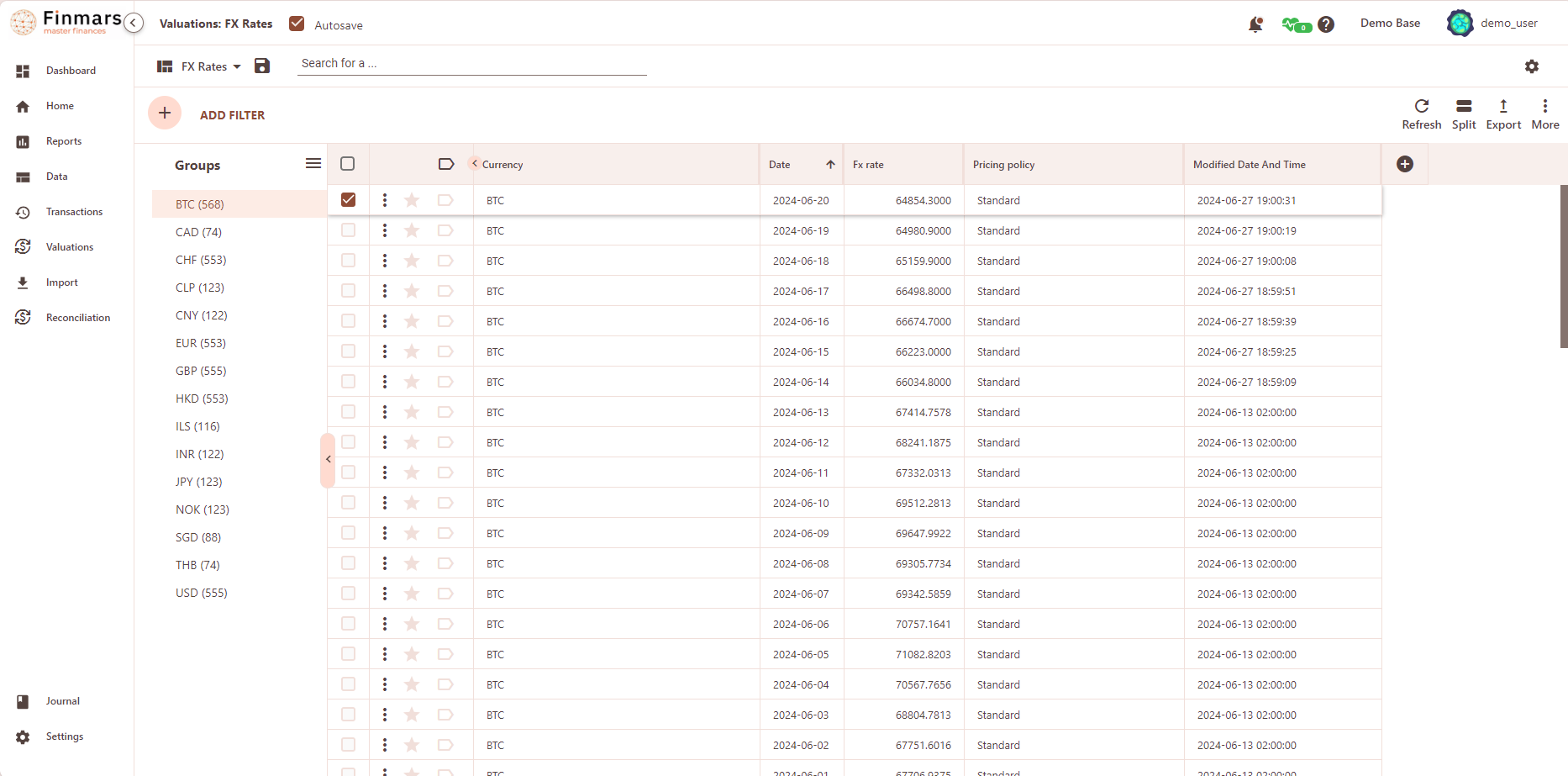
FX Rate in Finmars (a.k.a. Currency history) is an entity which evaluates a currency (base currency) in system default currency (quote currency, USD by default) on a specific date for specific pricing policy. By default, system currency is set to USD, it can be changed in default settings, but it's not recommended due to some modules may depend on system default currency set as USD.
Examples
| Currency | Date | Fx rate | Pricing policy | Modified Date And Time |
| BTC | 2024-06-20 | 64854.3000 | Standard | 2024-06-27 19:00:31 |
BTC- Base currency64854.3000- is BTC/USD FX Rate (quote currency is the default currency USD)Standard- is the name of the pricing policy2024-06-27 19:00:31- modified at datetime
Cookbook
CRUD
Operations within platform.
Use Cases
What for it's used.
F.A.Q.
Frequently asked questions.
API documentation
Link to API documentation.
Transaction Type
Table of Contents
Description
Financial meaning
Transaction types ensure that every economic event is correctly classified, allowing accurate portfolio valuation, performance calculation, risk analysis, compliance reporting, and accounting.
Platform abstraction
In the platform, transaction types drive the business logic behind how each transaction affects the portfolio structure and cash flows. They determine treatment in reconciliation, reporting, valuation, and accounting processes.
Transaction Type include:
-
Buy/Sell: buying or selling of instruments (e.g., stocks, bonds).
-
Coupon/Dividend: income received from holding an instrument.
-
Deposit/Withdrawal: cash movement into or out of the portfolio.
-
Expense/Income (Non-instrument): operational or external income/expense not tied directly to instruments.
-
Expense/Other Income (Instrument-related): expenses or additional income tied specifically to an instrument.
-
FX Forward: a forward contract to exchange currencies at a future date.
-
FX Trade: spot or forward transactions for currency exchange.
-
Position Daily: daily valuation update for open positions.
-
Position Initial: initial entry of a position into the system.
-
Standard (Import): imported transactions from external systems.
-
Transfer: internal movement of assets or cash between portfolios.
-
None: undefined or uncategorized transactions.
Examples
| User code | Group | Short Name | Name | Display Expression | Notes |
| com.finmars.standard-transaction-type:buy_with_fx_trade | Buy/Sell | Buy | Buy | 'Buy : ' \ |
-
User code: Internal user identifier for the entity. -
Group: Category grouping the action type (e.g., Buy/Sell). -
Short name: Short label representing the action (e.g., Buy or Sell). -
Name: Full name of the action type (Buy or Sell). -
Display Expression: Visual formatting or label used for display purposes. -
Notes: Optional field for additional comments or context.
Cookbook
CRUD
Operations within platform.
Use Cases
What for it's used.
F.A.Q.
Frequently asked questions.
API documentation
Link to API documentation.