# Pricing Policy
It's a set of prices for products or services, defining how they are structured and applied.
# Pricing Policy
#### **Table of Contents**
- [Description](#bkmrk-description)
- [Examples](#bkmrk-examples)
- [Cookbook](#bkmrk-cookbook)
- [F.A.Q.](#bkmrk-api-documentation)
- [API Documentation](#bkmrk-api-documentation)
#### **Description**
##### *Financial meaning*
**Pricing Policy** defines the methodology or rule set used to determine financial values, such as Fx Rates or instrument prices on a specific date. It ensures consistent and transparent valuation practices across portfolios and transactions.
##### *Platform abstraction*
In the **Finmars platform**, a **Pricing Policy** is a system-defined entity that determines how [prices ](https://docs.finmars.com/books/entities/page/price "Price")and [FX rates ](https://docs.finmars.com/books/entities/page/fx-rate-currency-history "FX Rate (Currency History)")are sourced, calculated, and maintained. It directly influences data handling in valuations, [reporting](https://docs.finmars.com/books/reports "Reports"), and [reconciliation](https://docs.finmars.com/books/reports/chapter/reconciliation "Reconciliation").
Pricing Policy types:
1. **Master –** Combines all other Pricing Policies in the Workspace. The compilation follows a configured order, and the Master Pricing Policy is mandatory for use in reports to ensure consistent aggregation logic.
2. **Rolled Master –** Designed to include rolled prices and FX rates. The rolling method is defined by a dedicated rolling pricing module, allowing dynamic calculation based on available data.
3. **Standard –** Applied when prices or rates are manually created or imported. It provides a straightforward structure for static or user-defined pricing.
**Pricing Policy also is used in:**
- valuation workflows, where it governs how instrument prices and [FX rates ](https://docs.finmars.com/books/entities/page/fx-rate-currency-history-eN8 "FX Rate (Currency History)")are sourced and applied based on policy type.
- [report ](https://docs.finmars.com/books/reports "Reports")generation, with the **Master** Pricing Policy ensuring consistent aggregation across [portfolios ](https://docs.finmars.com/books/entities/page/portfolio "Portfolio")and [transactions](https://docs.finmars.com/books/entities/page/transactions "Transactions").
- data imports and manual adjustments, where the **Standard** policy is used to apply static or user-defined [prices ](https://docs.finmars.com/books/entities/page/price "Price")and [FX rates](https://docs.finmars.com/books/entities/page/fx-rate-currency-history-eN8 "FX Rate (Currency History)").
- rolling calculations, where the **Rolled Master** policy enables dynamic valuation using time-series data through a rolling pricing module.
- [reconciliation ](https://docs.finmars.com/books/reports/chapter/reconciliation "Reconciliation")processes, supporting comparison of expected vs. actual [prices](https://docs.finmars.com/books/entities/page/price "Price") and rates.
- workspace configuration, where different Pricing Policies are assigned to ensure each [portfolio](https://docs.finmars.com/books/entities/page/portfolio-type "Portfolio Type") or [transaction type](https://docs.finmars.com/books/entities/page/transaction-type "Transaction Type") follows the appropriate pricing logic.
#### **Examples**
**Name**
**Unique Code**
**Notes**
Standard
com.finmars.standard-pricing:standard
Pricing Policy for Manual Import and Manually Created.
1. `Name`: full descriptive name of the pricing policy.
2. `Unique Code`: system-wide unique identifier for the pricing policy ( (e.g. com.finmars.standard-pricing:standard ).
3. `Notes`: optional free-text field for internal documentation, detailing assumptions, special rules, or customizations related to the pricing logic
#### **Cookbook**
##### *CRUD*
Operations within platform.
##### *Use Cases*
What for it's used.
#### **F.A.Q.**
Frequently asked questions.
#### **API documentation**
Link to API documentation.
# How to Create a Pricing Policy entity
## Prerequisites
We assume you have all prerequisites you may need, including:
[](https://docs.finmars.com/books/entities/page/how-to-create-a-currency-entity/edit?content-id=bkmrk-vpn-configured-%28prov&content-text=If%20needed%3A%20the%20VPN%20is%20configured%20to%20access%20the%20Fin "Jump to section in editor")
1. If needed: the VPN is configured to access the Finmars resources
2. If needed: access to the Virtual Machine to work with the sensitive information
3. Must have: registered in Finmars in the needed region environment (self-registered or registered by Finmars)
4. Must have: having permissions set to allow continue with the Action in the Guide
## Creation of Pricing Policy Entity
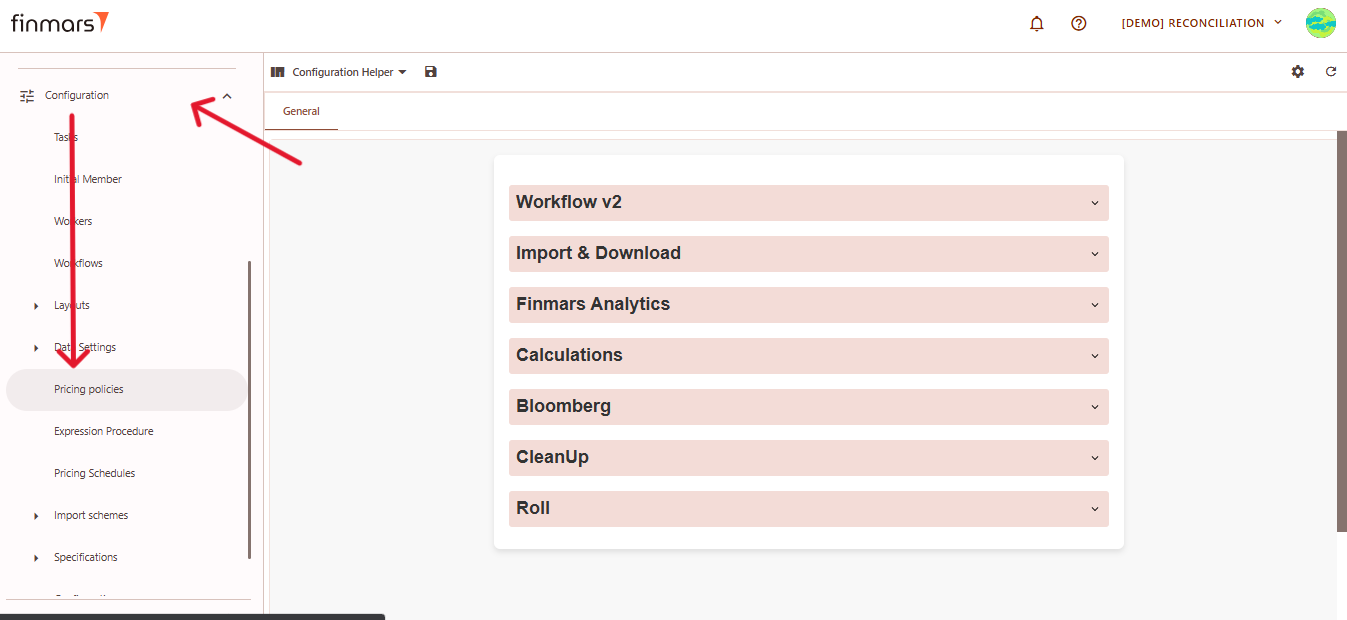
1. Open the ****“Configuration”**** section in the left-hand side menu. Select the ****“Pricing Policies”**** entity.
[](https://docs.finmars.com/uploads/images/gallery/2025-05/scaled-1680-/snimok-ekrana-2025-05-08-050733.png)
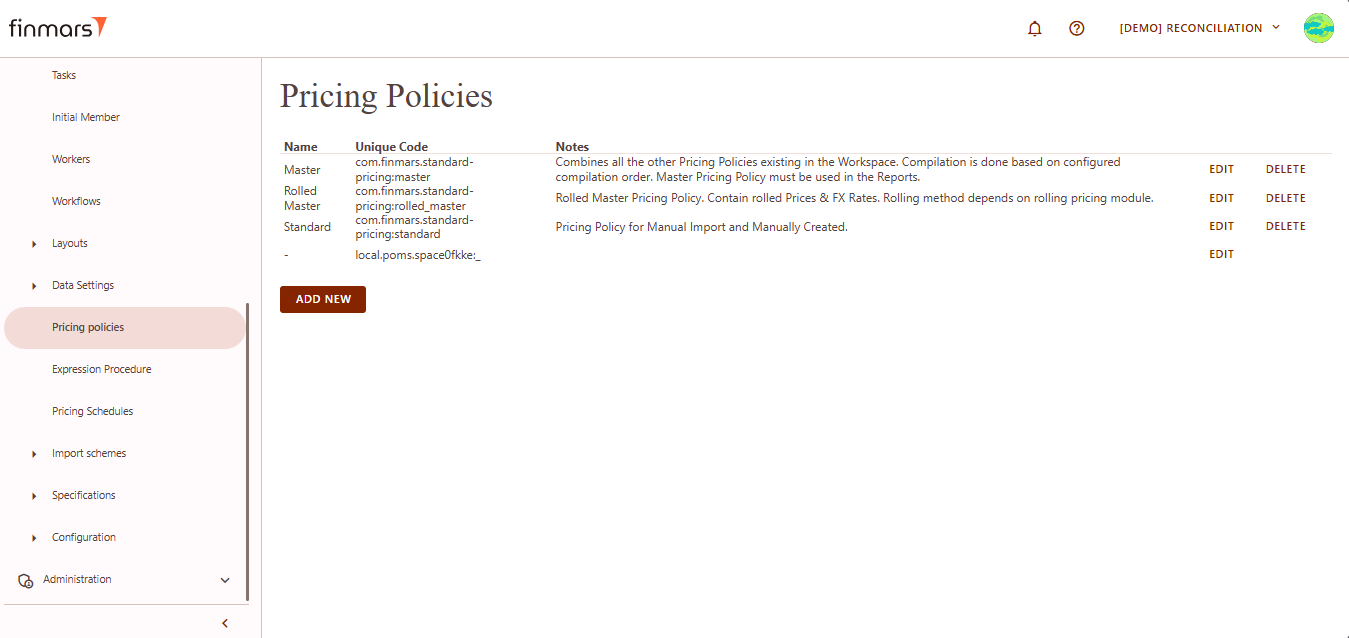
2. You will be directed to a page displaying a list of existing pricing policies.
[](https://docs.finmars.com/uploads/images/gallery/2025-05/scaled-1680-/snimok-ekrana-2025-05-08-050752.png)
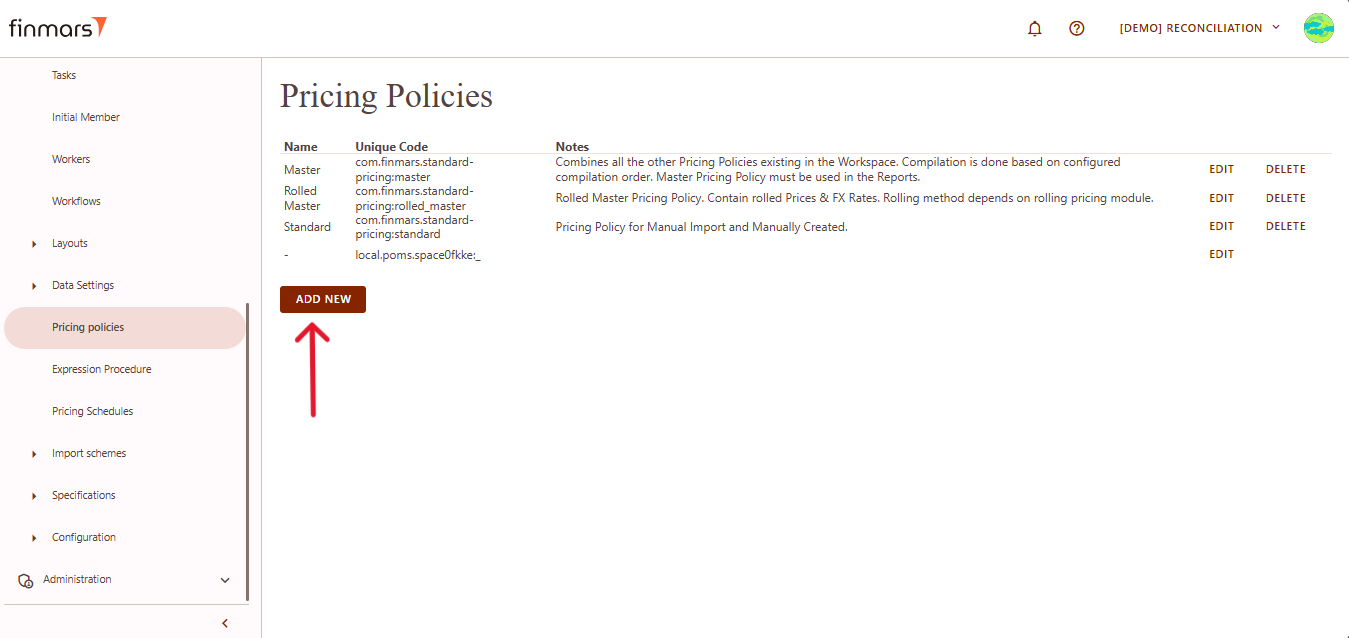
3. Scroll down to the bottom of the list and click the ****Add new**** button.
[](https://docs.finmars.com/uploads/images/gallery/2025-05/scaled-1680-/copy-5.png)
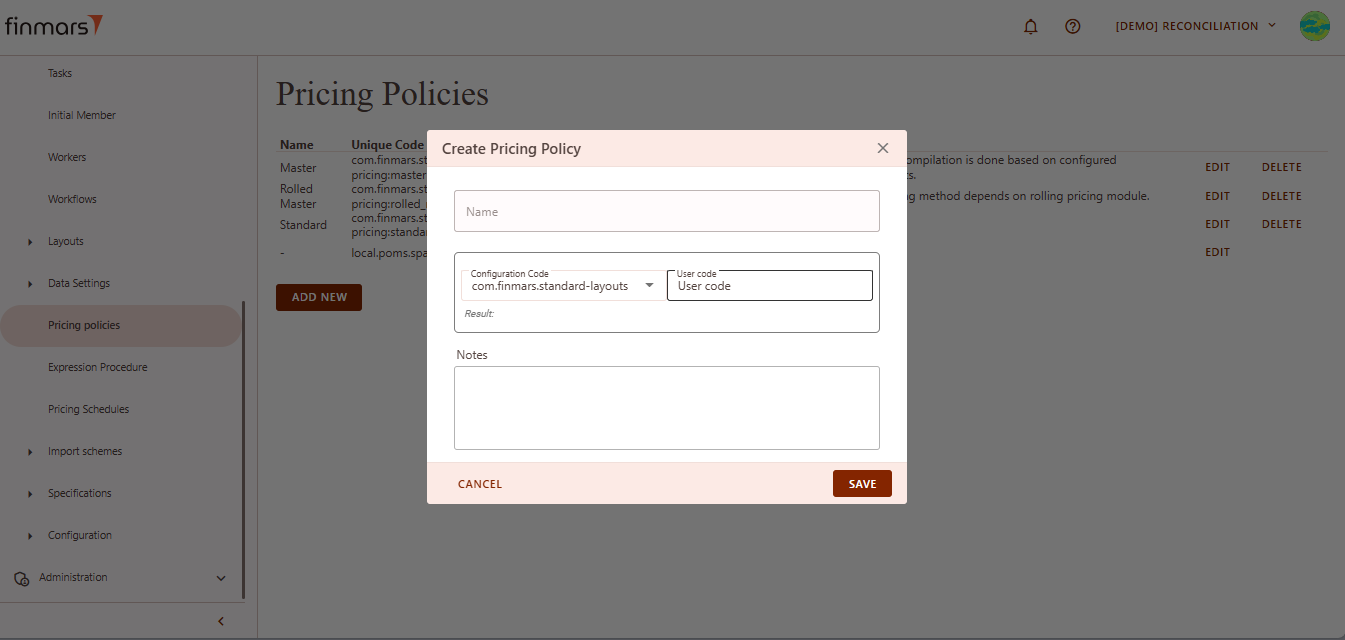
4. This action opens the ****Create Pricing Policy**** form.
[](https://docs.finmars.com/uploads/images/gallery/2025-05/scaled-1680-/snimok-ekrana-2025-05-08-050816.png)
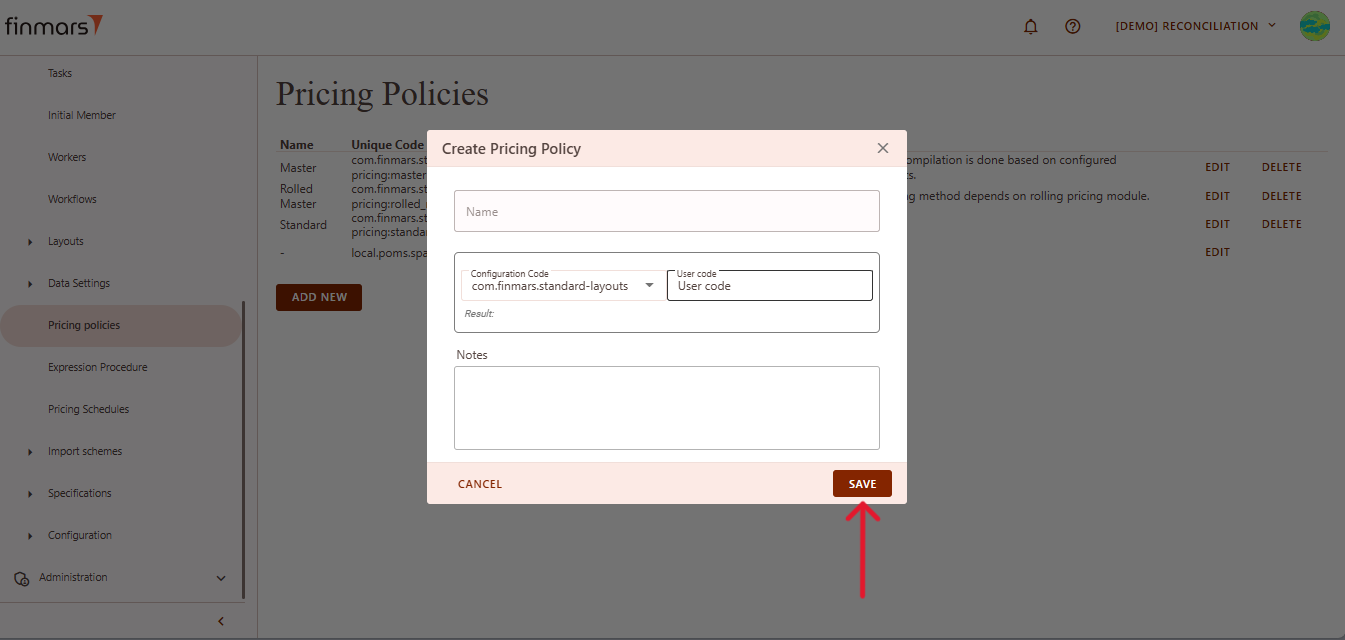
5. ****Fill in the following fields:****
1. ****Name**** – the name of the pricing policy.
2. ****Configuration Code**** – select from the dropdown menu.
3. ****User Code**** – enter a user code using only lowercase letters (`a–z`), numbers (`0–9`), and special characters: underscore (`_`) or dash (`-`).
4. ****Notes**** – any additional comments or context.
6. Once all required data is filled out, click ****Save**** to create the new pricing policy.
[](https://docs.finmars.com/uploads/images/gallery/2025-05/scaled-1680-/copy-6.png)