# Price
Market or calculated value of an instrument at a given time.
# Price
#### **Table of Contents**
- [Description](#bkmrk-description)
- [Examples](#bkmrk-examples)
- [Cookbook](#bkmrk-cookbook)
- [F.A.Q.](#bkmrk-api-documentation)
- [API Documentation](#bkmrk-api-documentation)
#### **Description**
##### *Financial meaning*
Prices represent the market value or quoted price of a financial instrument at a specific point in time. They are essential for valuation, performance measurement, and accurate reporting across financial systems.
##### *Platform abstraction*
In the Finmars platform, a Price is a separate entity linked to an [Instrument ](https://docs.finmars.com/books/entities/page/instrument "Instrument")and dated to a specific moment. Each price entry stores the principal value, accrued interest component (for debt instruments), a[ pricing policy](https://docs.finmars.com/books/entities/page/pricing-policy "Pricing Policy") identifier (e.g., Standard, Custom), and valuation-related fields like Yield to Maturity (YTM) and Duration.
**Prices are used in:**
- Providing market or modeled values for [instruments ](https://docs.finmars.com/books/entities/page/instrument "Instrument")held in [portfolios](https://docs.finmars.com/books/entities/page/portfolio "Portfolio").
- Defining end-of-day valuations and snapshots for asset positions.
- Supporting duration, yield, and factor-based sensitivity analyses.
- Assisting in generating fair value [reports](https://docs.finmars.com/books/reports "Reports"),[ P&L](https://docs.finmars.com/books/marscapital/chapter/pl-report "P&L Report"), and balance sheet entries.
#### **Examples**
| **Instrument** | **Date** | **Pricing Policy** | **Principal Price** | **Accrued Price** | **Factor** | **YTM** | **Modified Duration** | **Is Temporary Price** |
| BAIDU INC | 2023-03-14 | Standard | 144.9500 | 0.000 | 1 | 0.00 | 0.000 | False |
- `Instrument`: name or identifier of the financial instrument.
- `Date`: the date for which the price is recorded.
- `Pricing Policy`: method used for price calculation (e.g., Standard).
- `Principal Price`: main price of the instrument excluding accrued interest.
- `Accrued Price`: accumulated interest up to the pricing date.
- `Factor`: multiplier used to adjust the nominal or market value of the instrument.
- `YTM`: yield to maturity, representing the expected return if the instrument is held until maturity.
- `Modified Duration`: measure of the price sensitivity of the instrument to interest rate changes.
- `Is Temporary Price`: flag indicating if the price is temporary (`True` or `False`).
#### **Cookbook**
##### *CRUD*
Operations within platform.
##### *Use Cases*
What for it's used.
#### **F.A.Q.**
Frequently asked questions.
#### **API documentation**
Link to API documentation.
# How to Create a Price Entity
## Prerequisites
We assume you have all prerequisites you may need, including:
1. If needed: the VPN is configured to access the Finmars resources
2. If needed: access to the Virtual Machine to work with the sensitive information
3. Must have: registered in Finmars in the needed region environment (self-registered or registered by Finmars)
4. Must have: having permissions set to allow continue with the Action in the Guide
## Creation of Price Entity
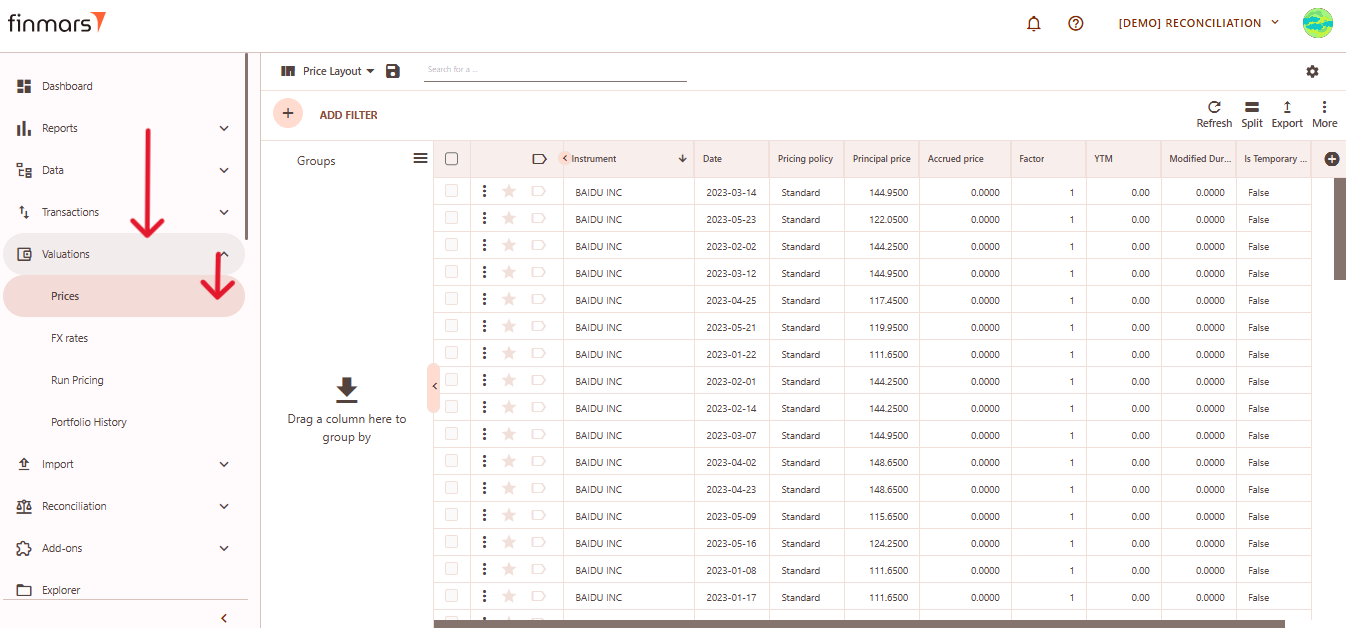
1. Open the ****“Valuation”**** section in the left-hand side menu. Select the ****“Price”**** entity from the list under ****Valuation****.
[](https://docs.finmars.com/uploads/images/gallery/2025-05/scaled-1680-/snimok-ekrana-2025-05-08-045350.png)
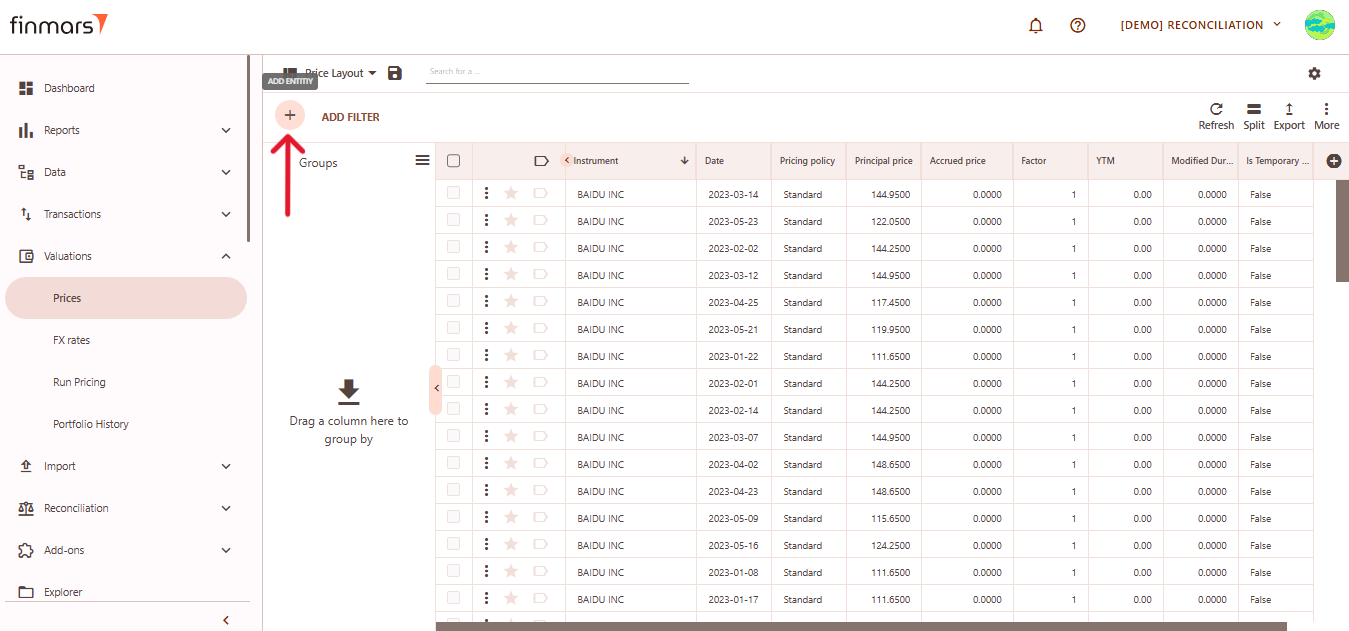
2. ****Click the “+ Add” button**** located in the top-left corner of the portfolio list view.
[](https://docs.finmars.com/uploads/images/gallery/2025-05/scaled-1680-/snimok-ekrana-2025-05-08-045357.png)
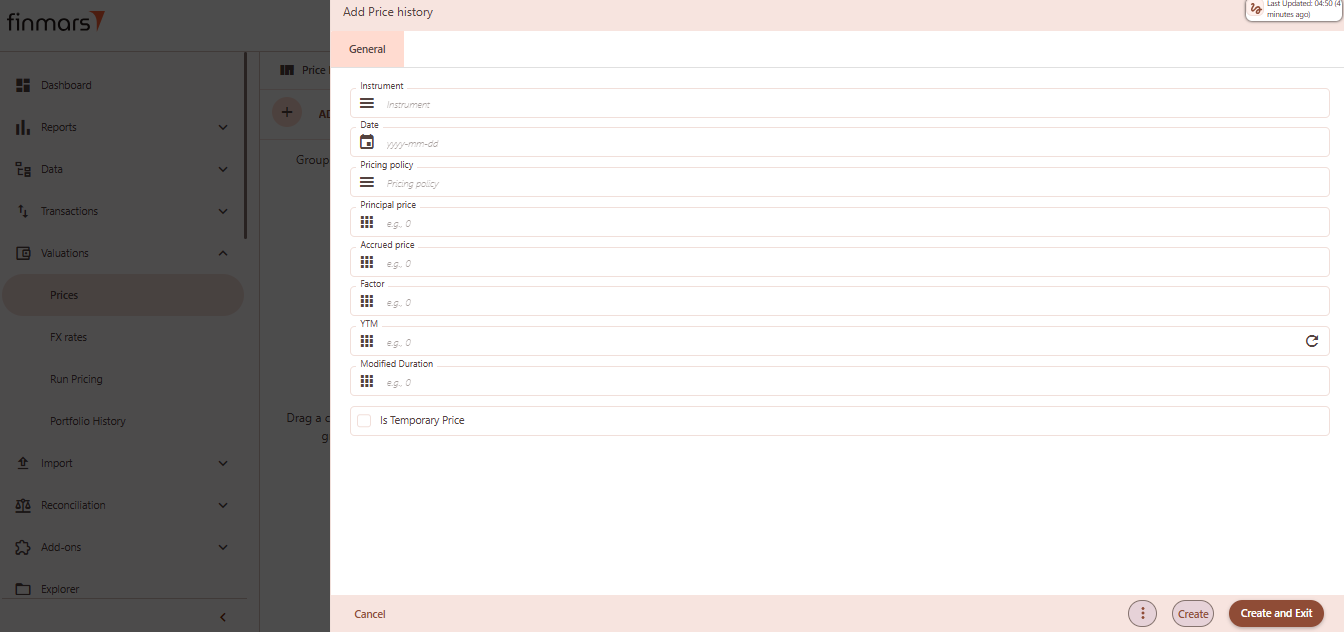
3. This action opens the ****Add Price history** form.
[](https://docs.finmars.com/uploads/images/gallery/2025-05/scaled-1680-/snimok-ekrana-2025-05-08-045414.png)
4. ****Fill out the following fields as needed:****
1. ****Instrument**** – select the full name or unique identifier of the instrument (required).
2. ****Date**** – the date when the price is recorded, in `yyyy-mm-dd` format (required).
3. ****Pricing Policy**** – select the pricing policy used for valuation.
4. ****Principal Price**** – main market price of the instrument (e.g., 100).
5. ****Accrued Price**** – the accrued interest or price component (e.g., 0).
6. ****Factor**** – scaling factor for partial repayments or amortization (e.g., 1 or 0.95).
7. ****YTM**** – yield to maturity as a percentage (e.g., 4.5).
8. ****Modified Duration**** – interest rate sensitivity measure (e.g., 2.3).
9. ****Is Temporary Price**** – optional checkbox; leave empty or check to mark the price as temporary.
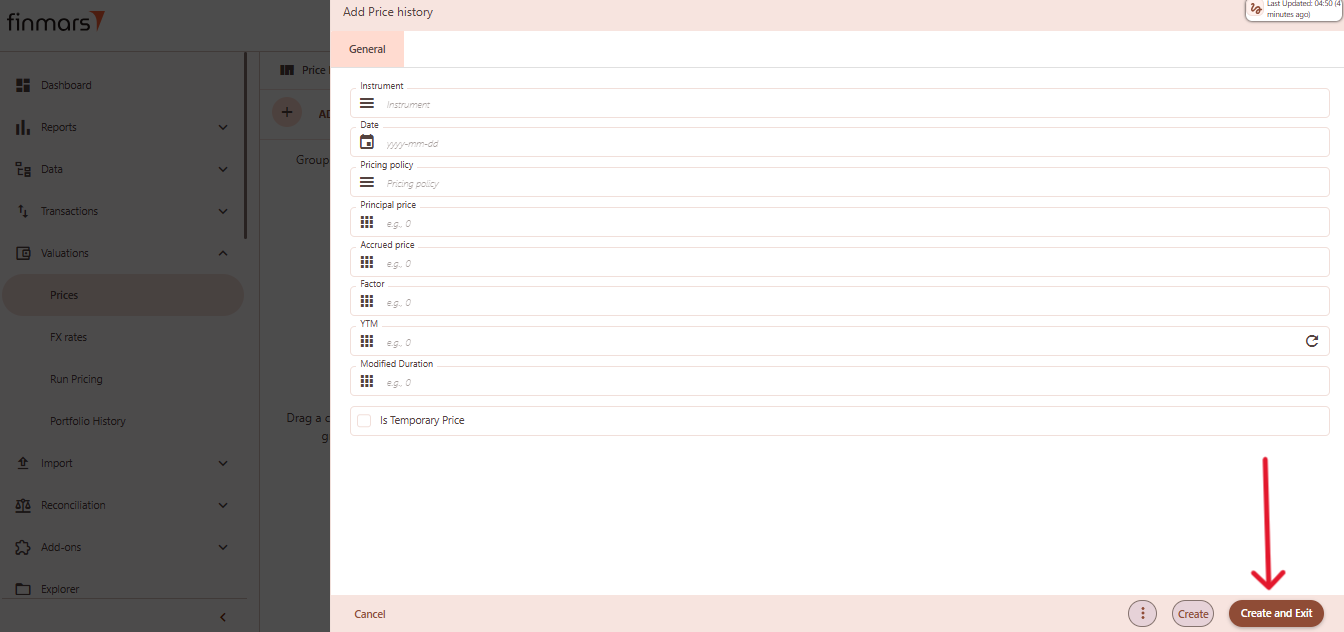
5. Click ****“Create and Exit”**** to save the portfolio and return to the list view. Alternatively, use ****“Create”**** to save and continue editing.
[](https://docs.finmars.com/uploads/images/gallery/2025-05/scaled-1680-/copy4.png)