# Portfolio
A collection of your investments, like stocks, bonds, or funds, all in one place.
# Portfolio
#### **Table of Contents**
- [Description](#bkmrk-description)
- [Examples](#bkmrk-examples)
- [Cookbook](#bkmrk-cookbook)
- [F.A.Q.](#bkmrk-api-documentation)
- [API Documentation](#bkmrk-api-documentation)
#### **Description**
##### *Financial meaning*
**Portfolio** refers to a collection of financial assets. Portfolios are held directly by investors and/or managed by financial professionals. Effective portfolio management involves diversification, asset allocation, and regular performance monitoring to optimize returns and manage risks.
##### *Platform abstraction*
**Portfolio** in Finmars platform is a container for financial assets (cash ([currency](https://docs.finmars.com/books/entities/page/currency "Currency")) & [instruments](https://docs.finmars.com/books/entities/page/instrument "Instrument")) allocation.
**Portfolio also is used in:**
- [performance](https://docs.finmars.com/books/reports/chapter/performance "Performance") calculation with its [registers](https://docs.finmars.com/books/entities/chapter/register "Register") grouped in [bundles](https://docs.finmars.com/books/entities/chapter/bundle "Bundle")
- [reconciliation](https://docs.finmars.com/books/reports/chapter/reconciliation "Reconciliation") using special [portfolio type](https://docs.finmars.com/books/entities/page/portfolio-type "Portfolio Type") and [portfolio reconcile group](https://docs.finmars.com/books/entities/page/portfolio-reconcile-group "Portfolio Reconcile Group").
#### **Examples**
| User code | Portfolio Type | Name | Short name | Public name | Notes | First Transaction Date | First Cash Flow Date | Accounts | Transaction types | Responsibles | Counterparties |
| obl01
| Manual | Bonds | Bonds | Bonds | - | 2022-12-01 | 2022-12-01 |
|
|
|
|
- `User code`: workspace unique identifier of the portfolio with source prefix as it's multi-source entity
- `Portfolio Type`: configuration-defined criterion for reconciliation
- `Name`: full name
- `Short name`: short name, showed in other relations
- `Public name`: public view name for users without access
- `Notes`: custom description for portfolio
- `First Transaction Date`: date of the first transaction in the portfolio (changes by the logic described below)
- `First Cash Flow Date`: date of the first transaction in the portfolio for base transaction class == Cash-Inflow or Cash-Outflow (changes by the logic described below)
- `Accounts`: (not strict, informative) selected accounts that can be used for this portfolio
- `Transaction types`: (not strict, informative)selected transaction types that can be used for this portfolio
- `Responsibles`: (not strict, informative)selected responsibles that can be used for this portfolio
- `Counterparties`: (not strict, informative)selected counterparties that can be used for this portfolio
Portfolio has 2 attributes `First Transaction Date` and `First Cash Flow Date` which are used for performance calculations with workflow and performance report and the logic for them is defined below:
**Logic for defining First Transaction Date & First Cash Flow Date based on complex transactions:**
1. Portfolio entity has 2 properties:
1. first\_transcation\_date (name = First transaction date, value = null)
2. first\_cash\_flow\_date (name = First cash flow date, value = null)
2. **For complex transaction CRUD** operations **For each base transaction** in the complex transaction:
1. if **Book**
1. if base transaction class == Cash-Inflow or Cash-Outflow
1. if trade\_date < first\_cash\_flow\_date
1. first\_cash\_flow\_date = trade\_date
2. if trade\_date < first\_transcation\_date
1. first\_transcation\_date = trade\_date
2. if **Rebook !!!**
1. if base transaction class == Cash-Inflow or Cash-Outflow
1. if **new **trade\_date < first\_cash\_flow\_date
1. first\_cash\_flow\_date = trade\_date
2. else
1. if **old **trade\_date == first\_cash\_flow\_date
1. first\_cash\_flow\_date = find new first\_cash\_flow\_date
2. if **new **trade\_date < first\_transcation\_date
1. first\_transcation\_date = trade\_date
3. else
1. if **old **trade\_date == first\_transcation\_date
1. first\_transcation\_date = find new first\_transcation\_date
3. if **Delete**
1. if base transaction class == Cash-Inflow or Cash-Outflow
1. if trade\_date == first\_cash\_flow\_date
1. if true first\_cash\_flow\_date = find new first\_cash\_flow\_date
2. if trade\_date == first\_transcation\_date
1. if true first\_transcation\_date = find new first\_transcation\_date
#### **Cookbook**
##### *CRUD*
- **Create: [How to Create a Portfolio Entity](https://docs.finmars.com/books/entities/page/how-to-create-a-portfolio-entity "How to Create a Portfolio Entity")**
- **Read: [How to Read a Portfolio Entity](https://docs.finmars.com/books/entities/page/how-to-read-a-portfolio-entity "How to Read a Portfolio Entity")**
- **Update: [How to Update a Portfolio Entity](https://docs.finmars.com/books/entities/page/how-to-update-a-portfolio-entity "How to Update a Portfolio Entity")**
- **Delete: [How to Delete a Portfolio Entity](https://docs.finmars.com/books/entities/page/how-to-delete-a-portfolio-entity "How to Delete a Portfolio Entity")**
##### *Use Cases*
- Within a portfolio, transactions and instrument positions are grouped using **registers**, which feed into bundles and ultimately affect portfolio-level calculations and reporting.
- Auto-populated fields such as **First Transaction Date** and **First Cash Flow Date** are critical inputs for internal workflows, audit tracking, and performance evaluation logic.
- Leverage the **Portfolio Type** field to define reconciliation logic and reporting behavior (e.g., General, Manual, or Position Only).
#### **F.A.Q.**
Frequently asked questions.
#### **API documentation**
Link to API documentation.
# How to Create a Portfolio Entity
## Prerequisites
We assume you have all prerequisites you may need, including:
1. If needed: the VPN is configured to access the Finmars resources
2. If needed: access to the Virtual Machine to work with the sensitive information
3. Must have: registered in Finmars in the needed region environment (self-registered or registered by Finmars)
4. Must have: having permissions set to allow continue with the Action in the Guide
## Creation of Portfolio Entity
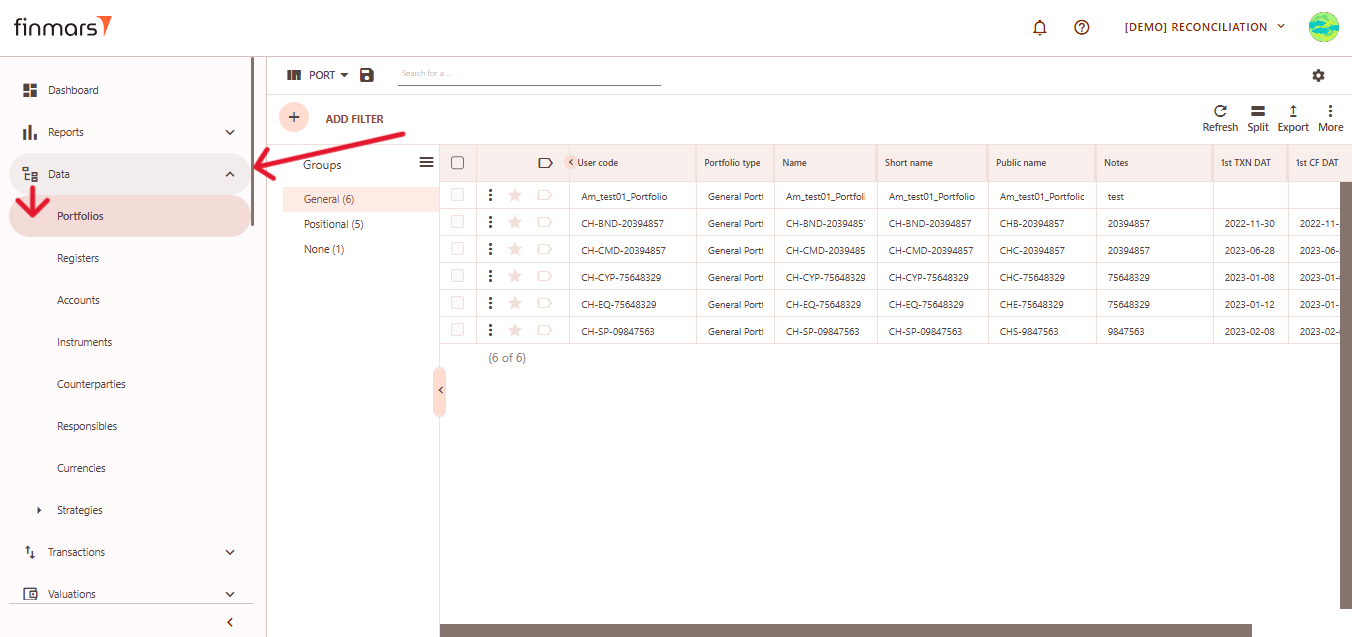
1. Open the ****“Data”**** section in the left-hand side menu. Select the ****“Portfolios”**** entity from the list under ****Data****.
[](https://docs.finmars.com/uploads/images/gallery/2025-05/scaled-1680-/snimok-ekrana-2025-05-04-195556.png)
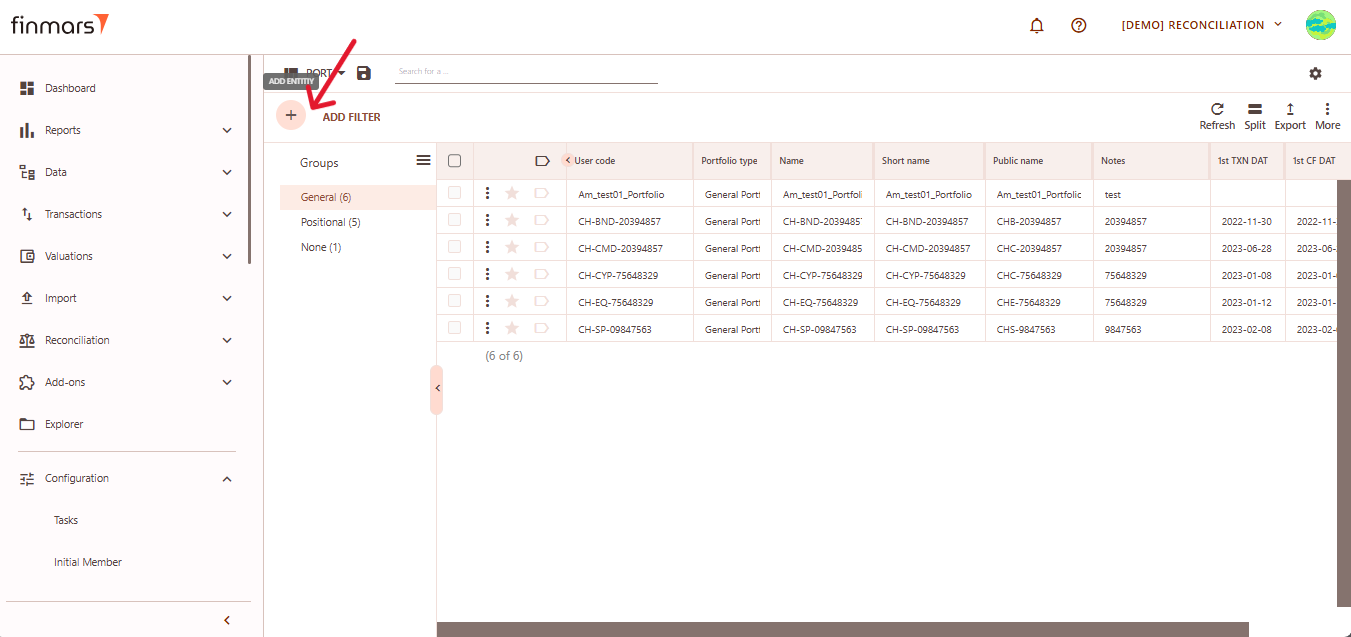
2. ****Click the “+ Add” button**** located in the top-left corner of the portfolio list view.
[](https://docs.finmars.com/uploads/images/gallery/2025-05/scaled-1680-/snimok-ekrana-2025-05-04-195818.png)
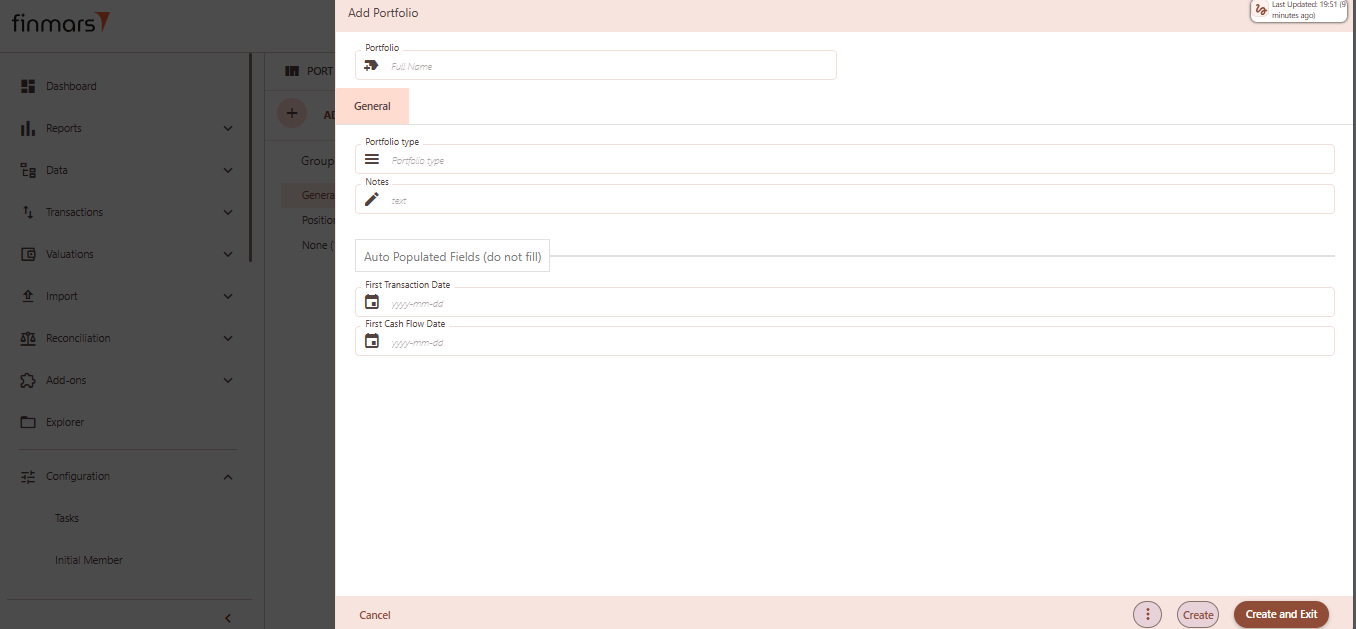
3. This action opens the ****Add Portfolio**** form.
[](https://docs.finmars.com/uploads/images/gallery/2025-05/image.png)
4. ****Fill in the required fields in the creation panel:****
1. ****Portfolio**** (Full Name) – the unique name of the portfolio. This will be used to identify it across the platform.
2. ****Portfolio Type –**** select from predefined types (e.g., General, Positional). Determines portfolio behavior and classification.
3. ****Notes**** – optional field to add internal comments or details about the portfolio’s purpose or structure.
4. ****First Transaction Date**** (auto populated, do not fill) – this field will automatically reflect the earliest transaction date once transactions are associated.
5. ****First Cash Flow Date**** (auto populated, do not fill) – similar to the above, it will auto-fill based on actual cash flow activity.
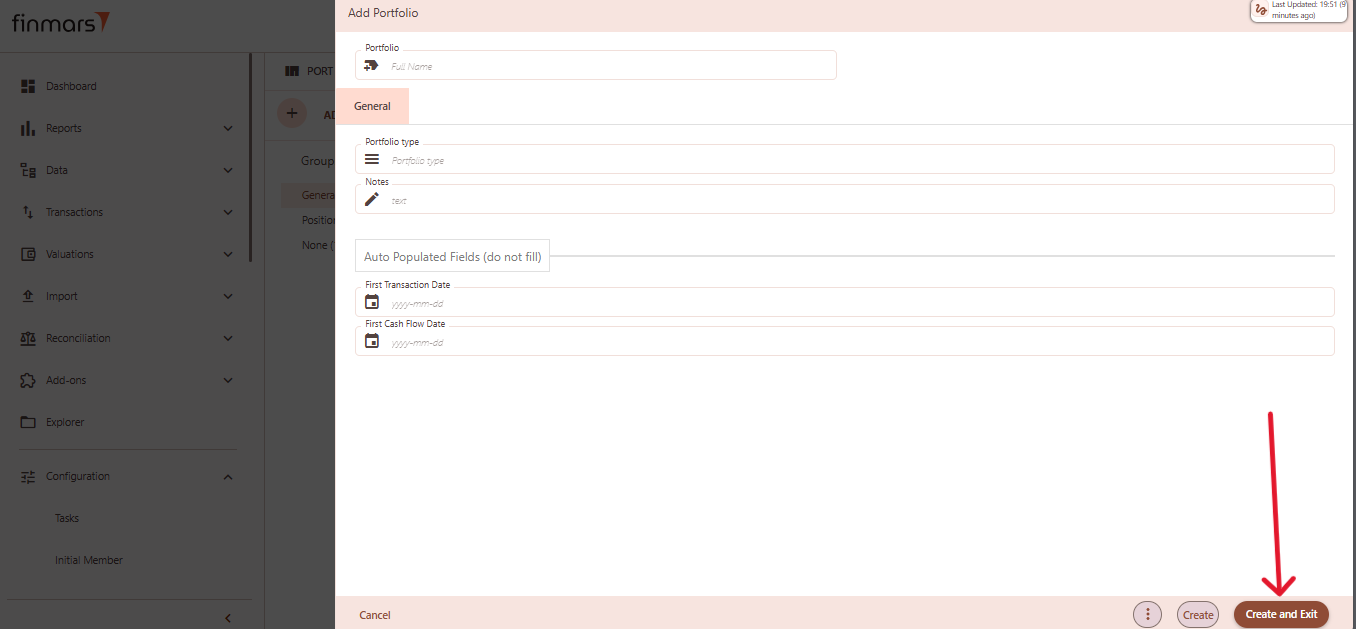
5. Click ****“Create and Exit”**** to save the portfolio and return to the list view. Alternatively, use ****“Create”**** to save and continue editing.
[](https://docs.finmars.com/uploads/images/gallery/2025-05/scaled-1680-/snimok-ekrana-2025-05-04-200008.png)
# How to Read a Portfolio Entity
#### ****Table of Contents****
- [Description](#bkmrk-description)
- [Examples](#bkmrk-examples)
- [Cookbook](#bkmrk-cookbook)
- [F.A.Q.](#bkmrk-api-documentation)
- [API Documentation](#bkmrk-api-documentation)
#### ****Description****
##### **Financial meaning**
Financial meaning behind the entity (incl. diagrams and other explanatory materials).
##### **Platform abstraction**
Description of the entity in Platform (incl. diagrams, excel and other explanatory materials on how it works).
#### ****Examples****
Platform screenshots with a description of a record table example.
#### ****Cookbook****
##### **CRUD**
Operations within platform.
##### **Use Cases**
What for it's used.
#### ****F.A.Q.****
Frequently asked questions.
#### ****API documentation****
Link to API documentation.
# How to Update a Portfolio Entity
#### ****Table of Contents****
- [Description](#bkmrk-description)
- [Examples](#bkmrk-examples)
- [Cookbook](#bkmrk-cookbook)
- [F.A.Q.](#bkmrk-api-documentation)
- [API Documentation](#bkmrk-api-documentation)
#### ****Description****
##### **Financial meaning**
Financial meaning behind the entity (incl. diagrams and other explanatory materials).
##### **Platform abstraction**
Description of the entity in Platform (incl. diagrams, excel and other explanatory materials on how it works).
#### ****Examples****
Platform screenshots with a description of a record table example.
#### ****Cookbook****
##### **CRUD**
Operations within platform.
##### **Use Cases**
What for it's used.
#### ****F.A.Q.****
Frequently asked questions.
#### ****API documentation****
Link to API documentation.
# How to Delete a Portfolio Entity
#### ****Table of Contents****
- [Description](#bkmrk-description)
- [Examples](#bkmrk-examples)
- [Cookbook](#bkmrk-cookbook)
- [F.A.Q.](#bkmrk-api-documentation)
- [API Documentation](#bkmrk-api-documentation)
#### ****Description****
##### **Financial meaning**
Financial meaning behind the entity (incl. diagrams and other explanatory materials).
##### **Platform abstraction**
Description of the entity in Platform (incl. diagrams, excel and other explanatory materials on how it works).
#### ****Examples****
Platform screenshots with a description of a record table example.
#### ****Cookbook****
##### **CRUD**
Operations within platform.
##### **Use Cases**
What for it's used.
#### ****F.A.Q.****
Frequently asked questions.
#### ****API documentation****
Link to API documentation.