Portfolio
A collection of your investments, like stocks, bonds, or funds, all in one place.
- Portfolio
- How to Create a Portfolio Entity
- How to Read a Portfolio Entity
- How to Update a Portfolio Entity
- How to Delete a Portfolio Entity
Portfolio
Table of Contents
Description
Financial meaning
Portfolio refers to a collection of financial assets. Portfolios are held directly by investors and/or managed by financial professionals. Effective portfolio management involves diversification, asset allocation, and regular performance monitoring to optimize returns and manage risks.
Platform abstraction
Portfolio in Finmars platform is a container for financial assets (cash (currency) & instruments) allocation.
Portfolio also is used in:
- performance calculation with its registers grouped in bundles
- reconciliation using special portfolio type and portfolio reconcile group.
Examples
| User code | Portfolio Type | Name | Short name | Public name | Notes | First Transaction Date | First Cash Flow Date | Accounts | Transaction types | Responsibles | Counterparties |
| obl01 |
Manual | Bonds | Bonds | Bonds | - | 2022-12-01 | 2022-12-01 |
User code: workspace unique identifier of the portfolio with source prefix as it's multi-source entityPortfolio Type: configuration-defined criterion for reconciliationName: full nameShort name: short name, showed in other relationsPublic name: public view name for users without accessNotes: custom description for portfolioFirst Transaction Date: date of the first transaction in the portfolio (changes by the logic described below)First Cash Flow Date: date of the first transaction in the portfolio for base transaction class == Cash-Inflow or Cash-Outflow (changes by the logic described below)Accounts: (not strict, informative) selected accounts that can be used for this portfolioTransaction types: (not strict, informative)selected transaction types that can be used for this portfolioResponsibles: (not strict, informative)selected responsibles that can be used for this portfolioCounterparties: (not strict, informative)selected counterparties that can be used for this portfolio
Portfolio has 2 attributes First Transaction Date and First Cash Flow Date which are used for performance calculations with workflow and performance report and the logic for them is defined below:
Logic for defining First Transaction Date & First Cash Flow Date based on complex transactions:
-
Portfolio entity has 2 properties:
-
first_transcation_date (name = First transaction date, value = null)
-
first_cash_flow_date (name = First cash flow date, value = null)
-
-
For complex transaction CRUD operations For each base transaction in the complex transaction:
-
if Book
-
if base transaction class == Cash-Inflow or Cash-Outflow
-
if trade_date < first_cash_flow_date
-
first_cash_flow_date = trade_date
-
-
-
if trade_date < first_transcation_date
-
first_transcation_date = trade_date
-
-
-
if Rebook !!!
-
if base transaction class == Cash-Inflow or Cash-Outflow
-
if new trade_date < first_cash_flow_date
-
first_cash_flow_date = trade_date
-
-
else
-
if old trade_date == first_cash_flow_date
-
first_cash_flow_date = find new first_cash_flow_date
-
-
-
-
if new trade_date < first_transcation_date
-
first_transcation_date = trade_date
-
-
else
-
if old trade_date == first_transcation_date
-
first_transcation_date = find new first_transcation_date
-
-
-
-
if Delete
-
if base transaction class == Cash-Inflow or Cash-Outflow
-
if trade_date == first_cash_flow_date
-
if true first_cash_flow_date = find new first_cash_flow_date
-
-
-
if trade_date == first_transcation_date
-
if true first_transcation_date = find new first_transcation_date
-
-
-
Cookbook
CRUD
-
Create: How to Create a Portfolio Entity
-
Update: How to Update a Portfolio Entity
-
Delete: How to Delete a Portfolio Entity
Use Cases
- Within a portfolio, transactions and instrument positions are grouped using registers, which feed into bundles and ultimately affect portfolio-level calculations and reporting.
- Auto-populated fields such as First Transaction Date and First Cash Flow Date are critical inputs for internal workflows, audit tracking, and performance evaluation logic.
- Leverage the Portfolio Type field to define reconciliation logic and reporting behavior (e.g., General, Manual, or Position Only).
F.A.Q.
Frequently asked questions.
API documentation
Link to API documentation.
How to Create a Portfolio Entity
Prerequisites
We assume you have all prerequisites you may need, including:
- If needed: the VPN is configured to access the Finmars resources
- If needed: access to the Virtual Machine to work with the sensitive information
- Must have: registered in Finmars in the needed region environment (self-registered or registered by Finmars)
- Must have: having permissions set to allow continue with the Action in the Guide
Creation of Portfolio Entity
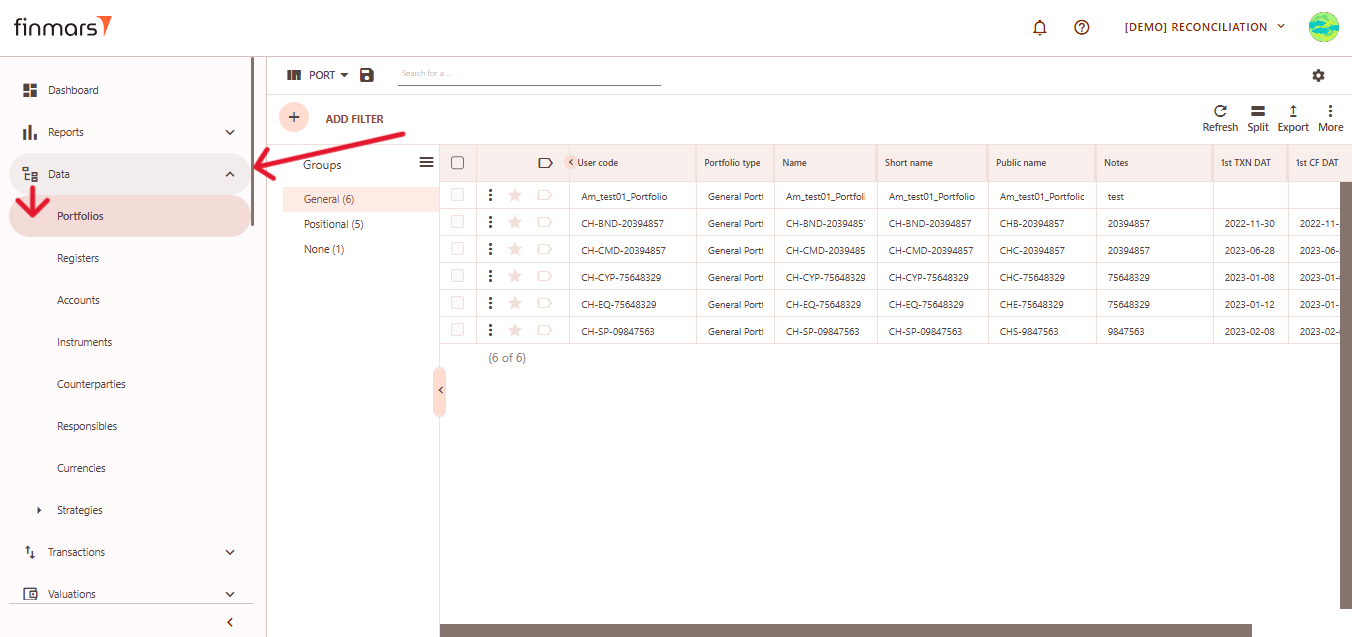
- Open the “Data” section in the left-hand side menu. Select the “Portfolios” entity from the list under Data.

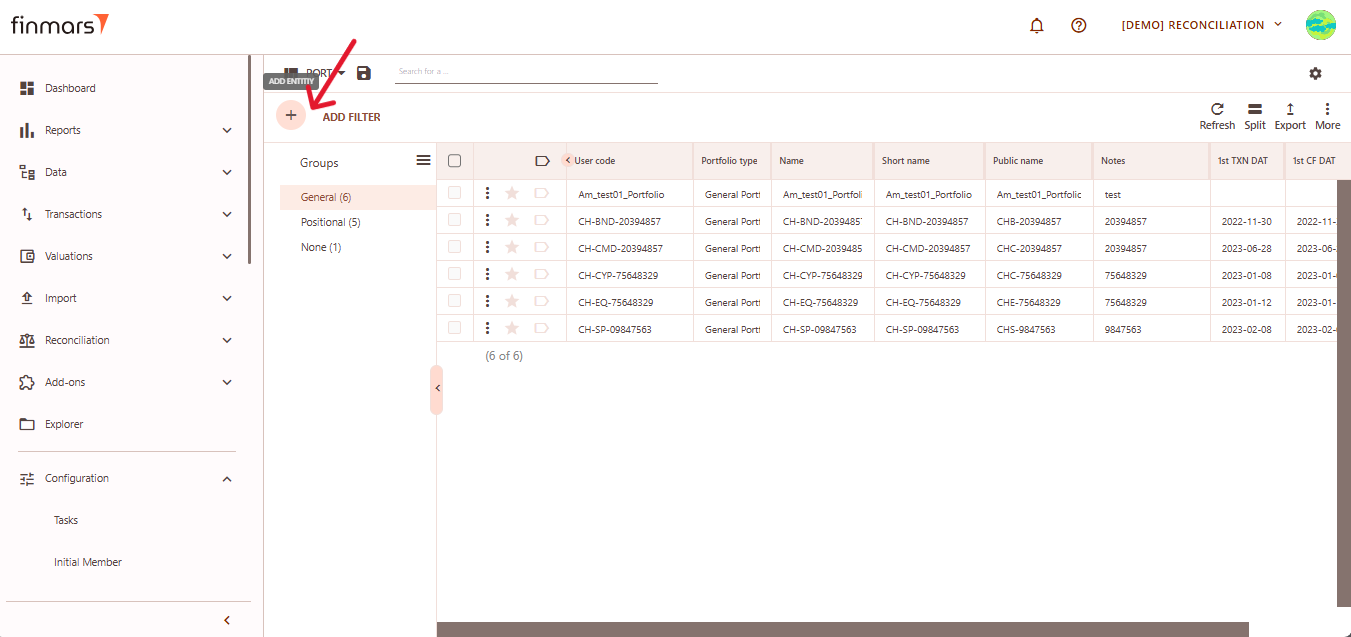
- Click the “+ Add” button located in the top-left corner of the portfolio list view.

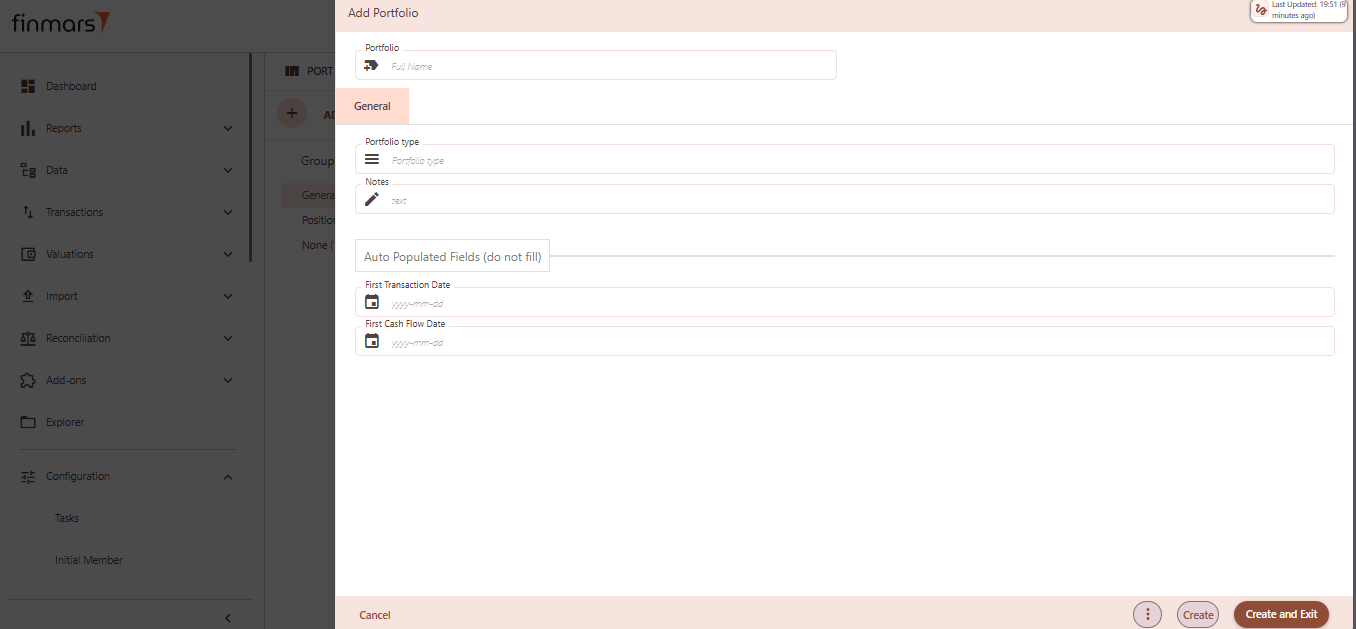
- This action opens the Add Portfolio form.

- Fill in the required fields in the creation panel:
- Portfolio (Full Name) – the unique name of the portfolio. This will be used to identify it across the platform.
- Portfolio Type – select from predefined types (e.g., General, Positional). Determines portfolio behavior and classification.
- Notes – optional field to add internal comments or details about the portfolio’s purpose or structure.
- First Transaction Date (auto populated, do not fill) – this field will automatically reflect the earliest transaction date once transactions are associated.
- First Cash Flow Date (auto populated, do not fill) – similar to the above, it will auto-fill based on actual cash flow activity.
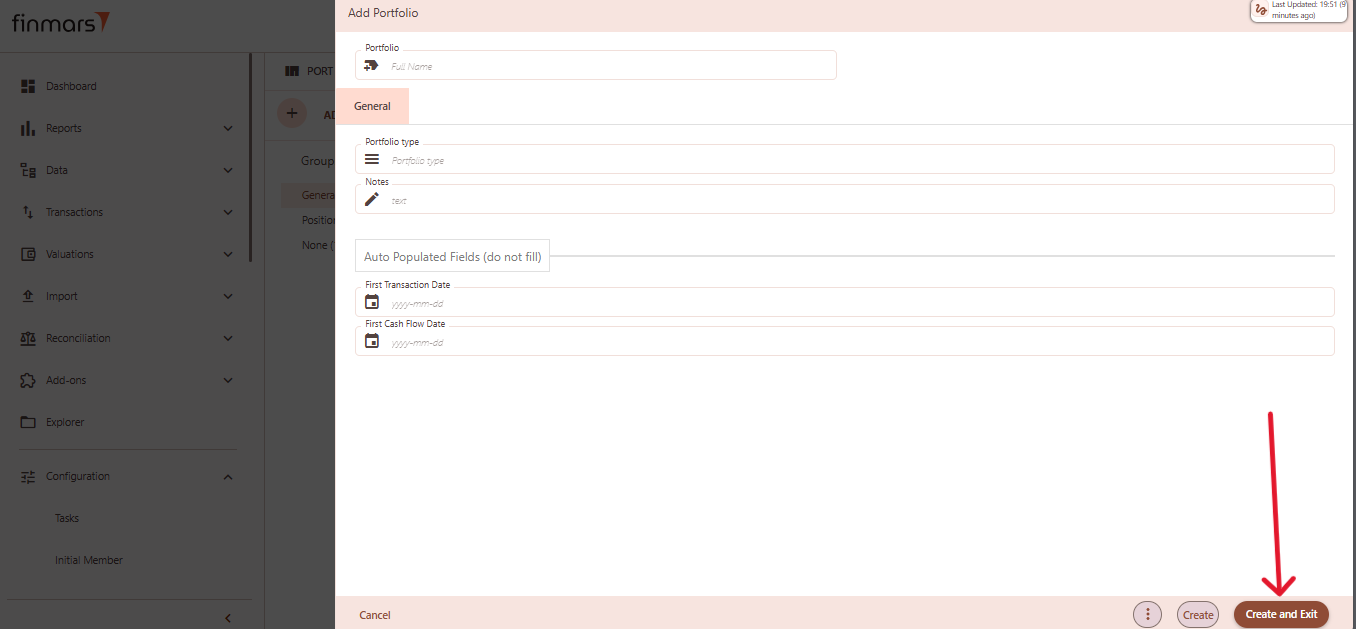
- Click “Create and Exit” to save the portfolio and return to the list view. Alternatively, use “Create” to save and continue editing.

How to Read a Portfolio Entity
Table of Contents
Description
Financial meaning
Financial meaning behind the entity (incl. diagrams and other explanatory materials).
Platform abstraction
Description of the entity in Platform (incl. diagrams, excel and other explanatory materials on how it works).
Examples
Platform screenshots with a description of a record table example.
Cookbook
CRUD
Operations within platform.
Use Cases
What for it's used.
F.A.Q.
Frequently asked questions.
API documentation
Link to API documentation.
How to Update a Portfolio Entity
Table of Contents
Description
Financial meaning
Financial meaning behind the entity (incl. diagrams and other explanatory materials).
Platform abstraction
Description of the entity in Platform (incl. diagrams, excel and other explanatory materials on how it works).
Examples
Platform screenshots with a description of a record table example.
Cookbook
CRUD
Operations within platform.
Use Cases
What for it's used.
F.A.Q.
Frequently asked questions.
API documentation
Link to API documentation.
How to Delete a Portfolio Entity
Table of Contents
Description
Financial meaning
Financial meaning behind the entity (incl. diagrams and other explanatory materials).
Platform abstraction
Description of the entity in Platform (incl. diagrams, excel and other explanatory materials on how it works).
Examples
Platform screenshots with a description of a record table example.
Cookbook
CRUD
Operations within platform.
Use Cases
What for it's used.
F.A.Q.
Frequently asked questions.
API documentation
Link to API documentation.