# Client Entity
It stores the data of an individual client. It provides a single point of access to user data and **API** keys (third-party services) associated with customer portfolios.
# How to create an Client Entity?
You need to get a new client into the system. To do this, find the item **Client Entity** in the side menu. On the page we can add a new client, or edit an existing one.
[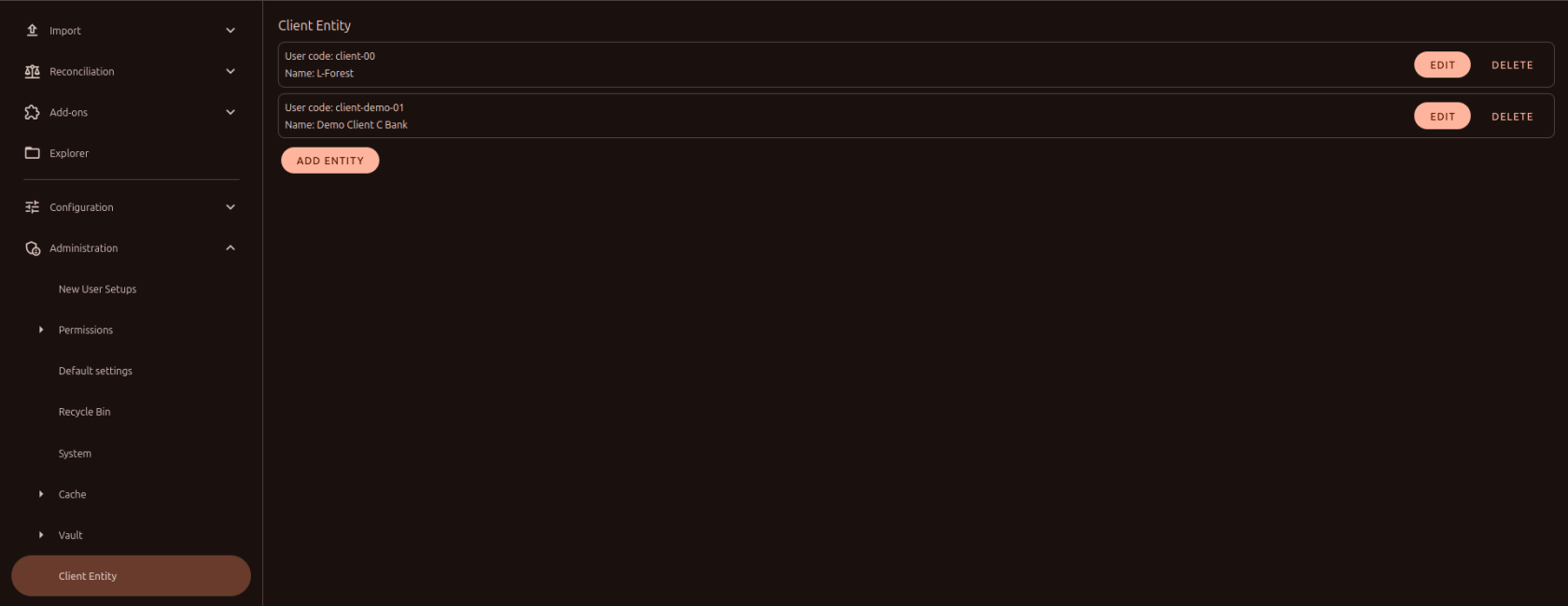](https://docs.finmars.com/uploads/images/gallery/2025-01/7zaimage.png)
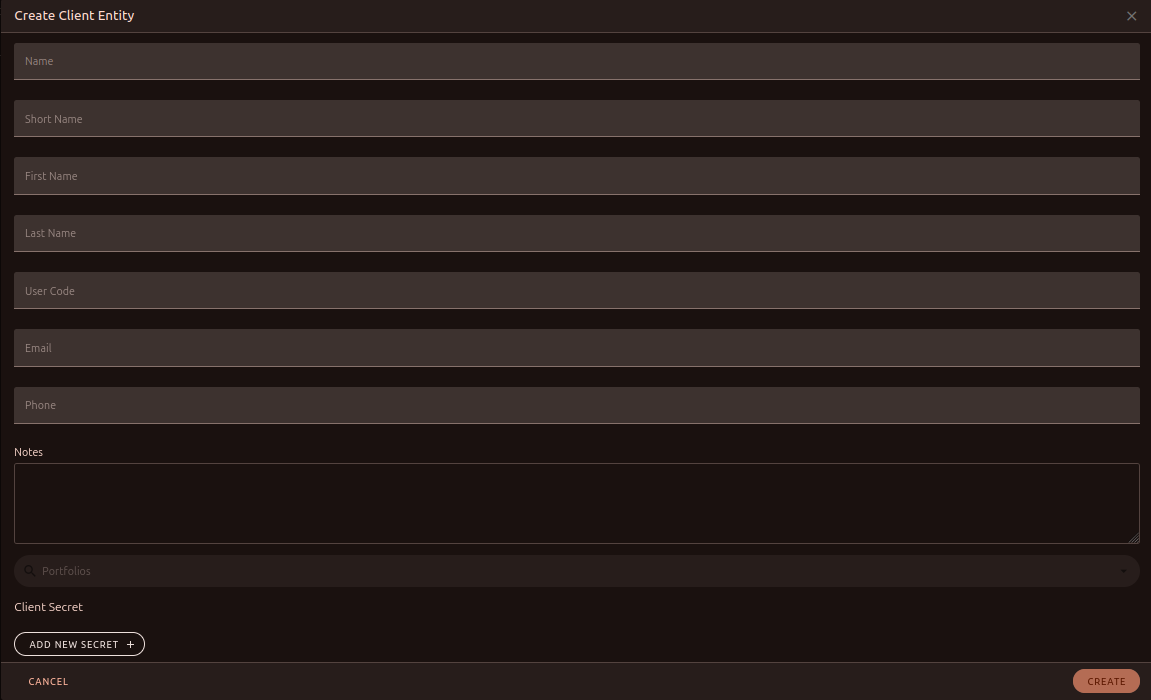
Our job is to add сlient into the system, so we clicked on the *Add Entity* button and a form appeared in front of us with the client's data filled in. Part of the form is reserved for the client's data, and the second part for his API keys.
[](https://docs.finmars.com/uploads/images/gallery/2025-01/iNAimage.png)
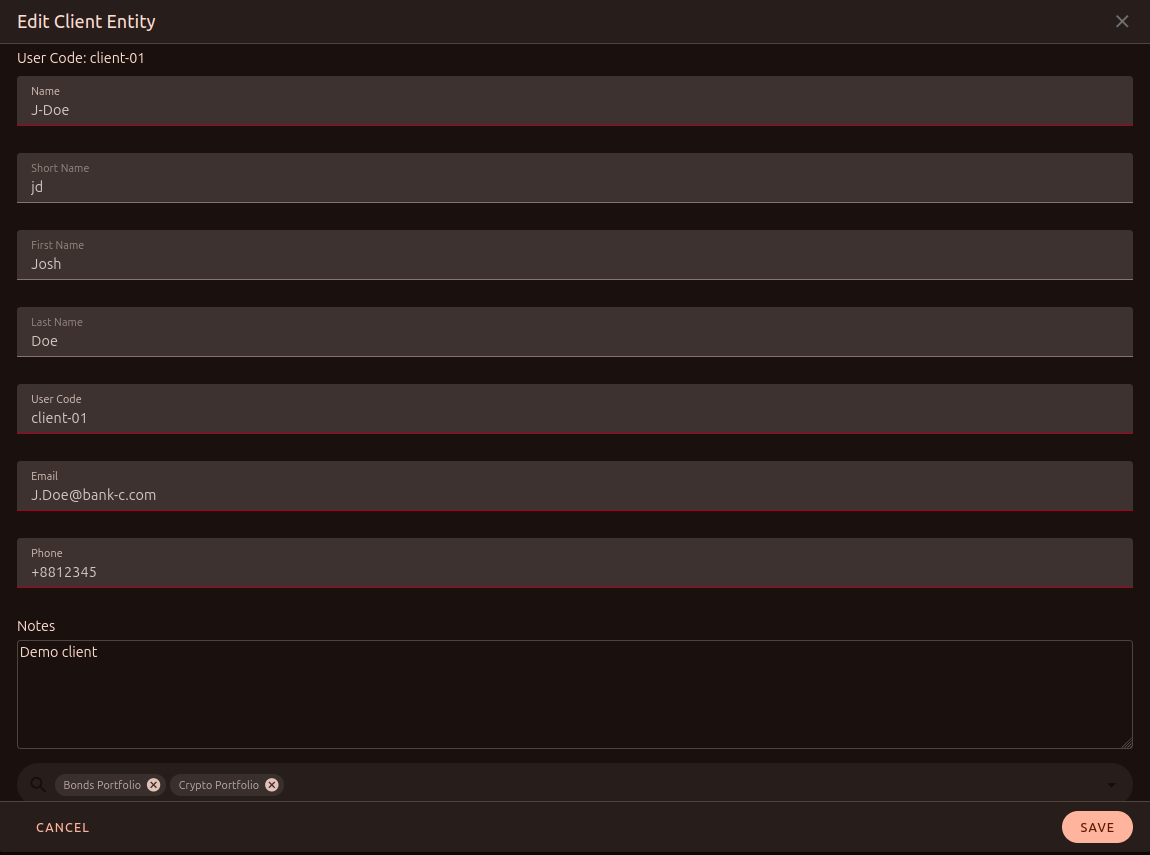
Let's fill out the client data. Fill in the client given and select the portfolios that will belong to it.
[](https://docs.finmars.com/uploads/images/gallery/2025-01/KaEimage.png)
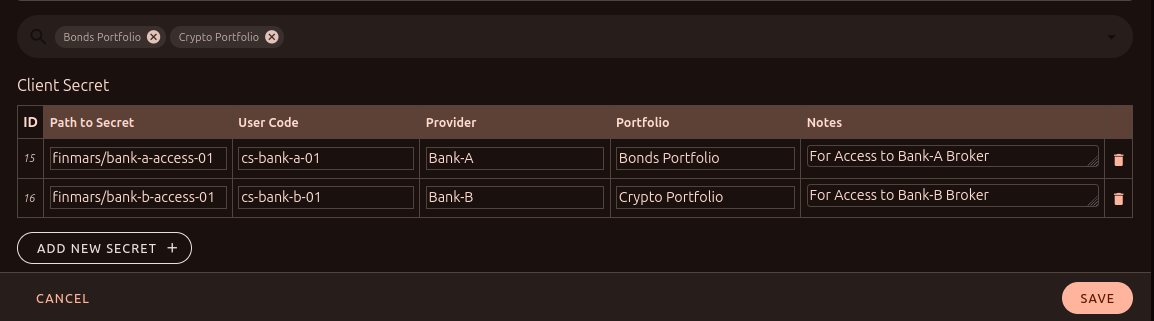
We can also immediately fill in the data for the API key of a third-party broker. For example, our client has two portfolios. In two different banks.
**Path to Secret** - path to the vault (with API Key).
**Provider** - name of broker, source, bank, API.
**Portfolio** - Portfolio name (e.g. above I chose *Bonds Portfolio* and *Crypto Portfolio* for the client).
[](https://docs.finmars.com/uploads/images/gallery/2025-01/XPEimage.png)
Once created, the client will be available for editing. For example, we can add a new API to it or modify an existing one.
[](https://docs.finmars.com/uploads/images/gallery/2025-01/LFmimage.png)
# Description
#### **Table of Contents**
- [Description](#bkmrk-description)
- [Examples](#bkmrk-examples)
- [Cookbook](#bkmrk-cookbook)
- [F.A.Q.](#bkmrk-api-documentation)
- [API Documentation](#bkmrk-api-documentation)
#### **Description**
##### *Financial meaning*
It stores the data of an individual client. It provides a single point of access to user data and **API** keys (third-party services) associated with customer portfolios.
##### *Platform abstraction*
A **Client** in Finmars platform is a container for client information, this entity is referenced by:
- [client\_secret](https://docs.finmars.com/books/client-entity/page/client-secret "Clietn Entity") an entity that stores the API keys to the brokers, one client's connection to many secrets.
- [portfolio](https://docs.finmars.com/books/entities/chapter/portfolio "Client Entity") container for financial assets, one client's connection to many portfolios.
#### **Examples**
| Name | Short Name
| Public Name | First Name
| Last Name | User code
| Notes | Email | Phone
|
| J-Doe | J-Doe
| J-Doe | Josh | Doe | client-00 | - | J.Doe@bank-c.com | +8812345 |
- `User code`: workspace unique identifier of the client
- `Name`: full name
- `Short name`: short name, showed in other relations
- `Public name`: public view name for users without access
- `First name`: public view name for users without access
- `Last name`: public view name for users without access
- `Notes`: custom description
- `Email`: client's email
- `Phone`: client's phone number (5-15 digits long)
#### **Cookbook**
##### *CRUD*
Operations within platform.
##### *Use Cases*
What for it's used.
#### **F.A.Q.**
Frequently asked questions.
#### **API documentation**
Link to API documentation.
# Client Secret
#### **Table of Contents**
- [Description](#bkmrk-description)
- [Examples](#bkmrk-examples)
- [Cookbook](#bkmrk-cookbook)
- [F.A.Q.](#bkmrk-api-documentation)
- [API Documentation](#bkmrk-api-documentation)
#### **Description**
##### *Financial meaning*
It stores the data of an API key of broker, bank, API. It provides a single point of access to user data and **API** keys (third-party services) associated with customer portfolios.
##### *Platform abstraction*
**Client Secret** in the Finmars platform is information about the client's API key, which refers to:
- [client](https://docs.finmars.com/books/client-entity/page/description "Client Secret") container for client information.
#### **Examples**
| User code
| Provider
| Portfolio
| Path to Secret
| Client ID
| Notes
|
| client-00 | Bank A
| Bonds Portfolio
| finmars/bank-a-access | 1
| -
|
- `User code`: workspace unique identifier of the client
- `Provider`: name of broker, source, bank, API
- `Portfolio`: portfolio name
- `Path to Secret`: path to the vault (with API key)
- `Notes`: custom description
- `Client ID`: ID of [client](https://docs.finmars.com/books/client-entity/page/description "Client Secret")
#### **Cookbook**
##### *CRUD*
Operations within platform.
##### *Use Cases*
Now u can use some thing like this in workflow script:
```python
payload = kwargs.get("payload")
client = payload.get("client")
secrets = workflow.finmars.get_secrets(client, provider="exante")
credentials = vault.get_secret(secret.path_to_secret)
```
#### **F.A.Q.**
Frequently asked questions.
#### **API documentation**
Link to API documentation.